


Overview
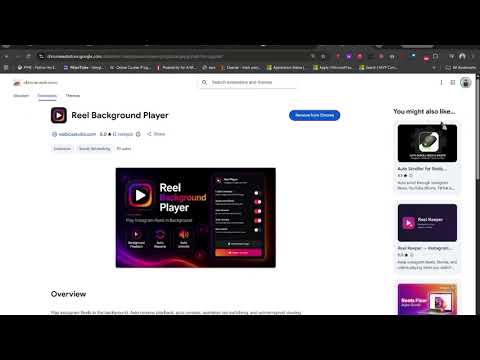
Uninterrupted Instagram Reels in the background. Auto-resume, auto-unmute, and auto-scroll as you switch between tabs.
Never miss a beat while multitasking! Reel Background Player lets you keep Instagram Reels playing uninterrupted in the background while you switch tabs, work, read, or browse other websites. Normally, switching away from an active Instagram tab automatically pauses your Reel. With Reel Background Player, your audio and video keep running seamlessly in the background so you can treat Reels like your personal soundtrack or podcast—and with our new Auto-Scroll feature, your feed practically plays itself! 🌟 Why Install Reel Background Player? --> Seamless Multitasking --> Hands-Free Browsing --> Real-Time Control --> Premium Design ✨ Key Features --> Uninterrupted Background Play --> Auto Next Reel (Auto-Scroll) --> Auto Resume --> Auto Unmute --> Force Mute Audio --> Smart Update System 🚀 How It Works --> Click "Add to Chrome" to install the extension. --> Pin Reel Background Player to your Chrome toolbar. --> Open Instagram Reels and ensure the "Enable Extension" toggle is ON. --> Switch to any tab your Reels will keep playing and scrolling effortlessly! 🔒 Privacy & Performance We respect your privacy. Reel Background Player operates entirely locally within your browser. It does not track your personal browsing history, save user data, or collect sensitive information. Crafted by Webica Studio – Upgrade your Instagram browsing experience today and enjoy uninterrupted audio wherever you go in Chrome!
5 out of 52 ratings
Details
- Version1.3
- UpdatedOctober 31, 2026
- Size1.79MiB
- LanguagesEnglish
- DeveloperWebsite
Email
webica.studio.offical@gmail.com - Non-traderThis developer has not identified itself as a trader. For consumers in the European Union, please note that consumer rights do not apply to contracts between you and this developer.
Privacy

This developer declares that your data is
- Not being sold to third parties, outside of the approved use cases
- Not being used or transferred for purposes that are unrelated to the item's core functionality
- Not being used or transferred to determine creditworthiness or for lending purposes
Support
For help with questions, suggestions, or problems, please open this page on your desktop browser