

Redline

Overview
Annotate live webpages and export structured change requests to Claude Code.
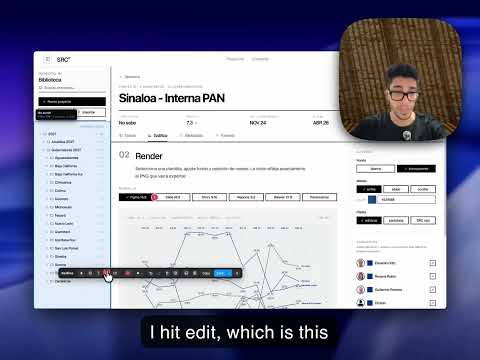
Redline turns a webpage into a precise change request. You spot something to fix on a live site: a heading that should be bigger, a button in the wrong place, spacing that is off. Redline lets you mark it on the page and hand an exact, structured request to your AI coding assistant. Activate Redline on any page. Drop a numbered callout on the element you want changed and describe the change. Or rewrite a heading or label directly on the page with the edit-text tool. Add boxes, arrows, and highlights for visual context. Then export. Redline captures an annotated screenshot and writes a markdown changelog where every numbered change is anchored to a precise DOM element, with its CSS selector, XPath, tag, classes, ARIA role, text, and position. That structured export is the point. A vague "make the header better" gives an AI nothing to act on. Redline gives it an address for every change. Redline is built for the Claude Code workflow. It ships a /redline slash command: save an export into your project, run /redline, and Claude Code finds each element in your source and applies the change. It also works with any assistant that can read an image and a markdown file. How it works: - Activate with a keyboard shortcut or the toolbar icon. - Callout and Text place numbered, element-anchored change requests. - Edit text rewrites an element's text in place; the export records the exact old text and new text. - Rectangle, Ellipse, Arrow, Freehand, and Highlight add visual emphasis. - Capture the visible area, or stitch the whole scrolling page. - Export to the clipboard, or save the screenshot and changelog into a project folder. - Annotations are saved per page, so you can pick up where you left off. Private by design. No backend, no account, no telemetry. Redline runs entirely in your browser, and nothing you annotate or export leaves your computer. Open source under GPL-3.0. Works on Chrome, Edge, Brave, and Arc.
0 out of 5No ratings
Details
- Version1.3.3
- UpdatedMay 28, 2026
- Offered bysebasbimbi
- Size40.5KiB
- LanguagesEnglish
- DeveloperSebastian Palacios Bimbi
JR.SANAT ELENA NORTE N.155 603 surco, Municipalidad Metropolitana de Lima 15023 PEEmail
sebastian@bimbi.digitalPhone
+51 930 287 967 - TraderThis developer has identified itself as a trader per the definition from the European Union and committed to only offer products or services that comply with EU laws.
Privacy

This developer declares that your data is
- Not being sold to third parties, outside of the approved use cases
- Not being used or transferred for purposes that are unrelated to the item's core functionality
- Not being used or transferred to determine creditworthiness or for lending purposes
Support
For help with questions, suggestions, or problems, visit the developer's support site