

Reddit PowerKit

Overview
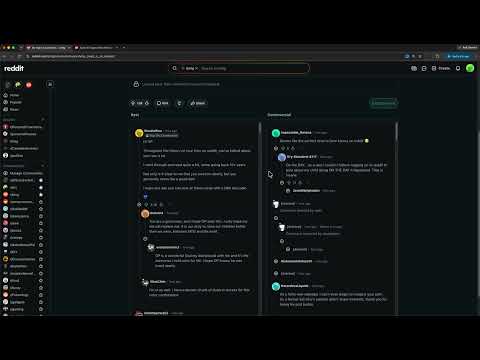
Filter Reddit posts by keyword, hide promoted ads, and compare Best vs Controversial comments in Split View.
Reddit PowerKit: take back control of your Reddit browsing. Reddit is great when you can focus. It’s worse when ads, noisy keywords, cluttered sidebars, and endless image carousels get in the way. Reddit PowerKit is a lightweight toolkit that quietly cleans up the experience so you spend less time fighting the UI and more time reading what matters. WHY INSTALL IT • Cut through noise: hide posts that match keywords you choose, and strip promoted posts from your feed. • Read threads faster: shrink oversized media, keep multi-image galleries usable, and hide mod-pinned comments when you don’t need them. • Compare discussions: open Split View to see Best and Controversial comments side by side. • Tidy the chrome: slim the left nav, pin your starred communities up top, hide Games / Custom feeds / Resources, and optionally hide the right sidebar. Everything runs locally in your browser. No account. No tracking server. Toggle features on or off from a simple popup. FEATURES Post filters Add keywords (for example “crypto” or “giveaway”) and PowerKit hides matching posts as you scroll. Turn on “Hide promoted posts” to remove ads and sponsored units from the feed so organic content stays front and center. Thread tools On comment pages, Compact post media keeps tall images and galleries shorter so you reach the discussion sooner without losing gallery arrows on multi-image posts. Hide mod-pinned comments when you want to jump straight to the real conversation. Split View On any thread, click Split View to load Best and Controversial in two columns. Exit anytime. Ideal when a post is heated and you want both the top-voted take and the contested one without flipping sort modes back and forth. Sidebar & navigation Slim left nav densifies the rail so more communities fit on screen. Starred community chips put your favorites at the top for one-click jumps. Hide left-nav sections you never use (Games on Reddit, Custom feeds, Resources), and optionally hide the right sidebar for a wider reading column. HOW IT WORKS 1. Install Reddit PowerKit and pin it from the toolbar. 2. Open the popup to add keywords and enable the options you want. 3. Browse Reddit as usual — filters and layout tweaks apply automatically. 4. On a comment page, use Split View when you want Best | Controversial side by side. Changes apply instantly on open Reddit tabs. Prefer a minimal setup? Leave most toggles off and only use keyword filtering or ad hiding. PRIVACY Reddit PowerKit stores your settings in Chrome sync storage on your profile. It does not sell data, show its own ads, or phone home. It only runs on Reddit pages to adjust what you see. WHO IT’S FOR Power users, lurkers, and anyone tired of a cluttered Reddit. If you’ve ever wished for fewer ads, a quieter feed, a denser nav, or a faster path to comments. Install Reddit PowerKit and make Reddit feel like yours again.
0 out of 5No ratings
Details
- Version1.2.1
- UpdatedAugust 13, 2026
- Size94.34KiB
- LanguagesEnglish
- Developer
Email
rod.martin@live.com - Non-traderThis developer has not identified itself as a trader. For consumers in the European Union, please note that consumer rights do not apply to contracts between you and this developer.
Privacy

This developer declares that your data is
- Not being sold to third parties, outside of the approved use cases
- Not being used or transferred for purposes that are unrelated to the item's core functionality
- Not being used or transferred to determine creditworthiness or for lending purposes