Item logo image for Reddit Ctrl+Enter Sender

Reddit Ctrl+Enter Sender

5.0(

1 rating

)
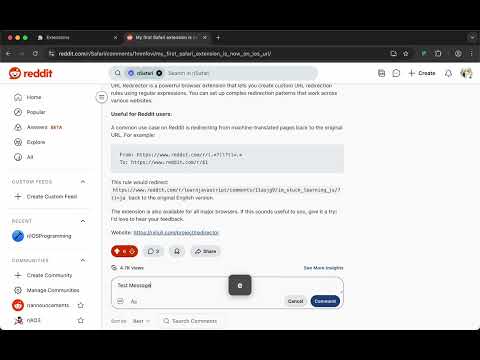
Item media 2 (screenshot) for Reddit Ctrl+Enter Sender
Item video thumbnail
Item media 2 (screenshot) for Reddit Ctrl+Enter Sender
Item video thumbnail
Item media 2 (screenshot) for Reddit Ctrl+Enter Sender

Overview

Use Ctrl/Cmd+Enter to quickly send replies, comments, or save edits on Reddit.

Reddit Ctrl+Enter Sender - Make Reddit Replies More Efficient! This extension adds the familiar keyboard shortcut functionality to Reddit, allowing you to use Ctrl+Enter (Cmd+Enter on Mac) to quickly send content, just like on other social platforms. 🚀 Key Features: • Quick send with Ctrl+Enter (Windows/Linux) or Cmd+Enter (Mac) • Smart context detection: Automatically detects whether you're replying, commenting, or editing • Supports all Reddit scenarios: Posts, comments, replies, edits, and more • No need to manually click buttons - boost your efficiency ✨ Use Cases: • Send replies instantly with keyboard shortcut • Save edits quickly after making changes • Submit new posts with one keystroke • Works anywhere with Reply, Comment, Post, or Save buttons 🎯 Smart Recognition: The extension automatically identifies submit buttons on the page, including: • Save Edits • Reply • Comment • Post • Submit • Send • Save 📝 How to Use: Install the extension and visit Reddit Type your content in any text field Press Ctrl+Enter (or Cmd+Enter on Mac) Your content is sent automatically! 🔧 Technical Features: • Lightweight design that doesn't affect page loading speed • Intelligent button detection with high accuracy • Supports both new and old Reddit interfaces • Fully open-source with transparent code Make your Reddit experience smoother and more efficient! Say goodbye to mouse clicks and enjoy the convenience of keyboard shortcuts. Why Choose This Extension? • Saves time on every interaction • Reduces repetitive clicking • Works seamlessly across all Reddit pages • No configuration needed - works out of the box • Privacy-focused: No data collection or tracking Perfect for power users, frequent commenters, and anyone who values efficiency in their Reddit browsing experience.

Details

  • Version
    0.1.0
  • Updated
    August 12, 2025
  • Size
    37.87KiB
  • Languages
    English
  • Developer
    Email
    rxliuli@gmail.com
  • Non-trader
    This developer has not identified itself as a trader. For consumers in the European Union, please note that consumer rights do not apply to contracts between you and this developer.

Privacy

The developer has disclosed that it will not collect or use your data. To learn more, see the developer’s privacy policy.

This developer declares that your data is

  • Not being sold to third parties, outside of the approved use cases
  • Not being used or transferred for purposes that are unrelated to the item's core functionality
  • Not being used or transferred to determine creditworthiness or for lending purposes

Support

For help with questions, suggestions, or problems, visit the developer's support site

Related

Reddit Comment Scraper

5.0

Scrape Reddit comments and export to CSV, JSON, Google Docs, ChatGPT, or Claude with permalinks and links.

MailMagic AI assistant for Youtube comments

4.7

Use AI to craft or reply to YouTube comments efficiently.

Reddit Comment Exporter

3.7

This tool enhances your browsing experience by enabling you to save comments from any Reddit thread in both JSON and CSV formats.

YouTube Studio GPT

3.0

Quickly reply to your YouTube channel comments in 3 click using AI

Chrome Capture - Screenshot & GIF

4.7

All-in-one screenshot + GIF capture! Take screenshots (area, full page), record screen & edit instantly.

Online Notepad

2.0

Use Online Notepad to write and save your notes, edit any text in an online text editor, making rapid notes and memos easily.

Text Editor

4.7

Plain Text Editor: a simple online notepad to quickly edit the text, jot bloc note and make txt file effortlessly.

Redust: Reddit History Remover

2.6

This extension allows you to anonymize, overwrite and/or delete all your reddit comments and posts.

Readdit Later

4.4

Manage your saved reddit posts with ease.

Reddit Enhancer

4.3

Various tweaks to customise your Reddit experience. Supports all versions of Reddit.

Text Shortcuts: canned messages and replies

4.8

Use customizable text shortcuts for frequently used text responses like canned replies. Save time and type smarter!

YouTube Comment Search & Filter

3.9

Search and filter YouTube comments with ease. Find specific comments, authors, or topics instantly.

Reddit Comment Scraper

5.0

Scrape Reddit comments and export to CSV, JSON, Google Docs, ChatGPT, or Claude with permalinks and links.

MailMagic AI assistant for Youtube comments

4.7

Use AI to craft or reply to YouTube comments efficiently.

Reddit Comment Exporter

3.7

This tool enhances your browsing experience by enabling you to save comments from any Reddit thread in both JSON and CSV formats.

YouTube Studio GPT

3.0

Quickly reply to your YouTube channel comments in 3 click using AI

Chrome Capture - Screenshot & GIF

4.7

All-in-one screenshot + GIF capture! Take screenshots (area, full page), record screen & edit instantly.

Online Notepad

2.0

Use Online Notepad to write and save your notes, edit any text in an online text editor, making rapid notes and memos easily.

Text Editor

4.7

Plain Text Editor: a simple online notepad to quickly edit the text, jot bloc note and make txt file effortlessly.

Redust: Reddit History Remover

2.6

This extension allows you to anonymize, overwrite and/or delete all your reddit comments and posts.

Google apps