

Recordist: Private AI Memory & Notes for Zoom, Google Meet, Teams & More

Overview
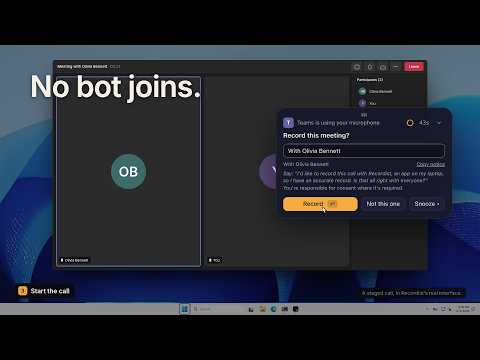
Your universal call memory, ready for any AI. No bot joins. Meeting notes and transcripts stay on your own machine, never with us.
Twenty minutes into the call, your client says they can live with the March date if the fee stays where it is, and you are still typing the sentence before that one. A week later they remember it differently, and you are scrolling through half a page of notes, hoping the words are in there somewhere. Recordist keeps those words. A live transcript builds in a panel beside your Google Meet or Microsoft Teams call in the browser, every line with a name and a time, read from the captions your meeting already shows, so the extension never records audio. It is free with no account to make, and the words stay in your browser until you delete them. 🚫 No bot joins and nobody new appears in the call. You tell the room yourself, and the button beside Start copies the words for the chat. 🧠 Every call you keep joins one memory that stays with you, and when you want help with one, you see its exact words and take them to ChatGPT, Gemini, Copilot or Claude yourself. Nothing passes through us. 🔎 Find a call later by a client's name or by something that was said, and search the one you are in to catch the figure from ten minutes ago. 📝 One button at the end hands the call to the free Recordist app, for notes checked against the transcript. 🎧 Zoom goes through that app as well. It records the call itself on your own machine, and by default it asks before it records. 🟢 To begin, turn on the call's captions (in Meet, press c), click the Recordist icon, open the transcript panel and press Start transcript. It never starts on its own. 🌸 A calmer, warmer look This version gives the side panel and the popup a new look, the one the Recordist app now wears. It is cream by day and deep green by night, following your browser's light or dark setting, and the words someone said are set like a quotation. What the extension asks for and what it does with your words have not changed, and a pairing with the app that fails can now be tried again with the code you typed. 🤝 You'll know if this is for you • You lead HR, and the person across from you is in the hardest conversation of their year. Afterwards you have to write down what was said, and it has to be fair to both of you. • You recruit, and a candidate has just told you why they really want to leave. Your interview notes should hold the words they actually used. • You advise people on their money, and a client walks you through details that matter to their family. You want to look at them while they talk and still have the figures afterwards. • You consult or coach, and your week is a run of client calls and one-on-ones. Each one deserves your full attention, and each one leaves promises you mean to keep. • You sell, and your calls are full of commitments, like a delivery date or a second demo for someone's boss, that a buyer will hold you to next month. • You work in a regulated or public role, where your credibility rests on getting people's words right. • Someone once asked you "what exactly did we agree?" and you wished you could simply show them. If you came here looking for AI meeting notes without a bot, Recordist gives you the transcript and the notes, and nothing ever joins the call. ⚡ How it works 1. Join your call in Google Meet or Microsoft Teams in your browser and turn on its captions. In Meet, press c or click the CC button at the bottom of the call. In Teams, open More, then Language and speech, then Turn on live captions. 2. Click the Recordist icon, open the transcript panel and press Start transcript. Lines appear as people speak. A caption that corrects itself replaces its line, and the panel saves every second, so a crash loses almost nothing. 3. When you leave the call or close the tab, the transcript ends with it and is saved in the panel, yours to search, copy, download, delete or turn into notes. If it stops while you are still in the call, Continue transcript adds the new lines to the same transcript. The panel follows the tab you are on. If captions are off, it tells you how to turn them on, and if the meeting page changes in a way it cannot read, it says so plainly instead of guessing. If you don't see the icon, open the puzzle piece beside the address bar and pin it. Past calls sit in one list, and from your second call a box above it finds one by a client's name, its title or something that was said, showing you the line itself. Copy the whole transcript, download it as a plain text file named with the meeting's title and date for your own notes, your CRM or a client file, or delete one or all of them, and the panel asks before it does. 🧠 Your universal call memory, and how any AI reads it Keep a run of transcripts, and when a client asks what you agreed last spring you can go and look, with each line saying who said it and when. That is the memory in the name. Recordist keeps that record with you, whatever the call ran on. The side panel covers Google Meet and Microsoft Teams in the browser. The free app records Zoom, the Teams desktop app, Webex and Slack huddles on your own machine, with no captions needed, and by default it asks before it records. A call you hand it from the panel sits there beside the ones it recorded. Any AI can read that memory, because you carry the words yourself. In the panel, Copy for AI (Beta) shows you the exact text of one call, word for word, and copies it when you press Copy, ready to paste into ChatGPT, Gemini, Copilot or Claude. It copies one call at a time, so two clients never mix, and it works while the call is still going. If a call runs past 60,000 characters, the oldest lines drop out of the copy and the panel says so, and a switch in Options turns the feature off. In the app, every call exports as Markdown or JSON with its notes, or its transcript as plain text, so the calls the app recorded travel the same way. Claude Desktop, Claude Code and Cursor can also read your transcripts straight from the app through its connector, on every plan. None of this passes through us. There is no server of ours holding your words, so we have nothing to hand over if anyone ever asks. Whatever you paste is read by that AI under its own terms. ✨ What is free, and what Pro is for The extension is free, with no account, and so is the Recordist app. In the app, recording, the full transcript, search, export as Markdown, plain text or JSON, and tapping any line to hear it said while the audio is kept, stay free for as long as you use it. Transcription runs on your own machine and recognises 99 languages, on every plan. Every new install of the app includes a free trial of Pro, with no card and no account, and after it Free still writes AI meeting notes for a few calls each month. Calls that arrive from this extension count among them. Pro is for the week with nine client calls in it, when you owe each of those people a note and it is already Thursday. With Pro, every call you record or bring across is written up, with the summary, the decisions, the open questions and the action items, each tied to the line of the transcript it came from. The follow-up email is drafted with the notes, for you to read, change and send from your own mail, and Recordist sends nothing for you. On the Fast built-in model no email is filled in, and you tick the lines that go in. Promises from every call gives you two lists, what you owe and what you are owed, in the words that were used. Ask puts a question like "what did we agree with Jordan about the start date?" to your recent meetings and answers with the call it came from. Before you meet someone again, a Prep Brief shows what you decided last time and what is still open, from your own notes and your calendar. Everything we add to Pro comes with it, at no extra cost. Plans and prices are on recordist.app/pricing. 🔒 Why nothing joins the call, and what stays with you A meeting bot joins as an extra participant that everyone sees arrive, and it usually records on its provider's servers. Plenty of teams are happy with that. Recordist works the other way round. The transcript comes from the captions your meeting already shows, read in your own browser, and the notes are written on your own machine, so there is no server of ours where your calls could end up. • The extension never records audio, video or your screen. It reads text on the meeting page, such as the captions, the meeting's title and the names shown. • Everything the extension keeps stays in your browser's storage on your own machine, and removing the extension removes all of it. • The one network connection it makes is to the app on the same machine. Pages on recordist.app open when you click them, apart from a welcome page when you install. • There are no ads or analytics in it and it runs no remote code. Nothing it reads is ever sold, and it is never used for advertising or to train an AI model. • In the app, transcription and notes run with a built-in engine on your own machine, so on the default setup nothing about your meetings leaves it. If you would rather use a cloud model, you can add your own key, and the app then talks to that provider directly, never through us. • The app keeps a Privacy Ledger in Settings, where every request that could carry anything from your meetings is written down with where it went and why, so you can check instead of taking our word for it. 🙋 Asking before recording Recordist is built on the idea that the people in a call should know. The extension never starts on its own, so a transcript exists because you pressed Start. The first time you start one, the panel says in one line that it is worth telling the room, and links to what the law says about recording and consent where you are. Tell the room copies a short, friendly line for you to paste into the meeting chat, so people hear it from you. When the app records a call, by default it asks before it records and captures nothing until you say yes, and it gives you words to tell the room there too. In some places the law requires everyone's consent, and in many more it is simply the decent thing to do. 💻 Windows, Mac and Linux The extension runs in Chrome and in Microsoft Edge, version 120 or later. The free Recordist app runs on Windows, Mac and Linux, and pairs with the extension once, with a short code the app shows you. From then on the panel knows when the app is there, so the button at the end of a call hands the transcript straight across. With the two paired, a Zoom call in the browser tells the app that the meeting has started, with its title and who is there, and by default the app asks whether to record. If the app is not installed, the end-of-call button takes you to the download page, and the transcript waits in the panel, marked Ready for Recordist, until you come back. 👥 For teams and IT • By default, each person's transcripts and notes stay with them, on their own machine. There is no shared cloud workspace to secure or to leak. • The extension asks for access to the meeting sites and a local connection to the Recordist app, and nothing more on the network. IT can install it on managed browsers by its store ID, with no accounts to create. • On the Macs IT manages, a configuration profile sets Recordist's policy, such as notes written on the Mac itself, no cloud AI keys, a cap on how long audio is kept and a legal hold. • The vendor pack at recordist.app/trust holds a one-page security brief and a pre-filled security questionnaire, along with our data-processing position, for whoever has to sign this off. • A team can have Pro on one invoice, each person at the yearly Pro price, the same as one person pays alone. recordist.app/teams has the details, and hello@recordist.app replies within one business day. ❓ Questions people ask before installing Does a bot join my call? No. Recordist reads the captions your meeting already shows, in your own browser. Nobody new joins or appears in the list of participants, and the call carries on as it always does. Can I download a Microsoft Teams transcript? Yes. Start the transcript in a Teams call in your browser with live captions on, and when the call ends, download it from the panel as a plain text file named with the meeting's title and date, or copy it. Does it transcribe Zoom? Through the free Recordist app, which records the call itself on your own machine, with no captions needed, and by default asks before it records. The same goes for the Zoom and Teams desktop apps. The live transcript in the side panel is for Google Meet and Microsoft Teams in the browser. Is it private? Yes, in the plain sense. The transcript stays in your browser and the notes are written on your own machine, with no server of ours in between. Private does not mean hidden from the people on the call, which is why the panel gives you words to tell them. Do the others on the call know? Not from us, because nothing joins the call to announce it. That is why Tell the room sits beside Start, why the panel links to what the law says where you are the first time you start, and why the Recordist app by default asks before it records. Is it really free, and do I need an account? Yes, and no. The live transcript is free, with no account and no limit on the number of calls you keep, and the app is free to download with no account to make there either. Where is my transcript kept? In your browser's storage for the extension, on your own machine, until you delete it. It is never sent to us or to anyone else. It goes to the app on the same machine when you press Get notes from this call, and at no other time. Is there a limit on how long a call can be? A transcript holds up to 5,000 lines, enough for a long afternoon of talking, and there is no limit on the number of calls you keep. Which languages does it work in? Whatever language the meeting's captions show, because the words come from the captions Google or Microsoft produce, and the transcript is as good as they are. The Recordist app's own transcription recognises 99 languages and detects which one is being spoken. How accurate are the notes? Before the notes are saved, each decision and action item is checked against the line it came from, so anything the transcript does not support is left out. Notes can still be wrong, which is why every item links to the moment it was said. They export as Markdown or copy out as plain text, a clean draft if you keep meeting minutes. Can I delete everything? Yes. Delete a single transcript, or use Delete all in the list of past calls, and once deleted it cannot be brought back. Removing the extension removes everything it kept. In the app, Delete all my data in Settings removes every meeting, transcript, note and audio file. What is Pro for? Having every call you record or bring across written up, with the follow-up email ready (on the Fast built-in model, from the lines you tick), along with Promises from every call, Ask and Prep Briefs. Every new install of the app includes a free trial of Pro, with no card and no account. How do I get help? Write to us through recordist.app/support, or at hello@recordist.app. If the panel ever stops reading captions after Google or Microsoft change their meeting page, tell us, so we can put it right. Where can I read more? • The free Recordist app: recordist.app/download?from=cws • Plans and prices: recordist.app/pricing • Trust Center and the vendor pack: recordist.app/trust • Privacy policy: recordist.app/privacy • Recording and consent where you are: recordist.app/tools/ask-to-record 👀 Listen properly Keep your eyes on the person in front of you, and still have what they said afterwards, with the moment each thing was said. Add Recordist, and on your next call tell the room and press Start.
0 out of 5No ratings
Details
- Version0.5.0
- UpdatedNovember 12, 2026
- Offered byRecordist
- Size294KiB
- Languages3 languages
- DeveloperHavihi Digital Inc.
2 McMillan Place Welland, Ontario L3B 0L5 CAEmail
hello@recordist.appPhone
+1 416-477-3314 - TraderThis developer has identified itself as a trader per the definition from the European Union and committed to only offer products or services that comply with EU laws.
- D-U-N-S240570513
Privacy

Recordist: Private AI Memory & Notes for Zoom, Google Meet, Teams & More has disclosed the following information regarding the collection and usage of your data. More detailed information can be found in the developer's privacy policy.
Recordist: Private AI Memory & Notes for Zoom, Google Meet, Teams & More handles the following:
This developer declares that your data is
- Not being sold to third parties, outside of the approved use cases
- Not being used or transferred for purposes that are unrelated to the item's core functionality
- Not being used or transferred to determine creditworthiness or for lending purposes
Support
For help with questions, suggestions, or problems, visit the developer's support site