

Recorder Action
3 रेटिंग
)
खास जानकारी
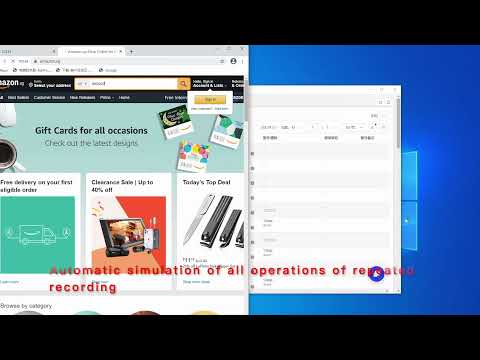
The operation on the operation webpage automatically generates AdsPower's RPA process
Operation recording is used for browser automation step recording. After starting, it will record clicks, input, page scrolling, and drop-down selections on the current page. The operation steps are as follows: 1. Click Recorder Now to start recording 2. The click, scroll, input, and jump of the operation page will be recorded as an RPA automation process 3. When the page jumps, you need to wait for the status WAIT to update to REC, and then re-operate to record 4. During the recording process, if some operations are not recorded, click Pause first, and then click Resume after the operation is complete 5. After the recording is complete, click Export and copy to the pasteboard 6. Process of RPA robot imported into AdsPower Operate on AdsPower: 1. Go back to the RPA robot process of AdsPower, create process -> import 2. Check the browser environment and select the RPA robot process just created 3. Here AdsPower will automatically open the browser, visit the website just recorded and repeat the operation just recorded
5 में से 1.33 रेटिंग
वर्णन
- वर्शन0.0.2
- पिछली बार अपडेट होने की तारीख:2 जुलाई 2021
- ऑफ़र करने वालाwonderful563
- आकार63.78KiB
- भाषाएं2 भाषाएं
- डेवलपर
ईमेल
wonderful563@gmail.com - गैर-व्यापारीइस डेवलपर ने अपनी पहचान व्यापारी के तौर पर ज़ाहिर नहीं की है. अगर आप यूरोपियन संघ के किसी देश में रहने वाले उपभोक्ता हैं, तो आपके और डेवलपर के बीच हुए समझौते पर उपभोक्ता के अधिकार लागू नहीं होंगे.
निजता

डेवलपर ने एलान किया है कि आपका डेटा
- जिन मामलों में इस्तेमाल की मंज़ूरी दी गई है उनके अलावा, किसी भी तीसरे पक्ष को नहीं बेचा जाता
- किसी ऐसे मकसद से इस्तेमाल या ट्रांसफ़र नहीं किया जाता जो आइटम के मुख्य फंक्शन के हिसाब से ज़रूरी नहीं है
- क़र्ज़ लेने या क़र्ज़ देने की स्थिति तय करने के लिए इस्तेमाल या ट्रांसफ़र नहीं किया जाता
सहायता
सवालों, सुझावों या समस्याओं से जुड़ी मदद पाने के लिए, कृपया इस पेज को डेस्कटॉप ब्राउज़र पर खोलें