


Overview
Your AI prompt manager. Save, organize and reuse prompts across web pages.
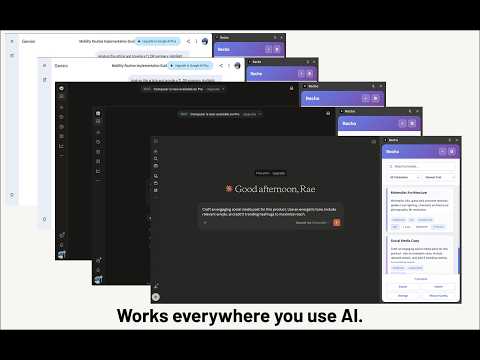
Recho — Your AI Prompt Manager Not all prompts are created equal. The good ones deserve to be saved. You've written the perfect prompt before. Then the tab closed, and it was gone. Next time, you spent 10 minutes trying to recreate it — and it never came out the same. Recho fixes that. What Recho does: Recho is a browser extension that lets you save, organize, and instantly reuse your best AI prompts — across any platform, any device, any time. Press ⌘K (or Ctrl+K) on any webpage to instantly pull up your prompt library. Find what you need in seconds. Copy and paste. Done. Why you need it: Every serious AI user knows: the difference between a good output and a great one is the prompt. But most people are rebuilding the same prompts from memory, over and over again. Recho turns your prompts into a compounding asset. The more you use it, the more powerful your library becomes. Key Features: ⌘K Quick Access — Press ⌘K / Ctrl+K on any page to instantly open your prompt library. No tab switching, no interruption. Sidebar Panel — A persistent sidebar that lives inside your browser. Browse, filter, and copy prompts without leaving your current page. Collections — Organize prompts into custom collections by project, topic, or workflow. Keep your library clean no matter how large it grows. One-Click Copy — Click any prompt to copy it instantly. Paste directly into any AI tool or chat interface. Local Storage — All your data stays in your browser. No account required, no data uploaded to any server. Your prompts are yours. Export & Import — Back up your entire prompt library or migrate it across devices with one click. Usage Tracking — See how many times each prompt has been used. Know which ones are actually working for you. Works across all major AI platforms: Recho works on any browser-based AI tool. If it runs in a browser tab, Recho works with it. Who is Recho for? → Content creators who rely on consistent tone and style prompts → Developers who use AI for code review, debugging, and architecture → Product managers building research and documentation workflows → Researchers who need repeatable, structured AI queries → Anyone who uses AI seriously and wants to stop starting from scratch Free to use. No sign-up required. Core features are completely free. Install in 30 seconds and start building your prompt library today. Don't just save it — Recho it.
0 out of 5No ratings
Details
- Version1.0.0
- UpdatedMarch 21, 2026
- Size228KiB
- LanguagesEnglish
- DeveloperWebsite
Email
yinyiling03@gmail.com - Non-traderThis developer has not identified itself as a trader. For consumers in the European Union, please note that consumer rights do not apply to contracts between you and this developer.
Privacy

Recho has disclosed the following information regarding the collection and usage of your data. More detailed information can be found in the developer's privacy policy.
Recho handles the following:
This developer declares that your data is
- Not being sold to third parties, outside of the approved use cases
- Not being used or transferred for purposes that are unrelated to the item's core functionality
- Not being used or transferred to determine creditworthiness or for lending purposes
Support
For help with questions, suggestions, or problems, visit the developer's support site