

Recallery: Prompt Chains, Folders & Search for ChatGPT, Claude, Gemini

Overview
Stop retyping prompts. Type // to insert a saved one, or let a chain send each step for you. Free, no account, stays on your device.
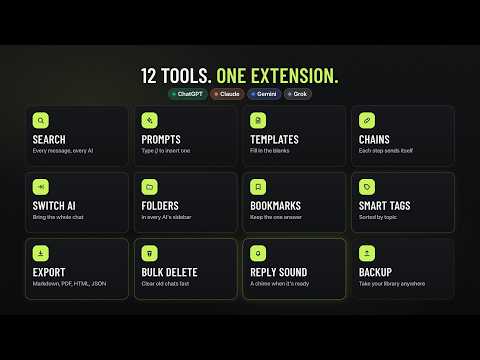
Recallery adds a prompt library, prompt chains, folders, full-text search and export to ChatGPT, Claude, Gemini and Grok, right inside the sites you already use. No account, and your chats stay in your browser. STOP RETYPING PROMPTS • Type // in the message box to insert a saved prompt. Its {{variables}} are filled in first, and whatever you already typed stays put. • Type .. to run a chain. Recallery sends each step when the previous reply finishes, so a research, outline and draft routine runs on its own. Stop it at any time. • Type @@ to bring another chat in as context, even one from a different AI. • Comes with 9 starter templates and a 3-step chain. Variables can have defaults, drop-down choices and today's date. FIND ANY CHAT AGAIN • Search the full text of your chats from all four AIs at once. The index is built and searched on your device. • Exact "phrases" and -exclusions on every plan. With Pro, also OR and filters for AI, folder, tag, date, your own messages and bookmarked chats. • Open a result and land on the matching message, highlighted. • Bookmark single messages, add a note and a color, and jump back to them later. ORGANIZE WITHOUT LEAVING THE PAGE • Nested, color-coded folders inside each site's own sidebar, or in a floating panel. • Drag a chat from the site's list onto a folder, or add the open chat with the + button. • Each one can hold chats from every AI. You can hide filed chats from the site's own list. • Smart tags label chats by topic automatically, using keyword rules that run on your device. Use the built-in tags or make your own. EXPORT AND CLEAN UP • Export a chat as Markdown, PDF, HTML, plain text or JSON. With Pro, export many at once as a ZIP. • Delete chats in bulk on all four sites, or archive them on ChatGPT, always after you confirm. • Continue a conversation in another AI: Recallery opens a new chat there with the conversation in the message box, for you to review and send. ALSO INCLUDED • A command palette and keyboard shortcuts, right-click actions for selected text, an optional sound when a reply finishes, light and dark themes, and backup and restore of your whole library. PRIVATE BY DESIGN • No account, no analytics, no tracking and no ads. • Your chats, your library and the search index stay in this browser. The extension never uploads them to Recallery or to any third party. • Every AI site stays off until you switch it on, and Chrome asks you to confirm. • Chats are read from the site's own tab, with the login you already have. FREE AND PRO • Every install starts with 7 days of Pro, then keeps the Free plan for as long as you like. • Free: search the last 30 days, 5 folders, 5 saved prompts plus the starters, 1 chain plus the starter, 10 bookmarks, 5 uses a day of @@ context and Continue in another AI, and export of one chat at a time. • Pro ($6 a month or $48 a year) removes every limit, including whole-history search with every filter and bulk actions on any number of chats. • Limits only stop you creating new things. Nothing you made is ever deleted or locked. • Pro is bought on getrecallery.com, with payments handled by Polar, and is checked on your device. GOOD TO KNOW • Works on chatgpt.com, claude.ai, gemini.google.com and grok.com. Requires Chrome 120 or later. English only for now. • There's no cloud sync. Use backup and restore to move your library to another browser. • If one of these sites changes its design, a feature can stop working there until Recallery is updated. Support: support@getrecallery.com Website: https://getrecallery.com Privacy policy: https://getrecallery.com/privacy Recallery is an independent extension, not affiliated with OpenAI, Anthropic, Google or xAI. ChatGPT, Claude, Gemini and Grok are trademarks of their owners.
5 out of 52 ratings
Details
- Version1.0.0
- UpdatedOctober 17, 2026
- Size269KiB
- LanguagesEnglish
- DeveloperWebsite
Email
mohits58355@gmail.com - Non-traderThis developer has not identified itself as a trader. For consumers in the European Union, please note that consumer rights do not apply to contracts between you and this developer.
Privacy

This developer declares that your data is
- Not being sold to third parties, outside of the approved use cases
- Not being used or transferred for purposes that are unrelated to the item's core functionality
- Not being used or transferred to determine creditworthiness or for lending purposes
Support
For help with questions, suggestions, or problems, please open this page on your desktop browser