

Real-Time Bilingual Video & Audio Translation – SonicCaption

Overview
Real-time dual subtitles & AI captions for any tab. Live video & audio translation in 60+ languages with low latency
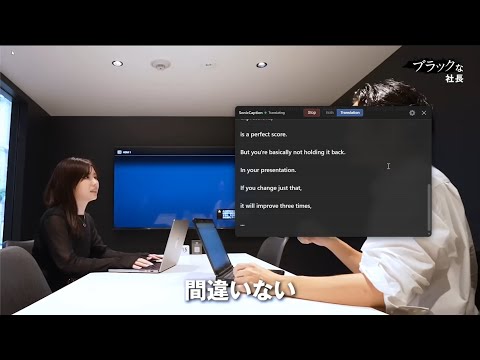
SonicCaption is a Chrome extension that gives you real-time bilingual subtitles on any tab. Watch videos, live streams, anime, meetings, and courses in another language and actually understand them – without waiting for official subtitles or manually uploading files. 💡How it works 1. Install SonicCaption and pin the extension in Chrome. 2. Open any tab with video or audio (YouTube, Netflix, Twitch, Zoom/Meet, online courses, podcasts, etc.). 3. Click the SonicCaption icon, choose your target languages, and click Start, SonicCaption listens to the tab audio and shows real-time subtitles and translation on top of the page. No uploads, no extra websites. Just instant AI captions in your browser. ✨Features 1. Real-time bilingual subtitles 2. Dual subtitles: original + translation at the same time 3. Works with both video and audio on any tab 4. AI-powered transcription and translation for high accuracy 5. Ultra-low latency, suitable for live streams and meetings 6. Subtitle history: SonicCaption keeps a history of your recent subtitle sessions, so you can quickly reopen captions, copy text, or download transcripts later as TXT or SRT files. 🌍Supported languages SonicCaption supports 60+ languages and variants, including: English, Chinese, Japanese, Korean Spanish, Portuguese, French, German Italian, Dutch, Russian, Turkish Vietnamese, Thai, Indonesian, Arabic …and more. Source language is auto-detected, just choose your target language, and get instant subtitles. 🎯Perfect for 1.Watching anime, dramas, and movies in other languages 2.Following YouTube tutorials and online courses from global creators 3.International meetings, webinars, and remote teamwork 4.Twitch and other live streams without native subtitles 5.Podcasts, interviews, and talk shows in foreign languages 6.Language learners who want to see original + translated subtitles together 7.anyone who wants to turn any tab into a bilingual viewing experience 📬Contact & feedback Questions, bugs, or feature ideas? We’d love to hear from you: support@soniccaption.com
4.2 out of 516 ratings
Details
- Version1.3.1
- UpdatedSeptember 8, 2026
- FeaturesOffers in-app purchases
- Size817KiB
- Languages55 languages
- DeveloperWebsite
Email
xtcodetech@gmail.com - Non-traderThis developer has not identified itself as a trader. For consumers in the European Union, please note that consumer rights do not apply to contracts between you and this developer.
Privacy

Real-Time Bilingual Video & Audio Translation – SonicCaption has disclosed the following information regarding the collection and usage of your data. More detailed information can be found in the developer's privacy policy.
Real-Time Bilingual Video & Audio Translation – SonicCaption handles the following:
This developer declares that your data is
- Not being sold to third parties, outside of the approved use cases
- Not being used or transferred for purposes that are unrelated to the item's core functionality
- Not being used or transferred to determine creditworthiness or for lending purposes
Support
For help with questions, suggestions, or problems, please open this page on your desktop browser