

Reading Time Calculator By Ofi Khan
1 valoración
)
Descripción general
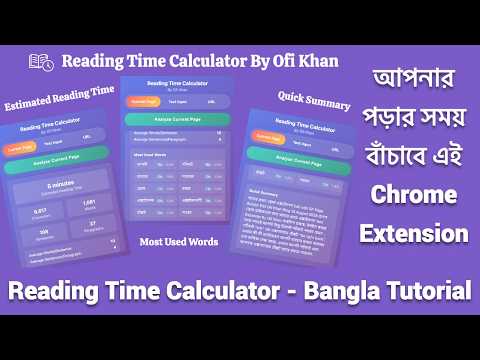
Calculate reading time, word count, character count, and sentences from web pages or text input
A Chrome extension that calculates reading time, character count, word count, sentence count, and paragraph count from web pages or text input. It also provides a quick summary of the content. Features - ✅ Current Page Analysis: Analyze the content of the currently active web page - ✅ Text Input Analysis: Paste any text and get instant statistics - ✅ URL Analysis: Enter any URL to analyze its content - ✅ Context Menu Support: - Right-click any page → Open Reading Time Calculator → instantly analyzes the page - Select any text → Open Reading Time Calculator → analyzes only the selected text in the *Text Input tab - ✅ Comprehensive Statistics: - Character count - Word count - Sentence count - Paragraph count - Average words per sentence - Average sentences per paragraph - Estimated reading time (based on 250 words/minute) - ✅ Most Used Words: Displays a frequency table of the most common words from the analyzed text - ✅ Quick Summary: Automatically generated summary of the content - ✅ Beautiful UI: Modern gradient design with smooth animations Usage Analyzing Current Page 1. Navigate to any webpage you want to analyze 2. Click the extension icon in your browser toolbar 3. Click "Analyze Current Page" button 4. View the results including reading time, statistics, and summary Analyzing Custom Text 1. Click the extension icon 2. Switch to "Text Input" tab 3. Paste your text in the text area 4. Click "Analyze Text" button 5. View the comprehensive analysis Analyzing Any URL 1. Click the extension icon 2. Switch to "URL" tab 3. Enter the URL you want to analyze 4. Click "Analyze URL" button 5. The extension will fetch and analyze the content Using Context Menu 1. Right-click anywhere on a webpage - Select Open Reading Time Calculator → extension opens with full page analysis 2. Select some text, right-click - Select Open Reading Time Calculator → extension opens in Text Input tab with analysis of selected text Common Issues 1. No readable content found - Some pages may have complex layouts or be heavily JavaScript-dependent - Try refreshing the page and analyzing again - Consider using the "Text Input" method instead 2. Analysis takes too long - Large pages may take a few seconds to analyze - Complex sites with lots of JavaScript may require more time - Consider using the URL method for better reliability Supported Websites The extension works best with: - Blog posts and articles - News websites - Documentation sites - Static content pages May have limited functionality on: - Single-page applications (SPAs) - Heavily JavaScript-dependent sites - Sites that load content dynamically Developer Created by [Ofi Khan](https://www.ofikhan.com) License This project is open-source and available under the [MIT License](LICENSE).
5 de 51 valoración
Detalles
- Versión1.0
- Actualizado24 de febrero de 2026
- Ofrecido porofikhan
- Tamaño1.18MiB
- IdiomasEnglish (United Kingdom)
- Desarrollador
Correo electrónico
ofi.khan051@gmail.com - No operadorEste desarrollador no se ha identificado como operador. Los consumidores residentes en la Unión Europea deben tener en cuenta que los derechos de los consumidores no son aplicables a los contratos que suscriban con este desarrollador.
Privacidad

Reading Time Calculator By Ofi Khan ha revelado la siguiente información sobre la recogida y el uso de tus datos. Puedes consultar información más detallada en la privacy policy del desarrollador.
Reading Time Calculator By Ofi Khan gestiona lo siguiente:
Este desarrollador declara que tus datos:
- No se venden a terceros, excepto en los casos de uso aprobados
- No se usan ni se transfieren para fines no relacionados con la función principal del elemento.
- No se usan ni se transfieren para determinar la situación crediticia ni para ofrecer préstamos.