

Reading Pencil: Reading Ruler & Line Guide

Overview
Never lose your place, online or in a PDF. A free reading ruler that moves by itself at your pace and remembers where you stopped.
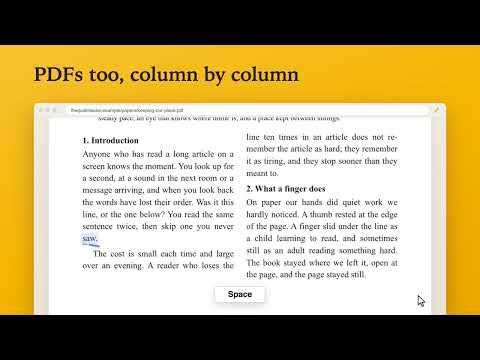
Free, with no account: a pencil that moves along each line for you, on web pages and in PDF files. Reading Pencil is a Chrome extension, a reading ruler and line guide. A small pencil sits under the line you're reading and moves along it at your own pace, like running a finger under the line in a paper book. Look away, look back, and your eyes know exactly where you were. It works where most reading rulers can't: PDF files, on the web or on your computer, and documents you read online. Papers in two columns are read one column at a time, page numbers and running heads are left out, and your place is kept to the line. It is made for anyone who finds long pages hard to follow: tired eyes, a busy mind, dyslexia or ADHD, reading in a second language, or simply a long article at the end of the day. It helps you take a long page line by line, staying with one line at a time. HOW IT WORKS 1. Open an article, a story, a paper or any long page you want to read. 2. Click the Reading Pencil icon and turn the switch on, or right-click a paragraph and choose "Start reading here" to read from there. 3. The space bar starts the pencil and pauses it. It moves along the line, then down to the next. WHAT IT DOES • A line reader that moves by itself: no need to hold the mouse under the line. It sits under the words, never over them. • Goes at your pace: find yours in a minute on the welcome page, then make it slower or faster with − and + as you read. • Waits while you look away to another window, and remembers where you stopped. Open it again from "Where you left off" and the pencil is waiting on that line, days later. • Keeps to the article: skips menus, sidebars, comments, ads, cookie notices and the sign-up boxes set into a story. On news sites that load the next story as you scroll, it stops at the end of yours. • Shows what you've read: a small bookshelf with a book for each article. • A pencil or a plain line, in six colors, held in your right or left hand, and a soft light on the line you're on. • Reads pages in many languages, right-to-left ones too. Its own buttons and notes are in English, Spanish, Portuguese, German and French, in your browser's language. • Simple keys: Space to start or pause, ↑ and ↓ to go back or on a line, − and + for the pace, Esc to put it down. Click any line to move the pencil there. EASY TO LEARN A short welcome page opens when you add it: try the pencil right away on a passage written for it, find your pace, or watch a one-minute video of it at work. "How to use" in the toolbar window explains everything again, any time, and "Feedback" there lets you tell me what's wrong or what you'd like. PRIVATE BY DESIGN • No account, no sign-up, no ads, no tracking. • Never uploads what you read. Your settings, saved places and reading counts stay in your browser, and nothing is kept from Incognito windows. • Chrome warns that it can "read and change" your pages: it has to read a page to find its lines, and changes nothing on it but the pencil it draws. What it reads stays on your computer. • The store's privacy list names what stays in your browser (your places and reading counts) and what Feedback sends, only when you press Send. GOOD TO KNOW • It appears only when you start it, and only on that page. • A Google Doc is read in Google's own simple view of it; Back returns to the doc. • It doesn't work on Chrome's own pages, or on scanned documents (pictures of pages, with no words in them). • Shortcut: Alt+Shift+R (Control+Shift+R on a Mac) turns it on or off. Reading Pencil is a reading aid, not a medical device or treatment.
4.8 out of 56 ratings
Details
- Version2.1.0
- UpdatedOctober 20, 2026
- Size4.27MiB
- Languages5 languages
- DeveloperWebsite
Email
hi@rawhul.com - Non-traderThis developer has not identified itself as a trader. For consumers in the European Union, please note that consumer rights do not apply to contracts between you and this developer.
Privacy

Reading Pencil: Reading Ruler & Line Guide has disclosed the following information regarding the collection and usage of your data. More detailed information can be found in the developer's privacy policy.
Reading Pencil: Reading Ruler & Line Guide handles the following:
This developer declares that your data is
- Not being sold to third parties, outside of the approved use cases
- Not being used or transferred for purposes that are unrelated to the item's core functionality
- Not being used or transferred to determine creditworthiness or for lending purposes
Support
For help with questions, suggestions, or problems, visit the developer's support site