

Reader View
8 rating
)
Ringkasan
Open any page in reader view mode; light, dark or sepia and clutter free.
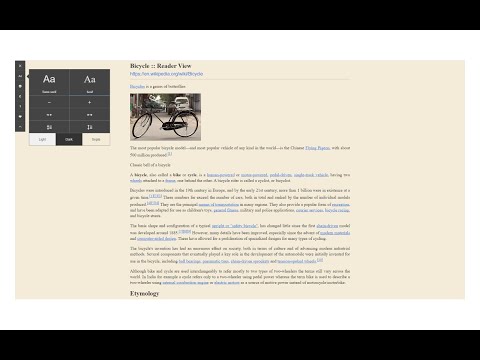
Reader View extension enables you to open any website in a simple and clutter-free environment. Simply click on the toolbar button to open the reader view UI. The current page will be reloaded in a plain format. Once the reader view interface is open, you can see a toolbar in the top left corner. Click on the second button from the top to open the settings view. There are three themes available for the reader view. The default theme is the - Light - color. But you can choose, Dark or Sepia options as well. Moreover, font size, line height, and page width can also be adjusted in the settings popup. The reader view is a format with minimal distractions. No, buttons, toolbars, background images, ads, or banners are allowed in reader view. It is much easier on your eyes and reduces eye strain if you spend a long time surfing the web. Please note that all changes are auto-saved to the memory in the add-on. Note 1: There are a few options available to open the reader view interface. Please right-click the toolbar button to see all the choices. By default, the reader view opens in the same-tab. Please note that, if you opt for the popup or sidebar view, the first time you access the reader view for a particular page, you will need to press the toolbar button twice to open the interface. Note 2: The reader view extension uses the Readability open-source library to render the page in a simple format. You can get more info about this library here: https://github.com/mozilla/readability To report bugs, please fill out the bug report form on the addon's homepage: https://mybrowseraddon.com/reader-view.html
3,6 dari 58 rating
Detail
- Versi0.1.8
- Diupdate26 Agustus 2025
- Ditawarkan olehMuyor
- Ukuran53.29KiB
- BahasaEnglish
- Developer
Email
mujo.hydrov@gmail.com - Non-pedagangDeveloper ini tidak mengidentifikasi diri sebagai pedagang. Bagi konsumen di Uni Eropa, perlu diperhatikan bahwa hak konsumen tidak berlaku untuk kontrak antara Anda dan developer ini.
Privasi

Developer ini menyatakan bahwa data Anda
- Tidak dijual ke pihak ketiga, di luar kasus penggunaan yang disetujui
- Tidak digunakan atau ditransfer untuk tujuan yang tidak terkait dengan fungsi inti item
- Tidak digunakan atau ditransfer untuk menentukan kelayakan kredit atau untuk tujuan pinjaman
Dukungan
Untuk mendapatkan bantuan terkait pertanyaan, saran, atau masalah, kunjungi situs dukungan developer