

Reader View
۸ ردهبندی
)
نمای کلی
Open any page in reader view mode; light, dark or sepia and clutter free.
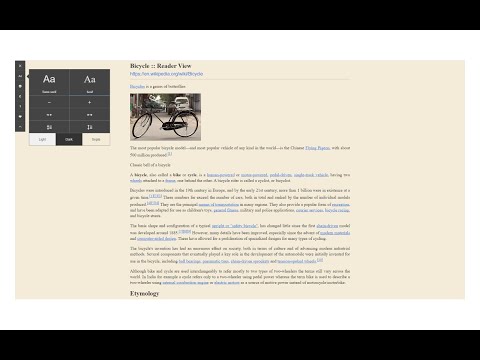
Reader View extension enables you to open any website in a simple and clutter-free environment. Simply click on the toolbar button to open the reader view UI. The current page will be reloaded in a plain format. Once the reader view interface is open, you can see a toolbar in the top left corner. Click on the second button from the top to open the settings view. There are three themes available for the reader view. The default theme is the - Light - color. But you can choose, Dark or Sepia options as well. Moreover, font size, line height, and page width can also be adjusted in the settings popup. The reader view is a format with minimal distractions. No, buttons, toolbars, background images, ads, or banners are allowed in reader view. It is much easier on your eyes and reduces eye strain if you spend a long time surfing the web. Please note that all changes are auto-saved to the memory in the add-on. Note 1: There are a few options available to open the reader view interface. Please right-click the toolbar button to see all the choices. By default, the reader view opens in the same-tab. Please note that, if you opt for the popup or sidebar view, the first time you access the reader view for a particular page, you will need to press the toolbar button twice to open the interface. Note 2: The reader view extension uses the Readability open-source library to render the page in a simple format. You can get more info about this library here: https://github.com/mozilla/readability To report bugs, please fill out the bug report form on the addon's homepage: https://mybrowseraddon.com/reader-view.html
۳٫۶ از ۵۸ ردهبندی
جزئیات
- نسخه0.1.8
- تاریخ بهروزرسانی۴ شهریور ۱۴۰۴
- ارائهکنندهMuyor
- اندازه53.29KiB
- زبانهاEnglish
- توسعهدهنده
ایمیل
mujo.hydrov@gmail.com - غیرتاجراین توسعهدهنده خودش را بهعنوان فروشنده معرفی نکرده است. اگر مصرفکنندهای در اتحادیه اروپا هستید لطفاً توجه داشته باشید که حقوق مصرفکننده برای قراردادهای میان شما و این توسعهدهنده اعمال نمیشود.
حریم خصوصی

این توسعهدهنده اعلام میکند که دادههای شما
- خارج از موارد استفاده تأییدشده، به اشخاص ثالث فروخته نمیشود
- برای اهداف نامرتبط با عملکرد اصلی مورد استفاده یا منتقل نمیشود
- برای تعیین اعتبارمندی یا برای اهداف وامدهی استفاده یا منتقل نمیشود
پشتیبانی
برای دریافت راهنمایی درباره سؤالها، پیشنهادها، یا مشکلات، از سایت پشتیبانی توسعهدهنده بازدید کنید