“Reader View”的产品徽标图片

Reader View

精选
4.7(

1115 个评分

)
扩展程序无障碍300,000 用户
Reader View的项目媒体 5(屏幕截图)
Reader View的项目媒体 6(屏幕截图)
产品视频缩略图
Reader View的项目媒体 2(屏幕截图)
Reader View的项目媒体 3(屏幕截图)
Reader View的项目媒体 4(屏幕截图)
Reader View的项目媒体 5(屏幕截图)
Reader View的项目媒体 6(屏幕截图)
产品视频缩略图
Reader View的项目媒体 2(屏幕截图)
产品视频缩略图
Reader View的项目媒体 2(屏幕截图)
Reader View的项目媒体 3(屏幕截图)
Reader View的项目媒体 4(屏幕截图)
Reader View的项目媒体 5(屏幕截图)
Reader View的项目媒体 6(屏幕截图)

概述

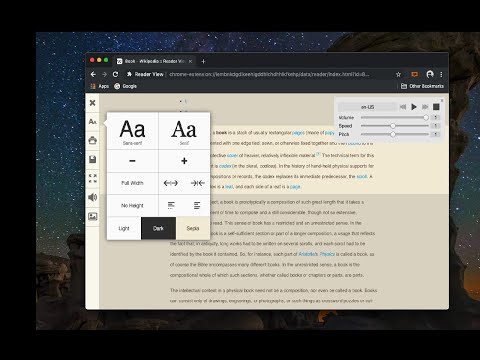
剥离按钮、背景图像等杂物,改变页面的文字大小、对比度和布局,以提高可读性

Reader View extension brings Mozilla's open-source Readability implantation to Chromium. Using this extension you can strip clutters from webpages and read them on "Reader View" mode. The extension allows you to toggle between normal view and reader view by pressing the page-action button. Note that reader view mode works best for web pages that have a lot of content. There are some tools in the left side panel that can help you personalize your Reader View. You can change color, background-color, font-size, font-family and width of the reader view. Features: -> Remove distraction -> Read in fullscreen mode -> Remove advertisements -> Save in HTML format -> Print document -> Read content using a powerful Text to Speech (TTS) engine -> Edit HTML content (live editor) -> Email document (with title, body, and reference to the original document) -> Correctly display mathematical formulas (MathJax equations are Supported) -> Highlight selected text -> Move to the next and previous pages -> Keyboard shortcuts for almost all actions -> Resize images on the design-mode -> Display DOI (Digital Object Identifier) details -> Display publish date For more info please visit: http://add0n.com/chrome-reader-view.html Change Log: 0.1.3: Calling a reader view by restoring it from history will trigger history.back 0.1.4: A more visible icon. Fixes a reader bug. 0.1.5: It is now possible to toggle the reader view using keyboard shortcut (define one from Chrome's settings page) 0.2.1: Document parsing is improved. Switched to the latest Readibility.js library. Ctrl + S now saves the document same as pressing the "Save" button. Reader View now supports both rtl and ltr languages 0.2.2: It is now possible to select some content and ask the reader view to convert only the selected part. This is useful if the automatic selection tool is not detecting the content correctly. 0.2.4: Speech engine is added. You can now ask the extension to read the article for you. Estimated reading time is displayed below the article title

4.7 星(5 星制)1115 个评分

详细了解结果和评价。

详情

  • 版本
    0.8.8
  • 上次更新日期
    2026年9月29日
  • 提供方
    yokris.dev
  • 大小
    319KiB
  • 语言
    14 种语言
  • 开发者
    邮箱
    yokris.dev@gmail.com
  • 非交易者
    该开发者尚未将自己标识为交易者。欧盟地区消费者须知:消费者权利可能不适用于您与该开发者达成的合约。

隐私权

管理扩展程序并了解它们在组织中的使用情况
该开发者已披露,此产品不会收集或使用您的数据。 如需了解详情,请参阅开发者的privacy policy。

该开发者已声明,您的数据:

  • 不会因未获批准的用途出售给第三方
  • 不会为实现与产品核心功能无关的目的而使用或转移
  • 不会为确定信用度或放贷目的而使用或转移

支持

若有任何疑问、建议或问题,请访问开发者的支持网站

相关

Readlax: Reader View with Phrase Highlighting

4.3

Clean websites from sidebars and ads, read with phrase highlighting.

Reader Mode

3.1

An all-in-one, distraction-free reader with dyslexia support, accessibility features, bookmarking, highlighting, and research tools

Reader View

3.6

Open any page in reader view mode; light, dark or sepia and clutter free.

EasyReader

4.6

EasyReader can customize and improve the readability of long web articles

Just Read

4.6

功能丰富、可自定义的阅读器扩展。

简悦 - SimpRead

4.8

让你瞬间进入沉浸式阅读的 Chrome 扩展,类似 Safari 的阅读模式。

Quiet Reader — Reader Mode

3.9

A calmer place to read. Simplify articles, save them offline, highlight passages and add notes.

读者观点

4.6

剥离像按钮,背景图像一样的杂乱,并改变页面的文本大小,对比度和布局,以提高可读性

Clearly Reader - 你的AI阅读助手

4.6

浏览器扩展,提供阅读模式,复制、翻译、语音、PDF 和 Markdown 导出等功能。

Otto: Pomodoro timer & Website Blocker. Block sites, Focus mindfully

4.7

Otto is a mindful focus timer and website blocker. Block websites, work mindfully with the Pomodoro timer. Be mindful while working.

Reader Mode - Natural Reader and dark mode

4.2

Distraction-free chrome reader view extension and dark mode for Chrome.

Instapaper

3.8

Instapaper browser extension to save links for offline reading.

Readlax: Reader View with Phrase Highlighting

4.3

Clean websites from sidebars and ads, read with phrase highlighting.

Reader Mode

3.1

An all-in-one, distraction-free reader with dyslexia support, accessibility features, bookmarking, highlighting, and research tools

Reader View

3.6

Open any page in reader view mode; light, dark or sepia and clutter free.

EasyReader

4.6

EasyReader can customize and improve the readability of long web articles

Just Read

4.6

功能丰富、可自定义的阅读器扩展。

简悦 - SimpRead

4.8

让你瞬间进入沉浸式阅读的 Chrome 扩展,类似 Safari 的阅读模式。

Quiet Reader — Reader Mode

3.9

A calmer place to read. Simplify articles, save them offline, highlight passages and add notes.

读者观点

4.6

剥离像按钮,背景图像一样的杂乱,并改变页面的文本大小,对比度和布局,以提高可读性

Google 应用