


Overzicht
Verwijdert overbodige elementen en optimaliseert tekstgrootte, contrast en lay-out voor betere leesbaarheid.
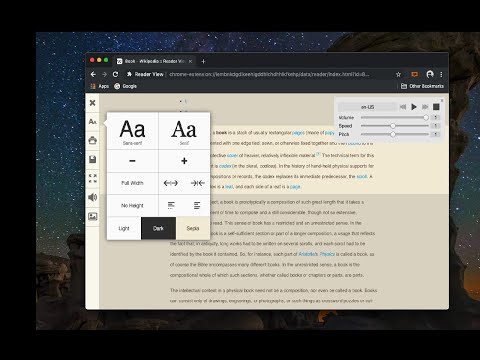
Reader View extension brings Mozilla's open-source Readability implantation to Chromium. Using this extension you can strip clutters from webpages and read them on "Reader View" mode. The extension allows you to toggle between normal view and reader view by pressing the page-action button. Note that reader view mode works best for web pages that have a lot of content. There are some tools in the left side panel that can help you personalize your Reader View. You can change color, background-color, font-size, font-family and width of the reader view. Features: -> Remove distraction -> Read in fullscreen mode -> Remove advertisements -> Save in HTML format -> Print document -> Read content using a powerful Text to Speech (TTS) engine -> Edit HTML content (live editor) -> Email document (with title, body, and reference to the original document) -> Correctly display mathematical formulas (MathJax equations are Supported) -> Highlight selected text -> Move to the next and previous pages -> Keyboard shortcuts for almost all actions -> Resize images on the design-mode -> Display DOI (Digital Object Identifier) details -> Display publish date For more info please visit: http://add0n.com/chrome-reader-view.html Change Log: 0.1.3: Calling a reader view by restoring it from history will trigger history.back 0.1.4: A more visible icon. Fixes a reader bug. 0.1.5: It is now possible to toggle the reader view using keyboard shortcut (define one from Chrome's settings page) 0.2.1: Document parsing is improved. Switched to the latest Readibility.js library. Ctrl + S now saves the document same as pressing the "Save" button. Reader View now supports both rtl and ltr languages 0.2.2: It is now possible to select some content and ask the reader view to convert only the selected part. This is useful if the automatic selection tool is not detecting the content correctly. 0.2.4: Speech engine is added. You can now ask the extension to read the article for you. Estimated reading time is displayed below the article title
4,7 van 51,1K beoordelingen
Details
- Versie0.8.3
- Geüpdatet29 oktober 2025
- Aangeboden dooryokris.dev
- Grootte302KiB
- Talen13 talen
- Ontwikkelaar
E-mail
yokris.dev@gmail.com - Geen handelaarDeze ontwikkelaar heeft zichzelf niet geïdentificeerd als handelaar. Voor consumenten in de Europese Unie geldt dat consumentenrechten niet van toepassing zijn op contracten tussen jou en deze ontwikkelaar.
Privacy

Deze ontwikkelaar verklaart dat je gegevens:
- Niet worden verkocht aan derden, behalve voor de goedgekeurde toepassingen
- Niet worden gebruikt of overgedragen voor doeleinden die niet zijn gerelateerd aan de kernfunctionaliteit van het item
- Niet worden gebruikt of overgedragen om de kredietwaardigheid te bepalen of voor doeleinden met betrekking tot leningen
Support
Ga naar de supportsite van de ontwikkelaar voor hulp bij vragen, suggesties of problemen