Tuotteen logokuva: Reader View

Reader View

Suositukset
4,7(

1,1 t. arvostelua

)
LaajennusSaavutettavuus300 000 käyttäjää
Kohteen media: 5 (kuvakaappaus) / Reader View
Kohteen media: 6 (kuvakaappaus) / Reader View
Tuotteen videon pikkukuva
Kohteen media: 2 (kuvakaappaus) / Reader View
Kohteen media: 3 (kuvakaappaus) / Reader View
Kohteen media: 4 (kuvakaappaus) / Reader View
Kohteen media: 5 (kuvakaappaus) / Reader View
Kohteen media: 6 (kuvakaappaus) / Reader View
Tuotteen videon pikkukuva
Kohteen media: 2 (kuvakaappaus) / Reader View
Tuotteen videon pikkukuva
Kohteen media: 2 (kuvakaappaus) / Reader View
Kohteen media: 3 (kuvakaappaus) / Reader View
Kohteen media: 4 (kuvakaappaus) / Reader View
Kohteen media: 5 (kuvakaappaus) / Reader View
Kohteen media: 6 (kuvakaappaus) / Reader View

Yleiskatsaus

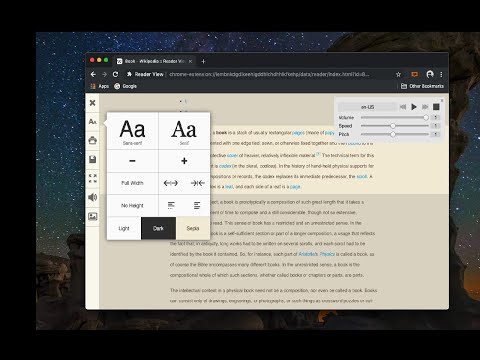
Poistaa turhat elementit ja säätää tekstin kokoa, kontrastia ja asettelua luettavuuden parantamiseksi.

Reader View extension brings Mozilla's open-source Readability implantation to Chromium. Using this extension you can strip clutters from webpages and read them on "Reader View" mode. The extension allows you to toggle between normal view and reader view by pressing the page-action button. Note that reader view mode works best for web pages that have a lot of content. There are some tools in the left side panel that can help you personalize your Reader View. You can change color, background-color, font-size, font-family and width of the reader view. Features: -> Remove distraction -> Read in fullscreen mode -> Remove advertisements -> Save in HTML format -> Print document -> Read content using a powerful Text to Speech (TTS) engine -> Edit HTML content (live editor) -> Email document (with title, body, and reference to the original document) -> Correctly display mathematical formulas (MathJax equations are Supported) -> Highlight selected text -> Move to the next and previous pages -> Keyboard shortcuts for almost all actions -> Resize images on the design-mode -> Display DOI (Digital Object Identifier) details -> Display publish date For more info please visit: http://add0n.com/chrome-reader-view.html Change Log: 0.1.3: Calling a reader view by restoring it from history will trigger history.back 0.1.4: A more visible icon. Fixes a reader bug. 0.1.5: It is now possible to toggle the reader view using keyboard shortcut (define one from Chrome's settings page) 0.2.1: Document parsing is improved. Switched to the latest Readibility.js library. Ctrl + S now saves the document same as pressing the "Save" button. Reader View now supports both rtl and ltr languages 0.2.2: It is now possible to select some content and ask the reader view to convert only the selected part. This is useful if the automatic selection tool is not detecting the content correctly. 0.2.4: Speech engine is added. You can now ask the extension to read the article for you. Estimated reading time is displayed below the article title

Tiedot

  • Versio
    0.8.8
  • Päivitetty
    29. syyskuuta 2026
  • Tekijä:
    yokris.dev
  • Koko
    319KiB
  • Kielet
    14 kieltä
  • Kehittäjä
    Sähköposti
    yokris.dev@gmail.com
  • Muu kuin elinkeinonharjoittaja
    Kehittäjä ei ole tunnistautunut elinkeinonharjoittajaksi. Huomioitavaa kuluttajille Euroopan Unionin alueella: Kuluttajan oikeudet eivät päde sinun ja kehittäjän välisiin sopimuksiin.

Tietosuoja

Ylläpidä laajennuksia ja selvitä, miten niitä käytetään organisaatiossasi
Kehittäjä on ilmoittanut, ettei dataasi kerätä tai käytetä. Kehittäjän privacy policy tarjoaa lisätietoa.

Kehittäjän mukaan datasi on

  • ei myydä kolmansille osapuolille muissa kuin hyväksytyissä käyttötapauksissa
  • ei käytetä tai siirretä syystä, joka ei liity tuotteen ydintoimintoihin
  • ei käytetä tai siirretä luottokelpoisuuden toteamiseksi tai lainoja varten.

Tuki

Jos sinulla on kysymyksiä, ehdotuksia tai ongelmia, siirry kehittäjien tukisivustolle.

Vastaavat

Readlax: Reader View with Phrase Highlighting

4,3

Clean websites from sidebars and ads, read with phrase highlighting.

Reader Mode

3,1

An all-in-one, distraction-free reader with dyslexia support, accessibility features, bookmarking, highlighting, and research tools

Reader View

3,6

Open any page in reader view mode; light, dark or sepia and clutter free.

EasyReader

4,6

EasyReader can customize and improve the readability of long web articles

Just Read

4,6

A feature-packed, customizable reader extension.

SimpRead - Reader View

4,8

Immersion-reading mode of Chrome extensions, similar to Safari read mode.

Quiet Reader — Reader Mode

3,9

A calmer place to read. Simplify articles, save them offline, highlight passages and add notes.

Reader View

4,6

Poistaa sotkua, kuten painikkeet, taustakuvat, ja muuttaa sivun tekstin kokoa, kontrastia ja asettelua paremman luettavuuden vuoksi

Clearly Reader - Your AI Reading Assistant

4,6

A browser extension with reader mode for optimal experience. Features copy, translate, speech, and PDF and Markdown export.

Otto: Pomodoro timer & Website Blocker. Block sites, Focus mindfully

4,7

Otto is a mindful focus timer and website blocker. Block websites, work mindfully with the Pomodoro timer. Be mindful while working.

Lukutila - Reader Mode

4,3

Häiriötön lukutilan laajennus Chromeen.

Instapaper

3,8

Instapaper browser extension to save links for offline reading.

Readlax: Reader View with Phrase Highlighting

4,3

Clean websites from sidebars and ads, read with phrase highlighting.

Reader Mode

3,1

An all-in-one, distraction-free reader with dyslexia support, accessibility features, bookmarking, highlighting, and research tools

Reader View

3,6

Open any page in reader view mode; light, dark or sepia and clutter free.

EasyReader

4,6

EasyReader can customize and improve the readability of long web articles

Just Read

4,6

A feature-packed, customizable reader extension.

SimpRead - Reader View

4,8

Immersion-reading mode of Chrome extensions, similar to Safari read mode.

Quiet Reader — Reader Mode

3,9

A calmer place to read. Simplify articles, save them offline, highlight passages and add notes.

Reader View

4,6

Poistaa sotkua, kuten painikkeet, taustakuvat, ja muuttaa sivun tekstin kokoa, kontrastia ja asettelua paremman luettavuuden vuoksi

Google-sovellukset