

ReadBeam - Read Aloud & Focus Reading with TTS

Overview
TTS reader with focus mode. Dims the page, tracks every word. Free, private, no account needed.
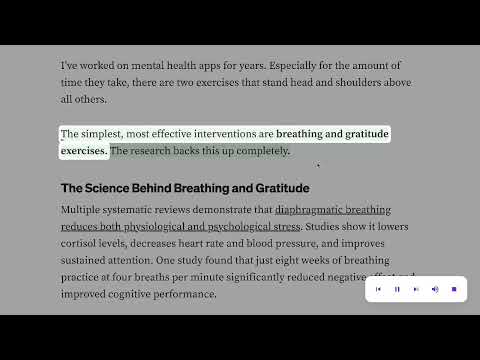
ReadBeam is a focus-first text-to-speech reader. Select text on any webpage and listen while a subtle dim overlay keeps your eyes locked on the sentence being read — no highlights, no clutter, no DOM pollution. ★ FOCUS MODE — DIMS THE PAGE AROUND THE CURRENT SENTENCE Unlike other TTS readers that just read aloud, ReadBeam dims everything on the page except the sentence currently being spoken. Your eyes stop skimming. You stop checking tabs. You actually finish the article. ★ FOCUS SCORE — EVERY SESSION GETS A 0-100 SCORE When you stop reading, ReadBeam calculates a Focus Score based on duration, drifts (when your eyes leave the page), and recoveries. Build a daily streak by hitting your goal. It turns "I should read more" into a habit you can measure. ★ READING INSIGHTS — TRACK YOUR FOCUS OVER TIME Open the popup to see today's focus time, a 7-day bar chart, your current streak, and recent sessions. All data stays on your device — no account, no cloud, no tracking. ★ SHARE CARD — EXPORT YOUR FOCUS SCORE AS PNG Finished a great reading session? Export a clean PNG of your Focus Score to share with friends, study groups, or your accountability buddy. ★ WORKS EVERYWHERE — ARTICLES, WIKIPEDIA, DOCS, BLOGS, LONG-FORM POSTS ReadBeam runs on any webpage with selectable text. No login, no account, no cloud TTS. Uses your browser's built-in voices, so it works offline and in 40+ languages. ━━━━━━━━━━━━━━━━━━━━━━━━━━━━━━ HOW IT WORKS ━━━━━━━━━━━━━━━━━━━━━━━━━━━━━━ 1. Select any text on a webpage (a sentence, a paragraph, or the whole article). 2. Hover the purple dot that appears near your selection. 3. Click "Read from here" or "Read selection". 4. ReadBeam starts reading. The page dims around the current sentence. 5. Use the floating toolbar to pause, skip sentences, or stop. 6. When you stop, your Focus Score and session summary appear. ━━━━━━━━━━━━━━━━━━━━━━━━━━━━━━ WHO IT'S FOR ━━━━━━━━━━━━━━━━━━━━━━━━━━━━━━ • Deep readers who want to rebuild attention in an age of infinite scroll • Students and researchers plowing through long articles, papers, and Wikipedia rabbit holes • People with ADHD who lose focus mid-article and want a gentle nudge back • Readers with dyslexia or visual fatigue who prefer listening while their eyes rest • Language learners practicing pronunciation and reading comprehension • Busy professionals catching up on newsletters, blogs, and documentation during commutes ━━━━━━━━━━━━━━━━━━━━━━━━━━━━━━ KEYBOARD SHORTCUTS ━━━━━━━━━━━━━━━━━━━━━━━━━━━━━━ • Alt+P — Play / Pause • Alt+, — Previous sentence • Alt+. — Next sentence • Esc — Stop reading ━━━━━━━━━━━━━━━━━━━━━━━━━━━━━━ FAQ ━━━━━━━━━━━━━━━━━━━━━━━━━━━━━━ Q: Do I need to create an account? A: No. ReadBeam works the moment you install it. No login, no email, no cloud sync. Q: Is it free? A: Yes. All core features — TTS reading, Focus Mode, Focus Score, Insights, Share Card — are free. Q: What languages are supported? A: Any language your browser has a voice for. Chrome ships with voices for 40+ languages on Windows, macOS, and Chrome OS. Pick your preferred voice in the popup settings. Q: Does it work on PDFs? A: ReadBeam works on any webpage with selectable text, including HTML-based PDF viewers and Google Docs. Native PDF files opened in Chrome's built-in viewer may need "Open with Google Docs" first. Q: Is my reading data sent anywhere? A: No. Every session, score, and streak is stored locally in your browser via chrome.storage. It never leaves your device. Clear your browser data and it's gone. Q: Does it read the whole page automatically? A: No — you select what you want to read. ReadBeam never auto-scans or auto-reads a page. You stay in control. ━━━━━━━━━━━━━━━━━━━━━━━━━━━━━━ PRIVACY ━━━━━━━━━━━━━━━━━━━━━━━━━━━━━━ ReadBeam is built privacy-first: • No accounts, no login, no email collection • No analytics, no tracking, no third-party scripts • All reading data stays in chrome.storage.local on your device • No cloud TTS — uses your browser's built-in voices • The only network permission is an optional self-hosted API for future features, currently unused ━━━━━━━━━━━━━━━━━━━━━━━━━━━━━━ ReadBeam is open about what it is: a quiet reading companion. It shows up when you need to focus, disappears when you don't. No banners, no popups, no upsells. Just you and the words.
0 out of 5No ratings
Details
- Version1.1.0
- UpdatedAugust 13, 2026
- Offered byZanX
- Size88.49KiB
- LanguagesEnglish
- Developer
Email
hello@byzanx.com - Non-traderThis developer has not identified itself as a trader. For consumers in the European Union, please note that consumer rights do not apply to contracts between you and this developer.
Privacy

This developer declares that your data is
- Not being sold to third parties, outside of the approved use cases
- Not being used or transferred for purposes that are unrelated to the item's core functionality
- Not being used or transferred to determine creditworthiness or for lending purposes
Support
For help with questions, suggestions, or problems, please open this page on your desktop browser