


Overview
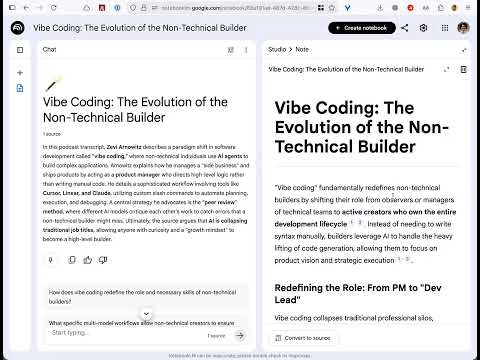
Readable for NotebookLM improves the readability of Google NotebookLM saved notes with better typography and enhanced focus mode.
Make NotebookLM Notes Actually Readable If you spend hours learning through Google NotebookLM, you know the pain: cramped text, awkward spacing, and no way to fix it. Since Google doesn't seem interested, I decided to fix it. WHAT IT DOES Readable for NotebookLM transforms the "Studio > Note" sidebar with professional typography that's easy on your eyes. Better line spacing, optimized font sizes, and breathing room where you need it—all while keeping every citation marker and NotebookLM feature intact. WHY YOU NEED THIS • No More Eye Strain: Professional typography designed for long-form reading • One-Click Toggle: Turn it on when you need it, off when you don't • Remembers Your Choice: Set it once, never think about it again • Seamless: All NotebookLM features still work exactly as expected HOW TO USE 1. Install the extension 2. Open any NotebookLM note 3. Click the extension icon to toggle readable mode That's it. Enjoy actually readable notes. Built by someone who loves NotebookLM and want it to be more useful for everyone. This is my first extension, created out of necessity and a little bit of stubbornness. PRIVACY: This extension doesn't collect any data. Ever. It just makes text easier to read.
0 out of 5No ratings
Details
- Version1.0.0
- UpdatedJanuary 26, 2026
- Size25.32KiB
- LanguagesEnglish
- DeveloperWebsite
Email
nando.rocker+chrome@gmail.com - Non-traderThis developer has not identified itself as a trader. For consumers in the European Union, please note that consumer rights do not apply to contracts between you and this developer.
Privacy

This developer declares that your data is
- Not being sold to third parties, outside of the approved use cases
- Not being used or transferred for purposes that are unrelated to the item's core functionality
- Not being used or transferred to determine creditworthiness or for lending purposes