


Visão geral
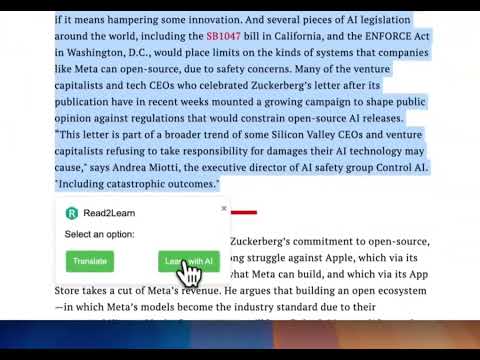
Learning English by reading articles with Click to Translate feature
Boost your English learning by reading quality articles with the Read to Learn Chrome Extension. Read to Learn is an innovative Chrome extension designed to enhance your English learning experience by combining AI-powered features that make reading more interactive and educational. * Key Features: 📊 Assess Article Difficulty Determine the reading level of any article to ensure it matches your English proficiency. Get insights into whether the content is appropriate for your learning stage. 🔍 Preview Unfamiliar Vocabulary Identify and understand challenging words or phrases in the text before you encounter them. Enhance your vocabulary by learning new words in context, with clear explanations and pronunciations. 📇 FlashCard Enhance your vocabulary retention with the FlashCard feature. Automatically generate flashcards for new words and phrases identified in the articles you read. Use the flashcards to review and memorize vocabulary, with the ability to see definitions, example sentences, and pronunciations. This interactive method aids in reinforcing your learning and improving your long-term retention of new vocabulary. 📝 Generate Quizzes Test your comprehension of articles with customized quizzes. Answer multiple-choice and short-answer questions generated based on the article’s content, and receive instant feedback to reinforce your learning. 🎯 Personalized Learning Set your English proficiency level to tailor the extension’s feedback and suggestions to your needs. Whether you’re a beginner, intermediate, or advanced learner, get a personalized learning experience. 🚀 Easy to Use Simply navigate to any article online, click on the extension icon, and choose the feature you want to use. Our intuitive interface ensures you get the most out of your reading experience without any hassle. * Why Read to Learn? Tailored Feedback: Get feedback that aligns with your English level, making learning more effective. Engaging Interaction: Turn reading into an interactive learning experience with quizzes and vocabulary insights. Supportive Learning: Grow your vocabulary and comprehension skills by learning new words in context and testing your knowledge regularly. * About Us Read to Learn is developed with the mission to make English learning accessible and engaging through the power of AI. We aim to support learners at all levels by providing tools that transform everyday reading into a valuable educational experience.
5 de 51 nota
Detalhes
- Versão0.7
- Atualização1 de agosto de 2024
- Tamanho4.58MiB
- IdiomasEnglish
- DesenvolvedorWebsite
E-mail
shenli3514@gmail.com - Não negocianteEsse desenvolvedor não se identificou como comerciante. Caso você seja da União Europeia, observe que os direitos do consumidor não se aplicam a contratos firmados entre você e esse desenvolvedor.
Privacidade

O desenvolvedor declara que seus dados
- Não são vendidos a terceiros, exceto nos casos de uso aprovados
- Não são usados ou transferidos para fins não relacionados à função principal do item
- Não são usados ou transferidos para informações de crédito ou empréstimo
Suporte
Para receber ajuda com perguntas, sugestões ou problemas, abra esta página no seu navegador para computador