


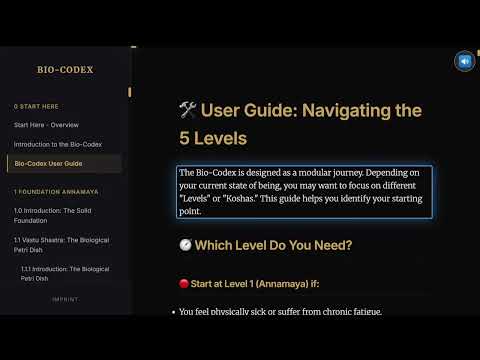
Overview
Reads text aloud directly in the browser, mimicking native Read Aloud.
Read TTS is a premium browser extension designed for a seamless, distraction-free reading experience. It brings a sophisticated "Read Aloud" capability to every website, with a focus on high-end typography, smooth navigation, and deep customization. KEY FEATURES: - Edge-Style Navigation: Double-click any text block to jump directly to that section. - Floating & Snappable UI: Choose where your toolbar sits. Snap it to any corner (Top Left/Right, Bottom Left/Right) and it stays there even when you resize. - Pixel-Perfect Margins: Fine-tune your reading area with absolute pixel-based margins for Header and Footer buffers, perfect for sites with sticky headers. - Custom Highlight Themes: Pick your preferred accent color from a curated palette or enter any custom HEX code for your reading focus. - Optimized for Notion: Precision coordinate tracking designed specifically for Notion's complex layouts and dynamic content. - Battery & GPU Efficient: Ultra-lightweight architecture ensures maximum battery life, unlike native readers that can be resource-heavy. - Multilingual Support: Automatically detects page language and selects the best matching voice from your system or online providers. PRIVACY FIRST: Read TTS uses your browser's native speech engine. No text is ever sent to external servers, and no data leaves your device. Your reading habit stays your business. Change History: V7.2.4 Bugfix Pause High CPU, more Stable Voice Dropdown V7.2.1 Bugfixes Margins and Stability of Features
0 out of 5No ratings
Details
- Version7.2.4
- UpdatedMarch 26, 2026
- Size165KiB
- LanguagesEnglish
- DeveloperWebsite
Email
webstore2@unterberger.media - Non-traderThis developer has not identified itself as a trader. For consumers in the European Union, please note that consumer rights do not apply to contracts between you and this developer.
Privacy

This developer declares that your data is
- Not being sold to third parties, outside of the approved use cases
- Not being used or transferred for purposes that are unrelated to the item's core functionality
- Not being used or transferred to determine creditworthiness or for lending purposes
Support
For help with questions, suggestions, or problems, please open this page on your desktop browser