


개요
Store links to read later, organize tabs and windows
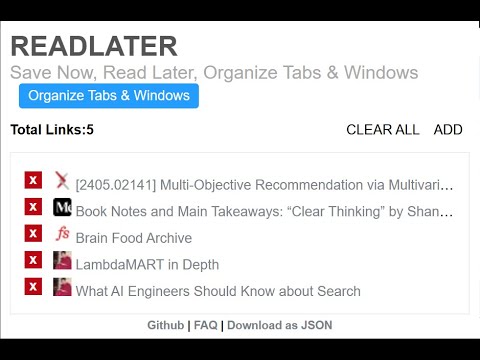
# ReadLater: The Ultimate Tab Manager & Reading List Lost a tab in another window again? We've all been there. With multiple projects and endless interesting articles, your browser quickly becomes a maze of tabs spread across different windows. Important work gets buried, your computer slows down, and your "read later" pile just keeps growing. ReadLater is a powerful two-in-one solution to conquer browser chaos. It combines a simple, syncable reading list with a brand-new Tab Manager that gives you a complete overview of everything you have open right now. # ✨ Meet Your New Command Center: The Open Tab Manager This is the feature you've been waiting for. Our revolutionary new Tab Manager gives you a bird's-eye view of your entire browser session. Now you can: See Everything in One Place: Get a clean, organized list of every single tab you have open across all your Chrome windows. No more hunting! Find Tabs Instantly: Quickly search, sort, and filter your open tabs by title or URL to find the exact page you need in seconds. Save with Precision: Add individual tabs to your reading list, or save an entire window's worth of links with a single click. It's the ultimate tool for session management and research. And the Perfect Reading List for Later Once you've organized your active tabs, ReadLater excels as your temporary inbox for things you want to read soon. One-Click Saving: Instantly save any page to your reading list with a click of the icon or the handy keyboard shortcut (Ctrl+Shift+Y). Declutter Your Browser: Close tabs confidently. Your reading list is a dedicated, clutter-free space for content, separate from your permanent bookmarks. Syncs Everywhere: Your reading list is automatically synced across all your Chrome browsers. Pick up right where you left off, on any device. # Getting Started To get the full power of ReadLater, make sure you're logged into your Google account in Chrome and have extension syncing enabled. You can check your settings here: chrome://settings/syncSetup. This ensures your reading list and settings are always backed up and available. Stop just saving links for later—take control of what's open right now. Install ReadLater today for a faster, more organized browsing experience! # Change Log: 5.0.0 ----- Updated keyboard shortcut to "Ctrl + Shift + Y" Added an "Open Tabs" section to the options page that lists tabs from all windows. Features: search/filter, sortable columns (Title, URL, Window), per-tab "Add" button, "Add All Tabs" and "Refresh Tabs". Window names are derived from each window's active tab title for easier identification. UI/Files affected: src/tab.html, src/tab.js, src/tab.css. Removed persistent identity permission from the manifest; identity is now requested on-demand (via runtime request) or surfaced as a CTA to open Chrome People/Sync settings. Added a Permissions panel to the options page showing declared and granted permissions with short descriptions. Added background service worker (background.js) to handle the keyboard command for adding the current page. Changed suggested keyboard shortcut to Ctrl+Shift+Y (and platform equivalents) to avoid conflicts; remind users they can reassign under chrome://extensions/shortcuts. Manifest now includes the "tabs" permission required for the new Open Tabs UI. UI/Files affected: src/manifest.json, src/tab.html, src/tab.js, src/tab.css, src/background.js. Fixed a small syntax bug in download JSON generation (missing parenthesis) that prevented the options script from executing. Minor UX tweaks: "Clear saved links" button wired to the existing clear handler and the saved/tabs lists refresh after clearing. Files: src/tab.js, src/core.js, src/tab.html. 4.0.3 ----- Allow backward compatibility with URL's not having timestamp. 4.0.2 ----- - Fix broken UI of 4.0.1 4.0.1 ----- 1. Add URLs using keyboard shortcut Ctrl+Shift+L 2. Cleaner API for managing storage. 3. Enhanced permissions. 4. Export URL's as JSON. Thanks to Alexander Kashev for contributions. 3.0.1 ------ Added badge to the icon to show total stored links. 2.0.1 ----- New Slick UI thanks to Johny Jose Icons and Shorter titles for links thanks FrelEsquif 1.0.1 -------- 1. Support adding more than 31 links, max limit 512 2. Duplicate links not allowed 3. Data structure for saving links changed. Each link is saved as key value pair in the sync storage as opposed to the earlier version where all links were stored in an array. 4. UI bug regarding Message box changed. ----------------------------------------------------------------- This is a google chrome extension for saving links for later reading. All the links are synced across all the google chrome browsers you are logged into. Download at: https://github.com/downloads/napsternxg/ReadLater/ReadLater.zip Source Code at: https://github.com/napsternxg/ReadLater FAQ at: http://smexyyweby.wordpress.com/readlater/
5점 만점에 4.6점평점 88개
세부정보
개인정보 보호
개발자가 사용자 데이터에 관해 다음과 같이 선언했습니다
- 승인된 사용 사례를 제외하고 서드 파티에 판매하지 않음
- 항목의 핵심 기능과 관련 없는 목적으로 사용하거나 전송하지 않음
- 신용도 판단 또는 대출 목적으로 사용하거나 전송하지 않음
지원
질문, 제안 또는 문제와 관련하여 도움이 필요하면 데스크톱 브라우저에서 이 페이지를 여세요.