

Read Later Pro

Overview
Save, organize, and manage your reading list with stars, categories, search, and more!
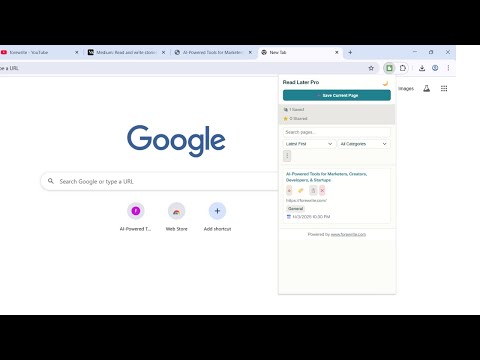
✨ KEY FEATURES ━━━━━━━━━━━━━━━━━━━━━━━━━━━━━━━━━━━━━━━━ 📌 ONE-CLICK SAVING → Instantly save any webpage to your reading list → Simply click the extension icon and select a category → Note: Chrome system pages and extension pages cannot be saved 📂 SMART ORGANIZATION → Organize saved articles into 12 predefined categories: • General • Articles • Videos • Research • Shopping • News • Tutorials • Social Media • Documentation • Entertainment • Work • Personal ⭐ RATING SYSTEM → Rate each saved article with stars (1-5) → Quickly identify your most valuable reads at a glance 🔍 POWERFUL SEARCH → Find articles instantly with full-text search → Search by title, URL, or content 🏷️ ADVANCED FILTERING → Filter your reading list by categories and tags → View only the content that matters right now 📊 SORTING OPTIONS → Sort your articles by: • Date saved (newest first) • Date saved (oldest first) • Title (A-Z) • Title (Z-A) • Rating (highest first) • Rating (lowest first) 🌙 DARK MODE → Switch between light and dark themes → Easy on the eyes, day or night 💾 EXPORT YOUR DATA → Download all saved articles as JSON file → Never worry about losing your reading list → Back up your data anytime 📥 IMPORT YOUR DATA → Restore from previously exported file → Migrate from another reading list manager → Your data is always in your control 🗑️ PRIVACY FIRST → All data stored locally on your browser → Nothing sent to external servers → Your reading habits are your own ━━━━━━━━━━━━━━━━━━━━━━━━━━━━━━━━━━━━━━━━ 🎯 PERFECT FOR ★ Content researchers and academics ★ Blog enthusiasts and news followers ★ Students collecting reference materials ★ Professionals curating industry articles ★ Anyone who wants to "read it later" ━━━━━━━━━━━━━━━━━━━━━━━━━━━━━━━━━━━━━━━━ ⚡ TECHNICAL DETAILS ✓ Fast and lightweight ✓ Works offline ✓ No account required ✓ No ads or tracking ✓ Open and transparent permissions ━━━━━━━━━━━━━━━━━━━━━━━━━━━━━━━━━━━━━━━━ 📖 HOW TO USE 1. Click the Read Later Pro icon to open the popup 2. Click "Save Current Page" to add the article 3. Select a category for organization 4. Search, filter, and sort your reading list anytime 5. Rate articles with stars 6. Export your data regularly for backup ━━━━━━━━━━━━━━━━━━━━━━━━━━━━━━━━━━━━━━━━ 🔐 PERMISSIONS EXPLAINED → Storage: To save your reading list and preferences locally → Tabs: To access information about pages you want to save → Active Tab: To get current tab's title and URL when saving ━━━━━━━━━━━━━━━━━━━━━━━━━━━━━━━━━━━━━━━━ Start building your perfect reading list today with Read Later Pro! 💬 Feedback? Issues? Feature requests? We'd love to hear from you. Your suggestions help us improve!
0 out of 5No ratings
Details
- Version2.0.0
- UpdatedNovember 5, 2025
- Offered byforewrite
- Size27.35KiB
- LanguagesEnglish
- DeveloperGagan Sahay
84/1 Nai Basti Abdullapur Meerut Meerut, Uttar Pradesh 250001 INEmail
gagansahay695@gmail.comPhone
+91 97617 38451 - TraderThis developer has identified itself as a trader per the definition from the European Union and committed to only offer products or services that comply with EU laws.
Privacy

This developer declares that your data is
- Not being sold to third parties, outside of the approved use cases
- Not being used or transferred for purposes that are unrelated to the item's core functionality
- Not being used or transferred to determine creditworthiness or for lending purposes
Support
For help with questions, suggestions, or problems, please open this page on your desktop browser