

Read It To Me: Text to Speech, Read Aloud

Overview
Read It To Me reads aloud web pages and PDFs in 50+ languages. Free, no sign-up, no word limit.
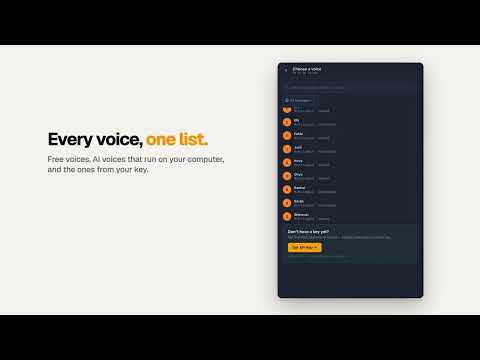
Read It To Me is an AI text-to-speech reader for Chrome that reads aloud websites, PDFs, ebooks and documents right in your browser. It turns written content into natural audio, so you can listen instead of read. Use the built-in voices or connect a premium AI voice for realistic narration while you work, study or relax. 🚀 Reads PDFs and all your everyday book and document formats 🚀 Dozens of natural voices across 50+ languages 🚀 Bookmarks, quotes and your reading place — synced across your devices 🚀 Connect your own API key (ElevenLabs and others) for the most lifelike sound 🚀 Free, with no sign-up required TEXT-TO-SPEECH FOR THE WHOLE WEB Have any website, article, blog or the news read aloud, plus mail in Gmail, docs in Google Docs and books in Google Play Books — all out loud, in more than 50 languages. YOUR OWN FILES — ON YOUR DEVICE Open your own files straight from your computer and turn a report, thesis or e-book into audio. It handles the common ebook and document types, and everything is processed locally — nothing is uploaded. 60+ BUILT-IN — PLUS YOUR OWN KEY Start instantly with 60+ free voices built into your browser and system, matched automatically to the language of the text. Want the most lifelike, modern sound? Connect your own API key from a premium provider and it appears right in the picker — your key stays on your device and we never see it. BOOKMARKS, QUOTES AND YOUR PLACE — SYNCED In document mode, every book you open is saved to your personal shelf and remembers exactly where you stopped. Add bookmarks, save quotes, and jump around with a table of contents. Sign in (optional) to back up your place, bookmarks and quotes and sync them across computers — start on one, finish on another. Without an account, your shelf stays on this device until you close the browser. READING IN THE SIDE PANEL — NOT JUST A PLAYER The side panel stays open while you scroll, type and browse the same tab. The current sentence is highlighted and the page follows along, so you never lose your spot — a calm, distraction-free view for long listening. WHAT YOU CAN DO ⭐ Read any web page aloud, in 50+ languages ⭐ Open your ebooks and documents from your computer ⭐ Listen to your email, online docs and ebooks while you browse ⭐ 60+ built-in options, plus your own AI key ⭐ Right-click selected text → "Read It To Me" ⭐ Follow-along highlighting and auto-scroll ⭐ Bookmarks, quotes and a table of contents ⭐ Cross-device sync of your library and progress ⭐ Light and dark themes, your font and spacing PERFECT FOR ✔ Turning long reads and research into a podcast-like listen ✔ Students reviewing notes, articles and textbooks ✔ Accessibility — dyslexia, low vision, ADHD or tired eyes ✔ Language learners following along to improve comprehension ✔ Proofreading — catch mistakes by hearing your own words ✔ Multitasking while you cook, commute or work HOW IT WORKS ▶ Install the extension — it's free. ▶ Open an article or file and press play, or right-click selected text. ▶ Choose your speed, and enjoy. FAQ ❓ Is it free? Yes — it costs nothing and no sign-up is needed. ❓ Can it read documents aloud? Yes — PDFs, ebooks and more. ❓ Does it do AI narration? Yes — add your own key for premium quality. ❓ Which languages? More than 50, each read naturally. ❓ Are my files uploaded? No — they're processed on your device. FREE — WITH AN OPTIONAL UPGRADE The extension is free and works right away. Optionally, connect your own API key from a premium provider for the most realistic sound; the "Get API Key" link is an affiliate link and we may earn a commission. Your key and usage stay between you and the provider. Try Read It To Me today — the text-to-speech tool that turns any page or book into audio, anywhere, hands-free and eyes-free.
4.3 out of 598 ratings
Details
- Version1.9.75
- UpdatedOctober 30, 2026
- Size32.17MiB
- Languages54 languages
- DeveloperWebsite
Email
appreadittome@gmail.com - Non-traderThis developer has not identified itself as a trader. For consumers in the European Union, please note that consumer rights do not apply to contracts between you and this developer.
Privacy

Read It To Me: Text to Speech, Read Aloud has disclosed the following information regarding the collection and usage of your data. More detailed information can be found in the developer's privacy policy.
Read It To Me: Text to Speech, Read Aloud handles the following:
This developer declares that your data is
- Not being sold to third parties, outside of the approved use cases
- Not being used or transferred for purposes that are unrelated to the item's core functionality
- Not being used or transferred to determine creditworthiness or for lending purposes
Support
For help with questions, suggestions, or problems, visit the developer's support site