

Read Any Language - Powered by ElevenLabs
1 rating
)
Overview
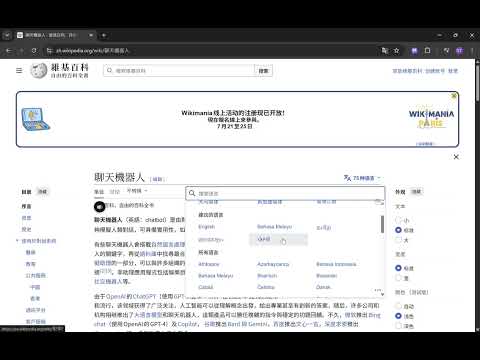
Text to speech: highlight text in any language and hear it read aloud in a natural voice. Powered by ElevenLabs.
Read Any Language turns any text on the web into natural-sounding speech. Highlight the text you want to hear, click the speaker button that appears, and listen — in the same language as the text. Powered by ElevenLabs text-to-speech, it produces lifelike voices across dozens of languages and automatically matches the language of whatever you highlight. No copy-pasting, no switching apps. How it works: 1) Create a ElevenLabs free account and generate a API key with restricted access. 2) Paste the ElevenLabs API key into settings. 3) Pick a voice and model (built-in guide). 4) Highlight text and click the speaker button. Features: natural AI voice • automatic multi-language • your ElevenLabs voices/models fetched live • voice preview • stop anytime, one narration at a time • per-selection character limit • remaining-quota display. Note: requires your own ElevenLabs account and API key (free tier available).
5 out of 51 rating
Details
- Version1.4.1
- UpdatedOctober 6, 2026
- Offered bygtfoo
- Size120KiB
- Languages31 languages
- Developer
Email
gtfoo.co+chromeextension@gmail.com - Non-traderThis developer has not identified itself as a trader. For consumers in the European Union, please note that consumer rights do not apply to contracts between you and this developer.
Privacy

Read Any Language - Powered by ElevenLabs has disclosed the following information regarding the collection and usage of your data. More detailed information can be found in the developer's privacy policy.
Read Any Language - Powered by ElevenLabs handles the following:
This developer declares that your data is
- Not being sold to third parties, outside of the approved use cases
- Not being used or transferred for purposes that are unrelated to the item's core functionality
- Not being used or transferred to determine creditworthiness or for lending purposes