「Read Aloud: 文字語音朗讀助理」的項目標誌圖片

Read Aloud: 文字語音朗讀助理

http://lsdsoftware.com/
精選商品
4.1(

3502 個評分

)
擴充功能無障礙工具6,000,000 使用者
商品影片縮圖
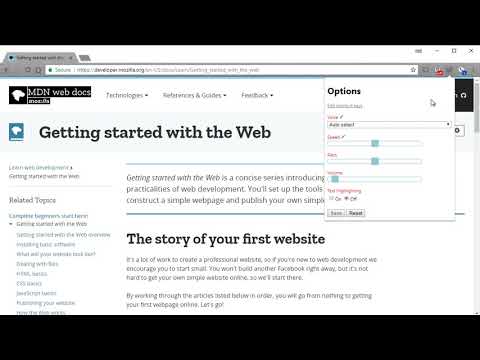
Read Aloud: 文字語音朗讀助理的項目媒體 2 (螢幕截圖)

總覽

輕輕點選,即可為您朗讀頁面上的文字。(目前支援超過 40 種以上的語言)

Read Aloud 使用文字轉語音 (TTS) 技術將網頁文字轉換為音訊。 它適用於各種網站,包括新聞網站、部落格、同人小說、出版物、教科書、學校和課程材料。大聲朗讀可以幫助那些喜歡聽內容而不是閱讀的用戶,包括學習閱讀的兒童和患有閱讀障礙或其他學習障礙的用戶。 Read Aloud 讓您可以從各種文字轉語音的聲音中進行選擇,包括瀏覽器提供的本機聲音和來自雲端供應商(如 Google Wavenet、Amazon Polly、IBM Watson、Microsoft Azure 和 OpenAI)的 AI 聲音。 基於雲端的語音可能需要額外的應用程式內購買或自帶 API 金鑰才能啟用。 Read Aloud 可以閱讀 PDF、Google Docs、Google Play 圖書、Amazon Kindle 和 EPUB(透過 epubread.com 提供的優秀 EPUBReader 擴充功能)。 要使用“大聲朗讀”,請導航到您想要閱讀的網頁,然後點擊瀏覽器選單上的“大聲朗讀”圖示。 您也可以使用快捷鍵 ALT-P、ALT-O、ALT-Comma 和 ALT-Period 來啟動擴充功能。 如果選擇了一些文本,則「大聲朗讀」將只朗讀所選的文本。 此外,您可以右鍵單擊文字選擇並從上下文功能表開始大聲朗讀。 若要變更聲音、閱讀速度、音調或啟用文字突出顯示,請透過擴展彈出視窗上的齒輪按鈕前往選項頁面(您需要停止播放才能看到齒輪按鈕)。您也可以透過右鍵點擊擴充圖示從上下文選單存取「選項」頁面。 在擴充彈出視窗上,有按鈕可以增加/減少彈出視窗的大小、字體大小以及切換暗模式。 Read Aloud 是一個開源專案。 如果您希望貢獻錯誤修復或翻譯,請造訪 GitHub 頁面 https://github.com/ken107/read-aloud

4.1 分 (滿分 5 分)3502 個評分

進一步瞭解結果與評論。

詳細資料

  • 版本
    2.22.0
  • 已更新
    2025年12月12日
  • 大小
    439KiB
  • 語言
    9 種語言
  • 開發人員
    Business
    158 Magellan Ave San Jose, CA 95116 US
    網站
    電子郵件
    support@lsdsoftware.com
  • 非交易商
    這位開發人員並未表明自己是交易商。歐盟地區的消費者請注意,消費者權利不適用於你和這位開發人員之間簽訂的合約。

隱私權

「Read Aloud: 文字語音朗讀助理」已揭露下列關於收集及使用資料的資訊。 如需更多詳細資訊,請參閱開發人員的《privacy policy》。

Read Aloud: 文字語音朗讀助理 會處理下列資料:

個人識別資訊
驗證資訊
網站內容

這位開發者就你的資料做出下列聲明:

  • 經核准的用途外,不會將你的資料販售給第三方
  • 不會基於與商品核心功能無關的目的,使用或轉移資料
  • 不會為了確認信用度或基於貸款目的,使用或轉移資料

支援

相關項目

Web Page Reader TTS Text To Speech

3.0

100% Free. No registration. No ads. No data sharing. Reads with no selection required. Highlights one sentence at a time.

@Voice Add To List

3.6

Open the current article in @Voice Aloud Reader Android app, or add it to reading list.

TTS 閱讀器 – Text to Speech

4.6

使用 TTS 閱讀器大聲朗讀網站內容。AI 文字轉語音讓文字聽起來清晰自然。

Text to Speech (TTS)

3.1

A text to speech tool with natural sounding voices.

Speechify — Voice AI Assistant

4.6

Speechify is the Voice AI Assistant you have always wanted. It reads websites aloud, types as you speak, and answers questions.

Read Aloud: 文字轉語音 (TTS, 朗讀功能)

4.3

文字轉語音 (TTS) 以自然語音朗讀文本、PDF 和電子書。

NaturalReader - AI Text to Speech

4.2

Read aloud any text with realistic AI voices, compatible with webpages, kindle Ebooks, Google Docs, PDF, Emails, and more.

Talkie: text-to-speech (TTS)

3.6

Fast & easy text-to-speech. Read aloud from websites, PDF, email. Privacy-aware, open source code.

Text to Speech (TTS) Read Aloud Voice Reader by Audeus

3.7

Read aloud using text-to-speech (TTS) to convert webpages, PDF, emails, & text to audio. Text-to-speech extension with AI voices

Voice Out: 文字轉語音

4.2

使用文字轉語音功能,以自然的語音朗讀任何網頁、Google文檔、PDF或書籍。

Text to Speech

3.4

Text to Speech Hewizo removes ads and reads articles in over 30+ languages using state of the art AI text to speech engine TTS

WebOutLoud - Text to Speech Web Reader

3.4

Listen to the web using text to speech. Perfect for dyslexia, low vision, students, researchers, kids, learning to read.

Web Page Reader TTS Text To Speech

3.0

100% Free. No registration. No ads. No data sharing. Reads with no selection required. Highlights one sentence at a time.

@Voice Add To List

3.6

Open the current article in @Voice Aloud Reader Android app, or add it to reading list.

TTS 閱讀器 – Text to Speech

4.6

使用 TTS 閱讀器大聲朗讀網站內容。AI 文字轉語音讓文字聽起來清晰自然。

Text to Speech (TTS)

3.1

A text to speech tool with natural sounding voices.

Speechify — Voice AI Assistant

4.6

Speechify is the Voice AI Assistant you have always wanted. It reads websites aloud, types as you speak, and answers questions.

Read Aloud: 文字轉語音 (TTS, 朗讀功能)

4.3

文字轉語音 (TTS) 以自然語音朗讀文本、PDF 和電子書。

NaturalReader - AI Text to Speech

4.2

Read aloud any text with realistic AI voices, compatible with webpages, kindle Ebooks, Google Docs, PDF, Emails, and more.

Talkie: text-to-speech (TTS)

3.6

Fast & easy text-to-speech. Read aloud from websites, PDF, email. Privacy-aware, open source code.

Google 應用程式
