รูปภาพโลโก้สินค้าสำหรับ Read Aloud: โปรแกรมอ่านออกเสียงข้อความ

Read Aloud: โปรแกรมอ่านออกเสียงข้อความ
http://lsdsoftware.com/
แนะนำ
4.1(

การให้คะแนน 3.6K รายการ

)
ภาพปกวิดีโอของรายการ
รายการสื่อ 2 (ภาพหน้าจอ) สำหรับ Read Aloud: โปรแกรมอ่านออกเสียงข้อความ

ภาพรวม

อ่านออกเสียงบทความบนหน้าเว็บปัจจุบันด้วยคลิกเดียว โดยใช้การแปลงข้อความเป็นเสียง รองรับกว่า 40 ภาษา

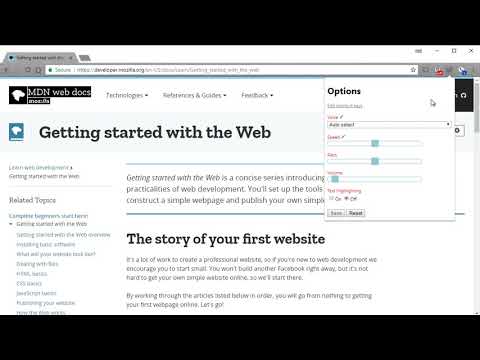
Read Aloud uses text-to-speech (TTS) technology to convert webpage text to audio. It works on a variety of websites, including news sites, blogs, fan fiction, publications, textbooks, school and course materials. Read Aloud helps users who prefer to listen to content instead of reading, including children learning to read and those with dyslexia or other learning disabilities. Read Aloud allows you to select from a variety of text-to-speech voices, including native voices provided by the browser and AI voices from cloud providers such as Google Wavenet, Amazon Polly, IBM Watson, Microsoft Azure, and OpenAI. Cloud-based voices may require additional in-app purchase or bringing your own API key to enable. Read Aloud can read PDF, Google Docs, Google Play books, Amazon Kindle, and EPUB (via the excellent EPUBReader extension from epubread.com). To use Read Aloud, navigate to the web page you want to read, then click the Read Aloud icon on the browser menu. You can also use the shortcut keys ALT-P, ALT-O, ALT-Comma, and ALT-Period to activate the extension. If some text is selected, Read Aloud will read only the selected text. Additionally, you can right click the text selection and start Read Aloud from the context menu. To change the voice, reading speed, pitch, or enable text highlighting, go to the Options page via the Gear button on the extension popup (you'll need to stop playback to see the Gear button). You can also access the Options page from the context menu by right clicking the extension icon. On the extension popup, there are buttons to increase/decrease the the size of the popup window, the font size, as well as toggle dark mode. Read Aloud is an open-source project. If you wish to contribute bug fixes or translations, please visit the GitHub page at https://github.com/ken107/read-aloud

4.1 จาก 5 คะแนนการให้คะแนน 3.6K รายการ

ดูข้อมูลเพิ่มเติมเกี่ยวกับผลการค้นหาและรีวิว

รายละเอียด

  • รุ่น
    2.24.0
  • อัปเดตแล้ว
    10 กรกฎาคม 2569
  • ขนาด
    475KiB
  • ภาษา
    25 ภาษา
  • นักพัฒนาซอฟต์แวร์
    Business
    158 Magellan Ave San Jose, CA 95116 US
    เว็บไซต์
    อีเมล
    support@lsdsoftware.com
  • ไม่ใช่ผู้ค้า
    นักพัฒนาซอฟต์แวร์รายนี้ไม่ได้ระบุว่าตัวเองเป็นผู้ค้า สำหรับผู้บริโภคในสหภาพยุโรป โปรดทราบว่าสิทธิของผู้บริโภคไม่มีผลกับสัญญาระหว่างคุณกับนักพัฒนาซอฟต์แวร์รายนี้

ความเป็นส่วนตัว

จัดการและดูวิธีใช้ส่วนขยายในองค์กร

Read Aloud: โปรแกรมอ่านออกเสียงข้อความ ได้เปิดเผยข้อมูลต่อไปนี้ซึ่งเกี่ยวกับการเก็บรวบรวมและการใช้ข้อมูลของคุณ ดูข้อมูลโดยละเอียดเพิ่มเติมได้ที่privacy policyของนักพัฒนาแอป

Read Aloud: โปรแกรมอ่านออกเสียงข้อความ จะจัดการสิ่งต่อไปนี้

ข้อมูลส่วนบุคคลที่ระบุตัวบุคคลนั้นได้
ข้อมูลการตรวจสอบสิทธิ์
เนื้อหาของเว็บไซต์

นักพัฒนาซอฟต์แวร์รายนี้ประกาศว่าข้อมูลของคุณจะ

  • ไม่ถูกขายไปยังบุคคลที่สามหากไม่ใช่ Use Case ที่ได้รับอนุมัติ
  • ไม่ถูกใช้หรือถูกโอนเพื่อวัตถุประสงค์ที่ไม่เกี่ยวข้องกับฟังก์ชันการทำงานหลักของรายการ
  • ไม่ถูกใช้หรือถูกโอนเพื่อพิจารณาความน่าเชื่อถือทางเครดิตหรือเพื่อวัตถุประสงค์การให้สินเชื่อ

สนับสนุน

รายการที่เกี่ยวข้อง

Web Page Reader TTS Text To Speech

3.0

100% Free. No registration. No ads. No data sharing. Reads with no selection required. Highlights one sentence at a time.

@Voice Connector

3.6

Open the current article in @Voice Aloud Reader Android app, or add it to reading list.

TTS Reader

4.5

Read any webpage, PDF, or Google Doc aloud with one click. 400+ AI voices with real-time highlighting and reading time estimates.

Text to Speech (TTS)

3.1

A text to speech tool with natural sounding voices.

Speechify — Text to Speech

4.6

Read aloud any Google Doc, PDF, webpage, or book with text to speech (TTS). Natural sounding voices in 60+ languages & 1,000 voices.

Read Aloud TTS: Text to Speech AI Voice Generator

4.3

Text to speech (TTS) with natural AI voices: read aloud web pages, PDFs & e-books. Free AI voice generator & text reader.

NaturalReader - AI Text to Speech

4.2

Read aloud any text with realistic AI voices, compatible with webpages, kindle Ebooks, Google Docs, PDF, Emails, and more.

Talkie: text-to-speech (TTS)

3.6

แปลงข้อความเป็นเสียงได้รวดเร็วและง่ายดาย อ่านออกเสียงจากเว็บไซต์ PDF อีเมล โค้ดโอเพ่นซอร์สที่คำนึงถึงความเป็นส่วนตัว

Text to Speech (TTS) Read Aloud Voice Reader by Audeus

3.8

Read aloud using text-to-speech (TTS) to convert webpages, PDF, emails, & text to audio. Text-to-speech extension with AI voices

Voice Out: ข้อความเป็นคำพูด

4.2

ใช้ข้อความเป็นคำพูดเพื่ออ่านหน้าเว็บ, เอกสาร Google, PDF หรือหนังสือใดๆ ด้วยเสียงที่เป็นธรรมชาติ

Text to Speech

3.4

Text to Speech Hewizo removes ads and reads articles in over 30+ languages using state of the art AI text to speech engine TTS

WebOutLoud - Text to Speech Web Reader

3.5

Listen to the web using text to speech. Perfect for dyslexia, low vision, students, researchers, kids, learning to read.

Web Page Reader TTS Text To Speech

3.0

100% Free. No registration. No ads. No data sharing. Reads with no selection required. Highlights one sentence at a time.

@Voice Connector

3.6

Open the current article in @Voice Aloud Reader Android app, or add it to reading list.

TTS Reader

4.5

Read any webpage, PDF, or Google Doc aloud with one click. 400+ AI voices with real-time highlighting and reading time estimates.

Text to Speech (TTS)

3.1

A text to speech tool with natural sounding voices.

Speechify — Text to Speech

4.6

Read aloud any Google Doc, PDF, webpage, or book with text to speech (TTS). Natural sounding voices in 60+ languages & 1,000 voices.

Read Aloud TTS: Text to Speech AI Voice Generator

4.3

Text to speech (TTS) with natural AI voices: read aloud web pages, PDFs & e-books. Free AI voice generator & text reader.

NaturalReader - AI Text to Speech

4.2

Read aloud any text with realistic AI voices, compatible with webpages, kindle Ebooks, Google Docs, PDF, Emails, and more.

Talkie: text-to-speech (TTS)

3.6

แปลงข้อความเป็นเสียงได้รวดเร็วและง่ายดาย อ่านออกเสียงจากเว็บไซต์ PDF อีเมล โค้ดโอเพ่นซอร์สที่คำนึงถึงความเป็นส่วนตัว

แอป Google