

Read Aloud: A Text to Speech Voice Reader

Pregled
Read aloud the current web-page article with one click, using text to speech (TTS). Supports 40+ languages.
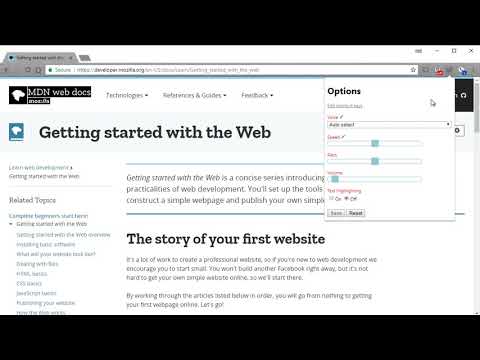
Read Aloud uses text-to-speech (TTS) technology to convert webpage text to audio. It works on a variety of websites, including news sites, blogs, fan fiction, publications, textbooks, school and course materials. Read Aloud helps users who prefer to listen to content instead of reading, including children learning to read and those with dyslexia or other learning disabilities. Read Aloud allows you to select from a variety of text-to-speech voices, including native voices provided by the browser and AI voices from cloud providers such as Google Wavenet, Amazon Polly, IBM Watson, Microsoft Azure, and OpenAI. Cloud-based voices may require additional in-app purchase or bringing your own API key to enable. Read Aloud can read PDF, Google Docs, Google Play books, Amazon Kindle, and EPUB (via the excellent EPUBReader extension from epubread.com). To use Read Aloud, navigate to the web page you want to read, then click the Read Aloud icon on the browser menu. You can also use the shortcut keys ALT-P, ALT-O, ALT-Comma, and ALT-Period to activate the extension. If some text is selected, Read Aloud will read only the selected text. Additionally, you can right click the text selection and start Read Aloud from the context menu. To change the voice, reading speed, pitch, or enable text highlighting, go to the Options page via the Gear button on the extension popup (you'll need to stop playback to see the Gear button). You can also access the Options page from the context menu by right clicking the extension icon. On the extension popup, there are buttons to increase/decrease the the size of the popup window, the font size, as well as toggle dark mode. Read Aloud is an open-source project. If you wish to contribute bug fixes or translations, please visit the GitHub page at https://github.com/ken107/read-aloud
4,1 od 53,5 tis. oceni
Podrobnosti
- Različica2.22.0
- Posodobljeno12. december 2025
- Velikost439KiB
- JezikiŠt. jezikov: 9
- Razvijalec
- Nisem posrednikTa izdajatelj se ni opredelil kot posrednik. Potrošniki v Evropski uniji morate upoštevati, da potrošniške pravice za pogodbe, sklenjene med vami in tem razvijalcem, ne veljajo.
Zasebnost
Razvijalec Read Aloud: A Text to Speech Voice Reader je razkril naslednje informacije glede zbiranja in uporabe vaših podatkov. Več podrobnih informacij je na voljo v tem razvijalčevem dokumentu: privacy policy.
Read Aloud: A Text to Speech Voice Reader obravnava to:
Ta razvijalec glede vaših podatkov izjavlja naslednje:
- Zunaj okvirov dovoljenih primerov uporabe se ne prodajajo tretjim osebam.
- Ne uporabljajo ali prenašajo se za namene, ki niso povezani s temeljno funkcijo izdelka.
- Ne uporabljajo ali prenašajo se zaradi ugotavljanja kreditne sposobnosti ali zaradi namenov posojanja denarja.
Podpora
Če potrebujete pomoč pri vprašanjih, predlogih ali težavah, odprite to stran v namiznem brskalniku