

Read Aloud: Tekst til tale-oppleser

Oversikt
Les den gjeldende nettsideartikkelen høyt med ett klikk, ved hjelp av tekst til tale. Støtter over 40 språk.
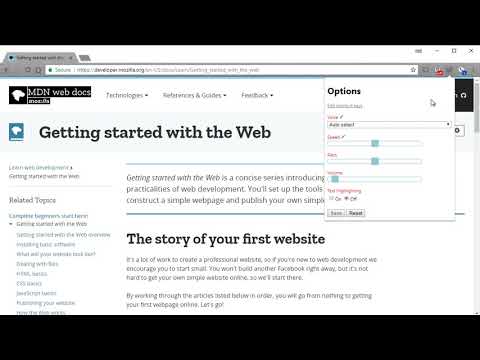
Read Aloud uses text-to-speech (TTS) technology to convert webpage text to audio. It works on a variety of websites, including news sites, blogs, fan fiction, publications, textbooks, school and course materials. Read Aloud helps users who prefer to listen to content instead of reading, including children learning to read and those with dyslexia or other learning disabilities. Read Aloud allows you to select from a variety of text-to-speech voices, including native voices provided by the browser and AI voices from cloud providers such as Google Wavenet, Amazon Polly, IBM Watson, Microsoft Azure, and OpenAI. Cloud-based voices may require additional in-app purchase or bringing your own API key to enable. Read Aloud can read PDF, Google Docs, Google Play books, Amazon Kindle, and EPUB (via the excellent EPUBReader extension from epubread.com). To use Read Aloud, navigate to the web page you want to read, then click the Read Aloud icon on the browser menu. You can also use the shortcut keys ALT-P, ALT-O, ALT-Comma, and ALT-Period to activate the extension. If some text is selected, Read Aloud will read only the selected text. Additionally, you can right click the text selection and start Read Aloud from the context menu. To change the voice, reading speed, pitch, or enable text highlighting, go to the Options page via the Gear button on the extension popup (you'll need to stop playback to see the Gear button). You can also access the Options page from the context menu by right clicking the extension icon. On the extension popup, there are buttons to increase/decrease the the size of the popup window, the font size, as well as toggle dark mode. Read Aloud is an open-source project. If you wish to contribute bug fixes or translations, please visit the GitHub page at https://github.com/ken107/read-aloud
4,1 av 53,6k vurderinger
Detaljer
- Versjon2.24.0
- Oppdatert10. juli 2026
- Størrelse475KiB
- Språk25 språk
- Utvikler
- Ikke-ervervsdrivendeDenne utvikleren har ikke identifisert seg selv som næringsdrivende. For forbrukere i EU gjelder ikke forbrukerrettighetene for kontrakter som er gjort mellom deg og denne utvikleren.
Personvern

Read Aloud: Tekst til tale-oppleser har oppgitt følgende informasjon om innsamling og bruk av dataene dine. Du finner mer detaljert informasjon i utviklerens privacy policy.
Read Aloud: Tekst til tale-oppleser håndterer følgende:
Denne utvikleren erklærer at dataene dine
- ikke selges til tredjeparter, med unntak for de godkjente bruksområdene
- ikke brukes eller overføres for formål som ikke er relatert til varens kjernefunksjonalitet
- ikke brukes eller overføres for å fastslå kredittverdighet eller for låneformål
Brukerstøtte
For å få hjelp med spørsmål, forslag eller problemer, åpne denne siden i en nettleser på en datamaskin