

Read Aloud: A Text to Speech Voice Reader

Gambaran keseluruhan
Read aloud the current web-page article with one click, using text to speech (TTS). Supports 40+ languages.
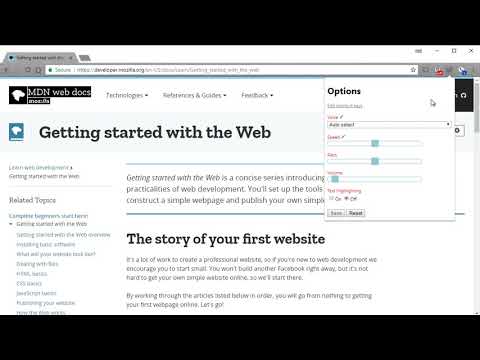
Read Aloud uses text-to-speech (TTS) technology to convert webpage text to audio. It works on a variety of websites, including news sites, blogs, fan fiction, publications, textbooks, school and course materials. Read Aloud helps users who prefer to listen to content instead of reading, including children learning to read and those with dyslexia or other learning disabilities. Read Aloud allows you to select from a variety of text-to-speech voices, including native voices provided by the browser and AI voices from cloud providers such as Google Wavenet, Amazon Polly, IBM Watson, Microsoft Azure, and OpenAI. Cloud-based voices may require additional in-app purchase or bringing your own API key to enable. Read Aloud can read PDF, Google Docs, Google Play books, Amazon Kindle, and EPUB (via the excellent EPUBReader extension from epubread.com). To use Read Aloud, navigate to the web page you want to read, then click the Read Aloud icon on the browser menu. You can also use the shortcut keys ALT-P, ALT-O, ALT-Comma, and ALT-Period to activate the extension. If some text is selected, Read Aloud will read only the selected text. Additionally, you can right click the text selection and start Read Aloud from the context menu. To change the voice, reading speed, pitch, or enable text highlighting, go to the Options page via the Gear button on the extension popup (you'll need to stop playback to see the Gear button). You can also access the Options page from the context menu by right clicking the extension icon. On the extension popup, there are buttons to increase/decrease the the size of the popup window, the font size, as well as toggle dark mode. Read Aloud is an open-source project. If you wish to contribute bug fixes or translations, please visit the GitHub page at https://github.com/ken107/read-aloud
4.1 daripada 53.6K rating
Butiran
- Versi2.22.0
- Dikemas kini12 Disember 2025
- Saiz439KiB
- Bahasa9 bahasa
- Pembangun
- Bukan pedagangPembangun ini masih belum mengenal pasti dirinya sebagai pedagang. Untuk pengguna dalam Kesatuan Eropah, harap maklum bahawa hak pengguna tidak digunakan pada kontrak antara anda dengan pembangun ini.
Privasi

Read Aloud: A Text to Speech Voice Reader telah mendedahkan maklumat yang berikut tentang pengumpulan dan penggunaan data anda. Maklumat yang lebih terperinci boleh ditemukan dalam privacy policy pembangun.
Read Aloud: A Text to Speech Voice Reader mengendalikan data yang berikut:
Pembangun ini mengisytiharkan bahawa data anda
- Tidak dijual kepada pihak ketiga, di luar kes penggunaan yang diluluskan
- Tidak digunakan atau dipindahkan untuk tujuan yang tidak berkaitan dengan fungsi teras item
- Tidak digunakan atau dipindahkan untuk menentukan kepercayaan kredit atau untuk tujuan pemberian pinjaman
Sokongan
Untuk mendapatkan bantuan tentang pertanyaan, cadangan atau masalah, sila buka halaman ini pada penyemak imbas desktop anda