

Read Aloud: قارئ النصوص الصوتي

نظرة عامة
اقرأ مقالة صفحة الويب الحالية بصوت عالٍ بنقرة واحدة، باستخدام تحويل النص إلى كلام. يدعم أكثر من 40 لغة.
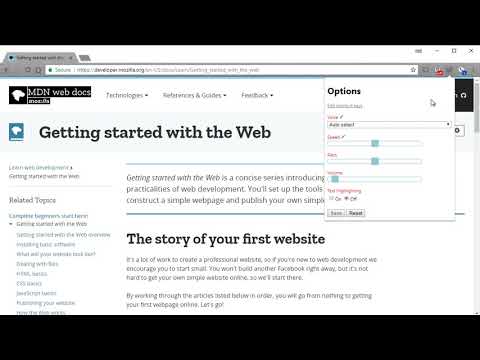
Read Aloud uses text-to-speech (TTS) technology to convert webpage text to audio. It works on a variety of websites, including news sites, blogs, fan fiction, publications, textbooks, school and course materials. Read Aloud helps users who prefer to listen to content instead of reading, including children learning to read and those with dyslexia or other learning disabilities. Read Aloud allows you to select from a variety of text-to-speech voices, including native voices provided by the browser and AI voices from cloud providers such as Google Wavenet, Amazon Polly, IBM Watson, Microsoft Azure, and OpenAI. Cloud-based voices may require additional in-app purchase or bringing your own API key to enable. Read Aloud can read PDF, Google Docs, Google Play books, Amazon Kindle, and EPUB (via the excellent EPUBReader extension from epubread.com). To use Read Aloud, navigate to the web page you want to read, then click the Read Aloud icon on the browser menu. You can also use the shortcut keys ALT-P, ALT-O, ALT-Comma, and ALT-Period to activate the extension. If some text is selected, Read Aloud will read only the selected text. Additionally, you can right click the text selection and start Read Aloud from the context menu. To change the voice, reading speed, pitch, or enable text highlighting, go to the Options page via the Gear button on the extension popup (you'll need to stop playback to see the Gear button). You can also access the Options page from the context menu by right clicking the extension icon. On the extension popup, there are buttons to increase/decrease the the size of the popup window, the font size, as well as toggle dark mode. Read Aloud is an open-source project. If you wish to contribute bug fixes or translations, please visit the GitHub page at https://github.com/ken107/read-aloud
4.1 من 53.6 ألف تقييمًا
التفاصيل
- الإصدار2.24.0
- تم التحديث10 يوليو 2026
- الحجم475KiB
- اللغات25 لغة
- مطوّر برامجBusinessموقع إلكتروني
158 Magellan Ave San Jose, CA 95116 USالبريد الإلكتروني
support@lsdsoftware.com - غير تاجرلم يعرِّف هذا المطوِّر نفسه بصفته جهة تجارية. بالنسبة إلى المستهلكين في الاتحاد الأوروبي، يُرجى العِلم أنّ حقوق المستهلك لا تسري على العقود المُبرمة بينك وبين هذا المطوِّر.
الخصوصية

تم الإفصاح من قِبل "Read Aloud: قارئ النصوص الصوتي" عن المعلومات التالية المتعلّقة بجمع بياناتك واستخدامها. لمعرفة مزيد من التفاصيل، يُرجى الاطّلاع على privacy policy لدى المطوّر.
تعالج الإضافة "Read Aloud: قارئ النصوص الصوتي" ما يلي:
يُقِرّ هذا المطوِّر بأنّ بياناتك:
- لا يتم بيعها لأطراف ثالثة خارج إطار حالات الاستخدام المُتفَق عليها.
- لا تُستخدَم أو تُنقَل لأغراض غير متعلِّقة بالوظيفة الرئيسية للعنصر.
- لا تُستخدَم أو تُنقَل لتحديد الأهلية الائتمانية أو لأغراض الإعارة.
دعم
للحصول على مساعدة بخصوص الاستفسارات أو الاقتراحات أو المشاكل، يُرجى فتح هذه الصفحة على متصفّحك المتوافق مع أجهزة الكمبيوتر المكتبي