


Overview
Sync reaction videos with Netflix, Prime Video, Crunchyroll & more. Pause, seek, skip — perfectly in time, automatically.
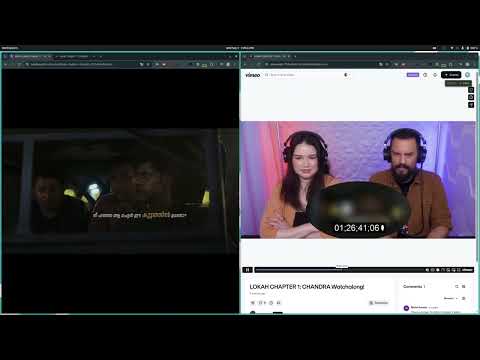
ReactionSync keeps an uncut reaction video and the source content playing in sync, in two browser tabs, automatically. Uncut reactions — the full-length ones creators post on Patreon and elsewhere — don't include the source. You play that yourself, in your own quality, on your own subscription. Which means keeping two tabs in step by hand: the reactor pauses to talk, rewinds to catch a line, skips the intro, and every time you're reaching for your own spacebar to match. ReactionSync does that part for you. Picture it: you hit play on the reaction and the film starts alongside it, already lined up. The reactor stops to say something and your screen stops with them. They rewind to catch a line they missed — you go back too. They skip the recap; you're past it before you notice. You get to the end without having touched the spacebar once. HOW IT WORKS 1. Open what you're watching in one tab, and the reaction video in another 2. Click the ReactionSync icon and pick the two tabs 3. Mark where they line up 4. Watch MARKING THE SYNC Most of the time one mark is enough — find the moment they match, and everything after it follows. But reactions aren't always a straight one-to-one, so you have more to work with: - Sync point — the two line up here, keep them together from now on - Hold the source — the reactor is talking; your side waits for them - Hold the reaction — the reactor watches ahead; the reaction waits instead Between them you can map a reaction of any shape, however the reactor recorded it. SHARE IT What you marked becomes a sync script. Save it as a file, or turn it into a link. Send that link to anyone and they pair both tabs in one click — no marking, no adjusting, nothing to learn. Every viewer after the first gets a finished experience, because someone already did the work once. ASK YOUR REACTOR If you follow a creator who posts uncut reactions, ask them to share a sync link with each one. It takes them a few minutes per video, and it turns every reaction they post into something their community can just press play on. WHAT YOU CAN PAIR Source content plays on the major streaming services, and reactions on the usual video and creator platforms. The full list is at reactionsync.com — it grows as we add support. Ads on Prime Video are handled, so syncing holds through them. On the other services you'll want an ad-free plan for now; support for those is on the way. You watch on your own subscriptions. ReactionSync doesn't host, provide, or unlock any content. FREE TRIAL & SUBSCRIPTION 30 days free with full access, no card required. A paid subscription after that — current rates are at reactionsync.com. Sign in with Google to start.
5 out of 52 ratings
Details
- Versionv1.8_b406718_20260925_022347
- UpdatedSeptember 26, 2026
- FeaturesOffers in-app purchases
- Size1.03MiB
- LanguagesEnglish (United States)
- DeveloperDWARKA POINT TECHNOLOGIES PRIVATE LIMITEDWebsite
TC X/3070[1], Dhanya, Gandi Lane, Kallarthala, Chempazhanthy, Thiruvananthapuram, Thiruvananthapuram- 695587, Kerala Trivandrum, Kerala 695587 INEmail
support@reactionsync.comPhone
+91 70129 26121 - TraderThis developer has identified itself as a trader per the definition from the European Union and committed to only offer products or services that comply with EU laws.
- D-U-N-S771984365
Privacy

ReactionSync has disclosed the following information regarding the collection and usage of your data. More detailed information can be found in the developer's privacy policy.
ReactionSync handles the following:
This developer declares that your data is
- Not being sold to third parties, outside of the approved use cases
- Not being used or transferred for purposes that are unrelated to the item's core functionality
- Not being used or transferred to determine creditworthiness or for lending purposes
Support
For help with questions, suggestions, or problems, visit the developer's support site