

ReactionSync: Reaction Videos in Sync with Your Show

Overview
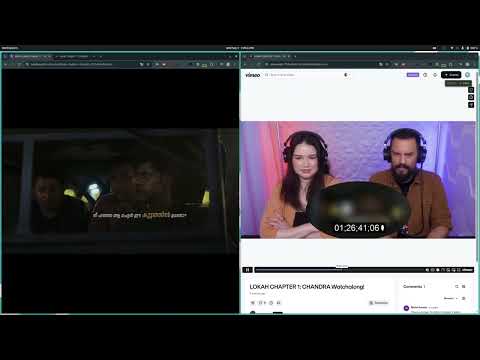
Watch a reaction video in sync with your own Netflix, Crunchyroll or Prime Video. When the reactor pauses, your show waits.
ReactionSync plays a reaction video in sync with your own copy of the show or film, each in its own tab. No more counting down 3-2-1 and hitting play on both. It's for anyone who watches full-length reactions, the uncut ones on YouTube or Patreon that leave the show out. You play the show on your own streaming account; ReactionSync keeps the two together to the end. HOW TO START 1. Add ReactionSync to Chrome and sign in once with Google. 2. Open the episode in one tab and the reaction in another, side by side, and press play on both. 3. Copy the reaction's sync link, if the creator or a fan has made one. 4. Click the ReactionSync icon, pick the two tabs, click Continue, then Load from Link, paste and click the arrow. Both start together. No sync link? Click Start New Session instead and mark the moment the two match; ReactionSync keeps them together from there. Save it as a link for the next person. WHAT STAYS IN SYNC - The reactor pauses the show to talk: your show waits (marked once, in the sync link or by you). - The reactor skipped part of the episode: the reaction waits while you watch it. - Either video buffers: both wait. - Pause or seek in either tab and the other follows. - A 25 fps copy and a 24 fps one can be matched with a small speed correction. - Prime Video ad breaks and regional intros are handled. Elsewhere, a plan without ads works best. WHERE IT WORKS On a computer, in Chrome, Edge, Brave and other Chromium browsers. The show plays on your own account on the major streaming services, and the reaction where it was posted. Services are added as viewers and creators ask; the current list is at reactionsync.com. YOUR SHOW, YOUR ACCOUNT Nothing is hosted or shared. Everyone watches the show on their own subscription; ReactionSync only keeps the timing. PRICE 30-day free trial from your first sign-in with Google: the whole product, no card. Then a paid subscription; current price at reactionsync.com/pricing.html. If it breaks for you, write to support@reactionsync.com and say which two sites you paired. We read every message.
5 out of 52 ratings
Details
- Versionv1.9_9b2e65b_20261020_184153
- UpdatedOctober 22, 2026
- FeaturesOffers in-app purchases
- Size1.03MiB
- LanguagesEnglish (United States)
- DeveloperDWARKA POINT TECHNOLOGIES PRIVATE LIMITEDWebsite
TC X/3070[1], Dhanya, Gandi Lane, Kallarthala, Chempazhanthy, Thiruvananthapuram, Thiruvananthapuram- 695587, Kerala Trivandrum, Kerala 695587 INEmail
support@reactionsync.comPhone
+91 70129 26121 - TraderThis developer has identified itself as a trader per the definition from the European Union and committed to only offer products or services that comply with EU laws.
- D-U-N-S771984365
Privacy

ReactionSync: Reaction Videos in Sync with Your Show has disclosed the following information regarding the collection and usage of your data. More detailed information can be found in the developer's privacy policy.
ReactionSync: Reaction Videos in Sync with Your Show handles the following:
This developer declares that your data is
- Not being sold to third parties, outside of the approved use cases
- Not being used or transferred for purposes that are unrelated to the item's core functionality
- Not being used or transferred to determine creditworthiness or for lending purposes
Support
For help with questions, suggestions, or problems, visit the developer's support site