Item logo image for React Inspector Pro

React Inspector Pro

Item media 6 (screenshot) for React Inspector Pro
Item video thumbnail
Item media 2 (screenshot) for React Inspector Pro
Item media 3 (screenshot) for React Inspector Pro
Item media 4 (screenshot) for React Inspector Pro
Item media 5 (screenshot) for React Inspector Pro
Item media 6 (screenshot) for React Inspector Pro
Item video thumbnail
Item media 2 (screenshot) for React Inspector Pro
Item media 3 (screenshot) for React Inspector Pro
Item media 4 (screenshot) for React Inspector Pro
Item media 5 (screenshot) for React Inspector Pro
Item media 6 (screenshot) for React Inspector Pro

Overview

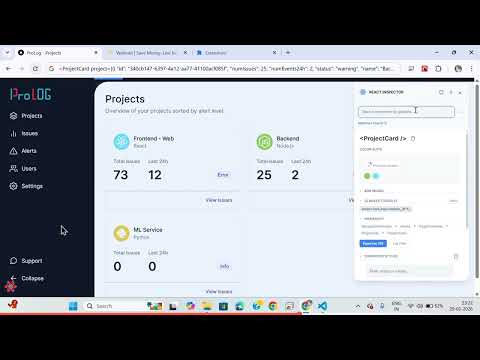
High-fidelity React component inspector with JSX export, computed styles, and global search.

React Inspector Pro is a Chrome/Edge extension that inspects the live React Fiber tree directly on the page. It provides component inspection, JSX export, computed CSS exploration, and performance/a11y insights without switching away from the page.

Details

  • Version
    2.6.0
  • Updated
    February 3, 2026
  • Size
    1.01MiB
  • Languages
    English
  • Developer
    Email
    saikrishna.kanteti@gmail.com
  • Non-trader
    This developer has not identified itself as a trader. For consumers in the European Union, please note that consumer rights do not apply to contracts between you and this developer.

Privacy

Manage extensions and learn how they're being used in your organization

React Inspector Pro has disclosed the following information regarding the collection and usage of your data. More detailed information can be found in the developer's privacy policy.

React Inspector Pro handles the following:

Website content

This developer declares that your data is

  • Not being sold to third parties, outside of the approved use cases
  • Not being used or transferred for purposes that are unrelated to the item's core functionality
  • Not being used or transferred to determine creditworthiness or for lending purposes

Related

HTML to React

4.5

The fastest and smartest way to analyze HTML elements and generate full React component representations.

ExtJS Spyglass

5.0

Empower Ext JS devs with ExtJS Spyglass Chrome extension. Inspect, debug, and gain insights into Ext JS apps.

aside

0.0

A modular browser extension for developers

Reactime

4.8

A Chrome extension for time travel debugging and performance monitoring in React applications.

React Developer Tools

4.0

Adds React debugging tools to the Chrome Developer Tools. Created from revision 3cde211b0c on 10/20/2025.

Inspect Element

2.9

Inspect element for content, and margin.

React Inspector

3.5

The Inspector launch with Ctrl+Shift+X (Command+Shift+X on Mac). You can detect and open the React component source code easily.

Angulariad — Angular DevTools Inspector

5.0

Inspect Angular component hierarchy, view data flow and prop diffs.

Excompt

2.8

Free to scan tailwind css and export tailwind CSS component in any website page

React Scan Toggle

5.0

Toggle React Scan functionality to analyze React component renders

CSS Peek: Element Inspector

5.0

Instantly inspect elements and explore CSS properties, XPath, and more. Easily export assets, color palettes, and typography.

React Hook Form Developer Tools

2.4

React Hook Form developer tools to help debug forms with validation.

HTML to React

4.5

The fastest and smartest way to analyze HTML elements and generate full React component representations.

ExtJS Spyglass

5.0

Empower Ext JS devs with ExtJS Spyglass Chrome extension. Inspect, debug, and gain insights into Ext JS apps.

aside

0.0

A modular browser extension for developers

Reactime

4.8

A Chrome extension for time travel debugging and performance monitoring in React applications.

React Developer Tools

4.0

Adds React debugging tools to the Chrome Developer Tools. Created from revision 3cde211b0c on 10/20/2025.

Inspect Element

2.9

Inspect element for content, and margin.

React Inspector

3.5

The Inspector launch with Ctrl+Shift+X (Command+Shift+X on Mac). You can detect and open the React component source code easily.

Angulariad — Angular DevTools Inspector

5.0

Inspect Angular component hierarchy, view data flow and prop diffs.

Google apps