

Rate My Los Rios Professor
1 rating
)
Overview
Shows detailed RateMyProfessor ratings for professors on web pages
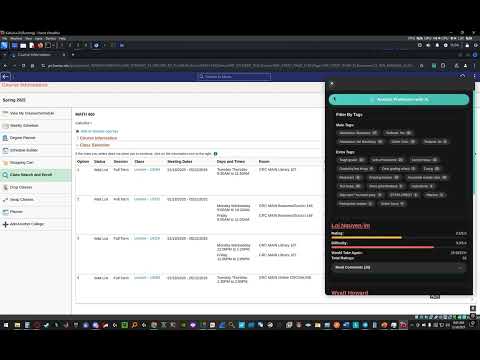
🎓 Professor Rater Pro: Your Smart Course Selection Assistant! Professor Rater Pro enhances your course selection experience by providing quick access to professor ratings from RateMyProfessors.com directly on your college's course registration pages. 🏫 Currently supported colleges: - Cosumnes River College - Sacramento City College - American River College - Folsom Lake College ✨ Key features: - Automatically scans course pages for professor names - Displays comprehensive professor ratings including overall rating, difficulty, and would take again percentage - Easy-to-use popup interface for quick access to professor information - Token-based system for fair usage 💎 Token System: - New users receive 20 free tokens upon email verification - Each professor scan uses 2 tokens - Tokens refresh automatically every 24 hours - Need more tokens? Visit our website to purchase additional tokens - Premium subscriptions available for unlimited scans This extension helps students make informed decisions about their courses by providing valuable insights about professors' teaching styles, course difficulty, and overall student satisfaction. Install Professor Rater Pro to streamline your course selection process and choose the best professors for your academic journey! 🔍 How To Make It Work: 1. Login into eServices page 2. Click - Manage Classes - 3. Click - Class Search and Enroll - 4. Select the Term 5. Search for the Class 6. Click on one of the Colleges that pop up (ARC, CRC, SCC, FLC) 7. When on the page with all the different Professors click on the extension and select from the drop down menu the College name and then press on - Scan page for Professors - 8. Wait 5 sec to 10 sec and the information should popup 📧 First-time users: Don't forget to verify your email to receive your free tokens and start using the extension!
1 out of 51 rating
Details
- Version1.0.6
- UpdatedFebruary 17, 2025
- FeaturesOffers in-app purchases
- Offered bybuyyav20
- Size71.33KiB
- LanguagesEnglish
- Developer
Email
buyyav20@gmail.com - Non-traderThis developer has not identified itself as a trader. For consumers in the European Union, please note that consumer rights do not apply to contracts between you and this developer.
Privacy

Rate My Los Rios Professor has disclosed the following information regarding the collection and usage of your data. More detailed information can be found in the developer's privacy policy.
Rate My Los Rios Professor handles the following:
This developer declares that your data is
- Not being sold to third parties, outside of the approved use cases
- Not being used or transferred for purposes that are unrelated to the item's core functionality
- Not being used or transferred to determine creditworthiness or for lending purposes