

Ramificar

Overview
Ramifica conversaciones de IA seleccionando texto y abriéndolo en una nueva pestaña como prompt de continuación.
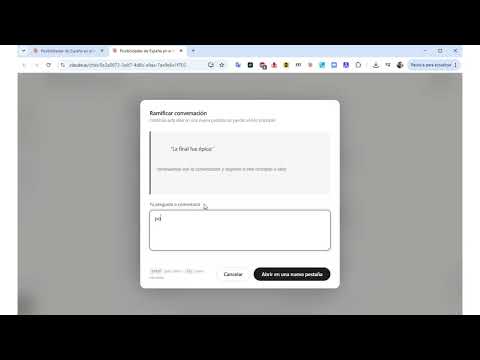
Ramificar — Explora ideas con IA sin perder el hilo. Gratis. ¿Cuántas veces una respuesta de la IA te ha abierto tres puertas a la vez y no has sabido cuál cruzar sin arruinar la conversación que ya tenías? Ramificar resuelve exactamente eso. Es una extensión gratuita para Chrome que te permite tomar cualquier fragmento de una respuesta de IA y abrirlo como una conversación nueva —ya contextualizada, ya enviada— en una pestaña aparte. Tu chat principal queda intacto. La nueva rama arranca sola. Tres clics. Un Enter. La IA ya está respondiendo. Selecciona el texto que quieres explorar. Clic derecho → Ramificar. Añade tu pregunta (o no, si la cita ya lo dice todo) → Enter. Chrome abre una nueva pestaña en la misma plataforma, inyecta el contexto automáticamente y lanza la pregunta. Tú ya estás leyendo la respuesta mientras tu conversación original sigue donde la dejaste. Compatible con las cinco grandes plataformas de IA ChatGPT · Claude · Google Gemini · Grok · DeepSeek Cada una tiene su propio adaptador interno. Si el envío automático falla por algún cambio en la interfaz, el texto queda pegado en el campo y solo tienes que pulsar enviar: nada se pierde nunca. Úsala como más te guste Investigación: ramifica el concepto secundario sin contaminar el hilo principal. Programación: entiende esa técnica que mencionó la IA sin perder el contexto de tu bug. Escritura: desarrolla tres ideas de una misma respuesta en tres pestañas paralelas. Estudio: pide ejemplos sin romper la explicación teórica que estás siguiendo. Comparativa: ramifica el mismo fragmento en ChatGPT y en Claude para ver cómo lo aborda cada uno. Personalízala a tu forma de trabajar Desde las opciones puedes activar solo las plataformas que usas y editar la frase puente que conecta la cita con tu pregunta. Por defecto dice "continuando con la conversación y respecto a este concepto o idea:", pero puedes cambiarla por lo que quieras. Se guarda y se sincroniza entre tus dispositivos. Privacidad total. Sin sorpresas. Ramificar no recopila datos, no tiene servidor propio, no incluye analítica ni publicidad. El único dato que toca es el fragmento que tú seleccionas, y desaparece de la memoria del navegador en cuanto llega a la pestaña nueva. Sin cuenta, sin registro, sin conexión a terceros. Funciona offline (más allá de la conexión que ya necesitas para usar la IA). Los permisos que solicita son los mínimos posibles: menú contextual, almacenamiento de tus preferencias y acceso limitado a las cinco webs de IA soportadas. Es gratis. Siempre. Sin planes de pago, sin funciones bloqueadas, sin versión Pro. Descárgala, úsala y, si te resulta útil, cuéntasela a alguien que también trabaje con IA. Pensar bien con IA es pensar en árbol, no en línea. Ramificar hace fluido lo que ya querías hacer.
0 out of 5No ratings
Details
- Version1.0.0
- UpdatedJune 24, 2026
- Offered bygabrielgisbert
- Size25.43KiB
- Languagesespañol
- Developer
Email
gabrielgisbert@gmail.com - Non-traderThis developer has not identified itself as a trader. For consumers in the European Union, please note that consumer rights do not apply to contracts between you and this developer.
Privacy

This developer declares that your data is
- Not being sold to third parties, outside of the approved use cases
- Not being used or transferred for purposes that are unrelated to the item's core functionality
- Not being used or transferred to determine creditworthiness or for lending purposes