


Overview
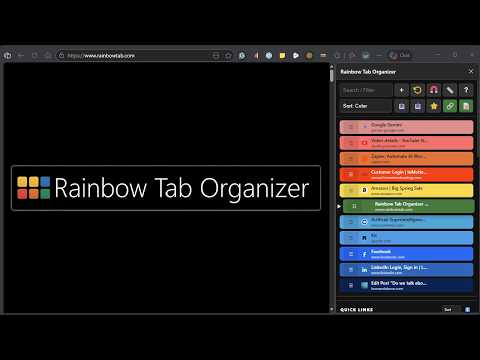
Colorful tab manager with domain color-coding, smart sorting, UI scaling, and a persistent 'Bucket' to save tabs for later.
🎁 **SPECIAL OFFER: Get 1 Full Year of Rainbow Tab PRO for FREE!** I want you to experience how much faster (and more colorful) your browser can be when you go PRO. I’m giving away a FREE 1-Year Pass—no catch, just pure productivity. **How to claim your free year in 60 seconds:** 1. Click the UNLOCK AMAZING FEATURES button at the top of the extension. 2. Select PURCHASE KEY and choose the Rainbow Tab Pro Subscription. 3. Use promo code **M3ODC3MQ** at checkout to drop the price to $0.00. 4. Complete checkout to instantly receive your PRO License Key! *(Note: Our payment processor requires card details to activate the zero-dollar checkout. You can easily remove your payment info anytime in your dashboard before the year ends, or keep it active if you love the app!)* Enjoy the full spectrum of PRO features—you're going to love it! 🎨🚀 --- Anyway, on to the details: 🚀 **The Tab Bucket (FREE!)** Never lose your place again. Spot a group of tabs you need for later? Drop them in the "Bucket" with one click. They stay saved even if you close your browser, allowing you to reopen your entire saved session instantly whenever you're ready to get back to work. **FIND THE EXACT BROWSER TAB YOU NEED INSTANTLY BY COLOR.** When your browser bar turns into a cluttered sea of tiny, identically colored tabs, finding the exact page you need becomes a frustrating guessing game that kills your focus. Stop wasting time hunting for lost tabs. Rainbow Tab Organizer brings colorful, visual clarity to your workflow, easing the stress of tab overload and removing the frustration of losing your place. ✨ **RAINBOW TAB ORGANIZER (Free Forever!):** • 🪣 The Tab Bucket: Save tabs for later with a single click. Your "Bucket" persists even after closing the browser, so you can pick up exactly where you left off. • 🎨 Custom Color Coding: Assign custom colors to specific domain tabs to turn your workspace into color "quick tabs" your brain can visually spot instantly. • ☁️ Automatic Cross-Device Sync: Sign in to your browser on another laptop or desktop, and your colors, settings, and tab bucket will automatically follow you everywhere. • 🔄 Smart Sorting: Instantly sort your tabs alphabetically, by the most recently used, or even by their custom colors. • 📏 Advanced Tab Scaling: Click the Ruler icon to cycle through 4 different UI sizes to fit your screen perfectly. • 🌐 Smart Omnibox: A built-in address bar that lets you search the web, your bookmarks, and your open tabs simultaneously. It even detects your browser to use your preferred search engine automatically! • ⧉ Pop-Out Tabs: Easily pop any tab out into its own separate browser window with a single click. • 🖐️ Drag & Drop Organization: Manually drag and drop your tabs in the side panel to arrange them in the exact order you want. 🌈 **UNLOCK RAINBOW TAB PRO:** Upgrade to Rainbow Tab Pro to access power-user tools like: • 🔇 **Mute / Unmute All Tabs (NEW):** One-click silencer right in the pull-down drawer that quiets every noisy tab in your window instantly. • 📱 **Instant QR Code Generator (NEW):** Generate an instant QR code of your active tab's URL to open any page on your phone immediately—completely client-side with no permissions needed. • 🔢 **Calculator Module:** A fully functional calculator built right into your side panel! Toggle it on from the main toolbar. • 📁 **Dedicated Folders:** Group your Quick Links into custom color-coded folders to keep your workspace perfectly organized. • 📝 **Persistent Smart Notes:** Save page-specific notes that automatically appear when you visit a website, or keep global notes that are always there when you need them. • ↕️ **Modular Workspace:** Rearrange your side panel! Move your Notes to the top or hide sections you don't need—it’s your workspace, your way. • 🕒 **3D Flipping Clock:** A stylish, minimalist header that shows the time and date, and flips to reveal your control panel on hover. • 📌 **Unlimited Quick Links:** Save and organize your most frequently visited pages for instant, one-click access. • 🧲 **One-Click Window Merger:** Instantly pull tabs from all open windows into one organized workspace. • ⏪ **Instant Tab Recall:** Accidentally closed a page? Click the restore button to instantly bring your last closed tab right back.
0 out of 5No ratings
Details
- Version2.6
- UpdatedSeptember 25, 2026
- FeaturesOffers in-app purchases
- Size18.45MiB
- LanguagesEnglish (United States)
- DeveloperThe Overwhelmed Brain, LLCWebsite
6175 Hickory Flat Hwy STE 110-197 Canton, GA 30115-7207 USEmail
paul@moretob.comPhone
+1 760-536-2051 - TraderThis developer has identified itself as a trader per the definition from the European Union and committed to only offer products or services that comply with EU laws.
Privacy

Rainbow Tab Organizer has disclosed the following information regarding the collection and usage of your data. More detailed information can be found in the developer's privacy policy.
Rainbow Tab Organizer handles the following:
This developer declares that your data is
- Not being sold to third parties, outside of the approved use cases
- Not being used or transferred for purposes that are unrelated to the item's core functionality
- Not being used or transferred to determine creditworthiness or for lending purposes
Support
For help with questions, suggestions, or problems, please open this page on your desktop browser