


Overview
Unlock contact details on the social profile you are viewing and organize prospects into lists.
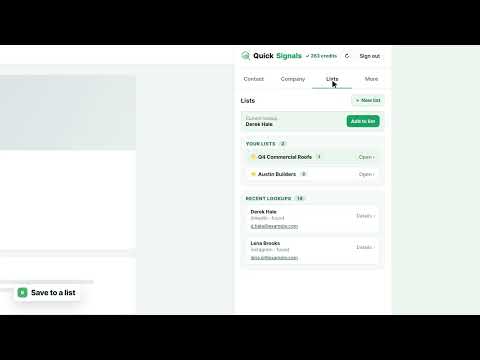
QuickSignals in your browser. Open a person's profile on LinkedIn, X, Facebook, Instagram or TikTok, then open the QuickSignals side panel. It picks up who you're looking at (name, headline, company and location as shown on the page) and lets you act on it without switching tabs. What you can do - Look up contact details Find a work email or phone number through your QuickSignals account. Credits are only used when you click Look up, and your remaining balance is always shown in the panel. How often a contact is found depends on how much the profile shows; TikTok profiles, for example, rarely list a real name or location. - Keep a record Every contact you look up is saved to your account. Group them into named lists (for example "Q4 outreach" or "Agency leads") and come back to them from the Lists tab. - Add company details If the company isn't filled in, add the company name and website yourself so the record is complete. - Send to your CRM Export a contact to HubSpot, Salesforce or GoHighLevel. If you've connected more than one, choose which ones. If you haven't connected any yet, connect from the panel without leaving the page you're on. - Sign in your way Use email and password, continue with Google, or sync your session from the QuickSignals web app. Credits, billing and CRM connections belong to your QuickSignals workspace; the extension uses the same account.
0 out of 5No ratings
Details
- Version0.5.5
- UpdatedNovember 16, 2026
- Size703KiB
- LanguagesEnglish
- DeveloperAYOBAMI O AKANBIWebsite
1631 Gresham Rd NE D Marietta, GA 30065 USEmail
contact@quicksignals.ioPhone
+1 404-307-3227 - TraderThis developer has identified itself as a trader per the definition from the European Union and committed to only offer products or services that comply with EU laws.
Privacy

QuickSignals has disclosed the following information regarding the collection and usage of your data. More detailed information can be found in the developer's privacy policy.
QuickSignals handles the following:
This developer declares that your data is
- Not being sold to third parties, outside of the approved use cases
- Not being used or transferred for purposes that are unrelated to the item's core functionality
- Not being used or transferred to determine creditworthiness or for lending purposes