

QuickNote — Voice & Text Notes
1 rating
)
Overview
Quickly jot down ideas by typing or speaking. Notes stay safe until you delete them yourself.
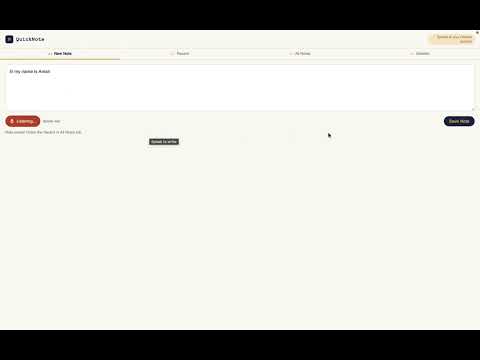
QuickNote is a simple, distraction-free way to capture ideas the moment they strike — by typing or by speaking. Tap the icon to open QuickNote in its own window. Type your thought, or hit Speak and talk — your words appear right in the same note as you say them. Save it with one click. Your notes are organized into four simple views: - New Note — write or speak a new idea - Recent — your most recently updated notes - All Notes — everything you've saved - Deleted — notes you've removed, kept safe until you permanently delete them Nothing is ever deleted for good unless you choose to. Deleted notes move to the Deleted tab first, where you can restore them or remove them permanently — your call, always. Notes are stored using Chrome's built-in sync storage, tied to whichever Google account your Chrome profile is signed into, so your notes stay with you across devices signed into that same account. No ads, no tracking, no unnecessary permissions — just a fast way to get an idea out of your head and onto the page.
5 out of 51 rating
Details
- Version1.9.3
- UpdatedOctober 1, 2026
- FeaturesOffers in-app purchases
- Offered byAman Kushwaha
- Size49.12KiB
- LanguagesEnglish (United States)
- Developer
Email
amansingh74826839@gmail.com - Non-traderThis developer has not identified itself as a trader. For consumers in the European Union, please note that consumer rights do not apply to contracts between you and this developer.
Privacy

QuickNote — Voice & Text Notes has disclosed the following information regarding the collection and usage of your data. More detailed information can be found in the developer's privacy policy.
QuickNote — Voice & Text Notes handles the following:
This developer declares that your data is
- Not being sold to third parties, outside of the approved use cases
- Not being used or transferred for purposes that are unrelated to the item's core functionality
- Not being used or transferred to determine creditworthiness or for lending purposes
Support
For help with questions, suggestions, or problems, visit the developer's support site