

QuickMail — Free Email Finder & Extractor

Overview
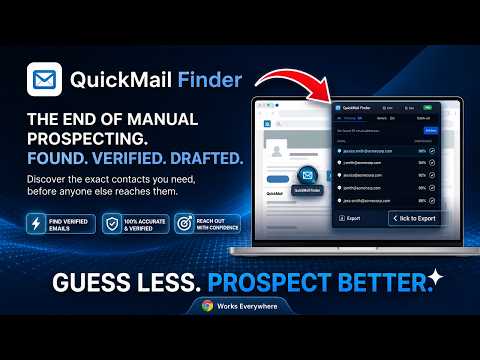
Free email finder and extractor on any website. 1-click draft in Gmail or Outlook with custom templates. 100% private.
QuickMail Finder is a free email finder and extractor that detects contact email addresses on any webpage and lets you open a personalized draft in Gmail or Outlook in one click — with no account, no credits, and no paywalls. Most email finders give you 25 free credits, then lock everything behind a $49/month subscription. QuickMail Finder works differently. It runs 100% inside your browser, detects every valid email address on the page you are currently viewing, and lets you reach out in seconds — whether you are on a company website, a team directory, a job board, or a professional profile like LinkedIn. Zero sign-up. Zero limits. --- ✨ KEY FEATURES 🔍 Real-Time In-Page Email Detection Automatically scans the active webpage and surfaces all valid contact emails as you browse. A live badge on the extension icon updates with the exact count. Works on static pages and on dynamic single-page apps where content loads as you scroll, including LinkedIn, Naukri, and similar platforms. Intelligent noise filtering strips out image filenames (like profile@2x.png), broken labels, and junk so your results stay clean. ⚡ 1-Click Email Draft in Gmail or Outlook Click the inline ✉ compose icon next to any detected email address — or select one from the popup — to instantly open a pre-filled draft window in Gmail or Outlook Web. No copy-pasting. No switching tabs. Supports multiple Gmail accounts (/u/0/, /u/1/) and standard mailto links for desktop clients like Apple Mail and Thunderbird. 📝 Personalized Email Templates with Dynamic Tokens Create and save reusable outreach templates for any purpose. Tokens like {name}, {company}, {email}, {yourName}, and {driveLink} are replaced automatically each time you open a compose window. Attach your Google Drive resume, portfolio, or proposal link without retyping it every time. 📊 Outreach History and Status Tracker Every draft you open is logged locally with the recipient's email, the source page URL, a timestamp, and a status (Pending or Submitted). Search and filter your full history to see at a glance who you have already contacted. Never send a duplicate message to the same contact. 📁 Export Email List to CSV or Excel Download all email addresses found on the current page into a clean, formatted CSV or Excel file with one click. Useful for building outreach sheets, contact logs, or application trackers inside Google Sheets or Microsoft Excel. 📬 Bulk Outreach Mode Select multiple email addresses from the popup and open personalized individual compose windows for each one. Alternatively, group them into a single BCC or TO draft for a broadcast message. The bulk selector works across your full saved history, not just the current page. 🛡️ 100% Private — No External Servers, No Tracking QuickMail Finder has no backend servers, no telemetry, and no data collection of any kind. Every detected email, saved template, and history entry lives only in your local Chrome browser storage and never leaves your device. --- 🛠️ HOW IT WORKS Step 1: Open any webpage that has email addresses on it — a company About page, a team directory, a job listing, or a professional profile. Step 2: QuickMail Finder automatically detects and highlights all valid emails on the page, and updates the toolbar badge with the live count. Step 3: Click the ✉ icon next to any email address to instantly open a pre-filled compose window in Gmail or Outlook with your saved template ready to send. --- ❓ FREQUENTLY ASKED QUESTIONS Q: Is QuickMail Finder completely free? A: Yes — fully free with no credit limits, no subscription tiers, no paywalls, and no credit card required. Detect and export as many emails as you want. Q: Do I need to create an account or sign in? A: No. The extension works immediately after you install it. No registration, no email verification, no login of any kind. Q: How does QuickMail Finder compare to Hunter.io, Snov.io, or ContactOut? A: Those tools charge $39–$99/month and restrict you to 25–50 credits before locking features. QuickMail Finder is a free alternative that is unlimited, requires no account, and works directly on the page you are browsing — not from a separate database. Q: Can I use it to find recruiter or hiring manager emails? A: Yes. If the email address is visible on the page — on a company team page, a job post, a LinkedIn profile, or a contact directory — QuickMail Finder will detect it automatically. Q: Does it work on LinkedIn, Naukri, or other dynamic platforms? A: Yes. The extension uses a MutationObserver to track newly loaded content as you scroll, so it captures email addresses that appear in dynamically rendered feeds and infinite scroll pages. Q: Can I export the detected emails to a spreadsheet? A: Yes. Click the CSV or Excel export button in the popup to download all emails found on the current page as a clean, formatted file. You can also bulk-export from your saved history. Q: Does it attach a Google Drive file or resume to my draft? A: Yes. Add your Google Drive link to the {driveLink} token in your template and it will be embedded automatically in every compose window you open. Q: Does QuickMail Finder read my emails or track my browsing? A: No. The extension does not have access to your inbox and sends zero data to any server. All processing runs locally inside your browser. Your data is entirely yours. --- QuickMail Finder — free email finder, email extractor, and 1-click Gmail and Outlook draft tool. No sign-up required.
0 out of 5No ratings
Details
- Version1.2.0
- UpdatedSeptember 16, 2026
- Size55.7KiB
- LanguagesEnglish
- Developer
- Non-traderThis developer has not identified itself as a trader. For consumers in the European Union, please note that consumer rights do not apply to contracts between you and this developer.
Privacy

QuickMail — Free Email Finder & Extractor has disclosed the following information regarding the collection and usage of your data. More detailed information can be found in the developer's privacy policy.
QuickMail — Free Email Finder & Extractor handles the following:
This developer declares that your data is
- Not being sold to third parties, outside of the approved use cases
- Not being used or transferred for purposes that are unrelated to the item's core functionality
- Not being used or transferred to determine creditworthiness or for lending purposes
Support
For help with questions, suggestions, or problems, please open this page on your desktop browser