

Quickly Copy

Overview
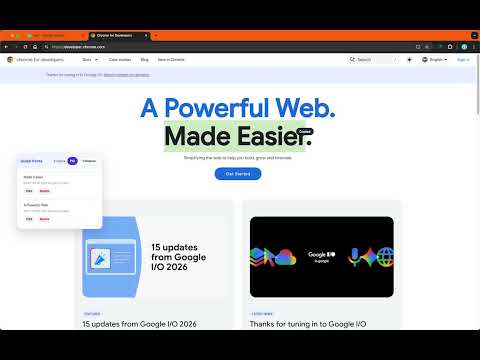
Copy selected text automatically, with a floating clipboard history panel that supports drag, collapse, edit, and quick paste.
Quickly Copy is a lightweight Chrome extension designed to make copy and paste workflows faster on any webpage. When you select text and release the mouse button, the extension automatically copies the selected content to the system clipboard and shows a brief confirmation toast. A draggable floating clipboard panel appears on the page to keep your recent copy history visible and easy to use. You can click a history item to paste it into the currently focused input field, or edit and delete entries as needed. The floating panel supports pinning, collapsing, position memory, and multilingual UI, making it useful for frequent copy, organize, and paste-back workflows. All data is stored locally in the browser for settings and copy history only. No remote server is required for the extension to work.
0 out of 5No ratings
Details
- Version1.0.0
- UpdatedMay 31, 2026
- Size60.88KiB
- Languages13 languages
- Developer
Email
hydwk2025@outlook.com - Non-traderThis developer has not identified itself as a trader. For consumers in the European Union, please note that consumer rights do not apply to contracts between you and this developer.
Privacy

This developer declares that your data is
- Not being sold to third parties, outside of the approved use cases
- Not being used or transferred for purposes that are unrelated to the item's core functionality
- Not being used or transferred to determine creditworthiness or for lending purposes