


Overview
Bookmark and save any webpage instantly with a note. Sync across devices with Pro. Share bookmarks with your team. Free to start.
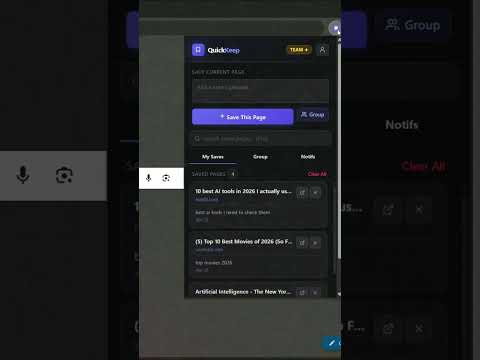
QuickKeep — Save Any Page Instantly. Add Notes. Sync Across Devices. Find Anything in Seconds. The bookmark manager that actually works the way your brain does. Save any webpage, YouTube video, article, link, or idea in one click — with a personal note attached — and find it again instantly, no matter when you saved it. Stop losing things you meant to come back to. Start actually using what you save. ━━━━━━━━━━━━━━━━━━━━━━━━━━━━━━━━━━━━━━ THE PROBLEM EVERY BROWSER USER HAS You open a tab to read something later. You forget it. You find a YouTube tutorial halfway through and lose it in your watch history. Someone shares a link in a chat, the conversation scrolls, and the link disappears. You search Google for the same article three times because you cannot remember where you found it. You close a browser session and lose every tab you meant to come back to. Your bookmarks folder is a graveyard of links you will never visit again. This is not a memory problem. This is a tools problem. Your browser was not built for saving things the way you actually think. Bookmarks have no context. Browser history is noise. Watch later fills up and becomes useless. Tabs multiply until your machine slows down and you close them all in frustration. QuickKeep was built to fix this — not with complexity, not with folders and tags and systems you have to maintain, but with something fast, lightweight, and actually useful. Save in one click. Add a note that gives it context. Find it again in seconds. That is it. That is the whole thing. ━━━━━━━━━━━━━━━━━━━━━━━━━━━━━━━━━━━━━━ WHAT QUICKKEEP DOES SAVE ANY WEBPAGE IN ONE CLICK Open the QuickKeep popup from your browser toolbar and click Save. The current page title and URL are captured automatically. No copying. No pasting. No forms to fill. No friction between you and saving what matters. Works on every website. Articles, documentation, tools, product pages, news, research, recipes, portfolios, GitHub repos, Reddit threads, pricing pages, landing pages — if it has a URL, QuickKeep can save it. SAVE YOUTUBE VIDEOS AND COME BACK IN ONE CLICK Watching a tutorial, a documentary, a video essay, a course, or a review you want to finish later? Save it with QuickKeep in one click. It appears in your saved list immediately. Click once to open it directly — no searching, no scrolling through watch history, no algorithm burying it. Your saved videos are always one click away, exactly where you left them. ADD NOTES TO EVERY SAVED PAGE This is the feature that changes everything. Attach a personal note to any saved page — write why you saved it, what you want to do with it, or a keyword that will help you find it later. Notes like "use this for the client proposal", "compare pricing with the other one", "send this to the team on Monday", "finish reading this weekend", or "the answer to that question is in here" turn a dead link into something you will actually use. Without a note, a saved link is just a URL. With a note, it is a decision, a reminder, a reference, and a shortcut — all in one. DOUBLE-CLICK ANYWHERE ON ANY PAGE TO SAVE INSTANTLY You do not always want to open the popup. Sometimes you are deep in an article, in a reading flow, and you just want to save and keep going. Double-click anywhere on any webpage to trigger a floating save overlay directly on the page, near your cursor. Type a note if you want one. Hit save. Done. You never left the page, never broke your focus, never switched context. CAPTURE HIGHLIGHTED TEXT AS YOUR NOTE — AUTOMATICALLY Select any text on a webpage — a quote you want to remember, a stat you want to cite, a product name, a code snippet, a definition, a key phrase — and double-click. QuickKeep captures the selected text and pre-fills it as the note for that saved page. Your future self will know exactly what mattered, exactly why you saved it, without having to type a single word. SAVE A SELECTION WITH THE FLOATING PILL Select a longer piece of text on any page and a floating Save button appears near your selection. Click it to open the save overlay with your highlighted text already filled in as the note. Fast, precise, and completely non-intrusive. OPEN ANY SAVED PAGE IN ONE CLICK Your entire saved list lives in the QuickKeep popup. Every entry shows the page title, the website name, your note, and when you saved it. Click any entry to open it in a new tab instantly. No hunting. No searching your history. No trying to remember which bookmark folder you put it in. Everything is right there, organized by when you saved it, with your own words telling you why. SEARCH THROUGH EVERYTHING YOU HAVE EVER SAVED Search across your entire saved list in real time — page titles, URLs, and notes all included. Find anything in seconds, no matter how long ago you saved it or how large your list has grown. Better than any bookmark search. Better than browser history. Your own personal search engine for the things that actually matter to you. SYNC ACROSS ALL YOUR DEVICES IN REAL TIME Save something on your work computer and access it instantly on your laptop, your home PC, or any other device where you have QuickKeep installed and signed in. Your saved list follows you everywhere, always up to date, always in sync. Never email yourself links again. Never text yourself URLs. Your saves are everywhere you are. SHARE SAVES AND COLLABORATE WITH YOUR GROUP Your personal saves are always yours alone. When you want to share something with others, you choose what goes to the group — and only that appears in the shared list. Create a group with up to 5 friends, teammates, classmates, or collaborators. Everyone sees the shared saves in real time, reacts to them, and stays on the same page — without a separate app, without an extra login, without any friction. Your private saves stay private. Always. The best link-sharing and collaborative bookmarking tool built directly into your browser. EXPORT YOUR SAVED LIST ANYTIME Export your entire saved list as CSV or Markdown at any time. Your data is always yours, always portable, always exportable. Use it however you want — in Notion, in a spreadsheet, in your notes app, or just as a backup. CLOSE YOUR TABS WITHOUT FEAR Once a page is saved in QuickKeep, you can close the tab. Restart the browser. Shut down the computer. Your saved list will be exactly where you left it the next time you open your browser. Tab anxiety is over. ━━━━━━━━━━━━━━━━━━━━━━━━━━━━━━━━━━━━━━ WHO QUICKKEEP IS FOR QuickKeep works for anyone who browses the web and wants to actually remember what they found. STUDENTS Save research articles, academic papers, reference pages, lecture videos, study resources, and course materials. Attach notes that tell you exactly what each source is for and why it matters for your assignment, thesis, or exam prep. Sync across your devices so your saved list is always with you whether you are in class, at the library, or studying at home. DEVELOPERS AND ENGINEERS Bookmark documentation, Stack Overflow answers, GitHub repositories, tutorial videos, API references, and tools you need to come back to. Save a code snippet as a note. Never lose a solution you found at 2am again. Search your entire saved list in seconds when you need to find something fast. RESEARCHERS AND ACADEMICS Collect sources, papers, data pages, citation links, and reference material with context attached. Build a personal research library that actually tells you why each link matters. Export everything as CSV or Markdown to plug directly into your workflow. CONTENT CREATORS Save inspiration, competitor pages, tools, resources, design references, and ideas while they are fresh. Come back to them when you need them, with your own notes telling you exactly what you were thinking when you saved them. Share your research list with a collaborator in real time. PROFESSIONALS AND BUSINESS USERS Keep track of vendor pages, product comparisons, pricing pages, reports, industry news, and resources without letting them pile up in bookmarks you will never revisit. Share relevant links with your team and collaborate on a shared saved list without switching tools. SHOPPERS AND DEAL HUNTERS Save product listings, reviews, price comparison pages, and alternatives before you buy. Add notes like "check price again Friday" or "compare with the other one". Never lose a product page you were considering. READERS AND LEARNERS Save articles, essays, and long reads you want to come back to without hunting through browser history. Add a note about what drew you to it. Come back when you have the time and the context to actually read it properly. YOUTUBE WATCHERS AND VIDEO LEARNERS Save tutorials, courses, documentaries, and video essays you want to finish. Open them with one click, exactly where you need them, without the algorithm burying them or your watch history becoming impossible to navigate. ━━━━━━━━━━━━━━━━━━━━━━━━━━━━━━━━━━━━━━ YOUR PRIVACY QuickKeep takes privacy seriously. When you use QuickKeep without an account, everything you save stays on your device. Nothing is uploaded anywhere. Nothing leaves your browser. No account required, no data collected, no tracking of any kind. When you sign in to access sync and advanced features, your saved list is securely stored in your account so it is accessible across your devices. You are always in full control of your data. You can export it or delete it at any time. No advertising. No selling your data. No tracking your browsing habits. QuickKeep does not know what websites you visit, what you search for, or how you use your browser. The only data we have is what you explicitly choose to save inside the extension. Full privacy policy available at quickkeep.icu. ━━━━━━━━━━━━━━━━━━━━━━━━━━━━━━━━━━━━━━ QUICKKEEP AT A GLANCE ✦ One-click save from the browser toolbar ✦ Save webpages, articles, YouTube videos, tools, documentation, product pages, and any URL ✦ Personal notes on every saved entry ✦ Double-click overlay on any webpage for instant in-page saving ✦ Highlighted text auto-captured as a note ✦ Floating Save pill for text selections ✦ One-click to reopen any saved page in a new tab ✦ Real-time search across all saves and notes ✦ Sync across all your devices ✦ Shared group saves with up to 5 members ✦ Export as CSV or Markdown ✦ Works on every website ━━━━━━━━━━━━━━━━━━━━━━━━━━━━━━━━━━━━━━ QuickKeep — The fastest way to save a webpage, a video, or an idea — and actually find it again. quickkeep.icu
4 out of 51 rating
Details
- Version1.3.4
- UpdatedJune 17, 2026
- FeaturesOffers in-app purchases
- Size55.9KiB
- LanguagesEnglish
- DeveloperAli TatbatWebsite
ANNOUR 2 SIDI YAHIA ZAER, Tamesna Tamesna 12200 MAEmail
support@quickkeep.icuPhone
+1 872-772-6979 - TraderThis developer has identified itself as a trader per the definition from the European Union and committed to only offer products or services that comply with EU laws.
Privacy

QuickKeep — Bookmark Manager has disclosed the following information regarding the collection and usage of your data. More detailed information can be found in the developer's privacy policy.
QuickKeep — Bookmark Manager handles the following:
This developer declares that your data is
- Not being sold to third parties, outside of the approved use cases
- Not being used or transferred for purposes that are unrelated to the item's core functionality
- Not being used or transferred to determine creditworthiness or for lending purposes
Support
For help with questions, suggestions, or problems, please open this page on your desktop browser