

QuickFix - Press Tab to Fix Grammar

Overview
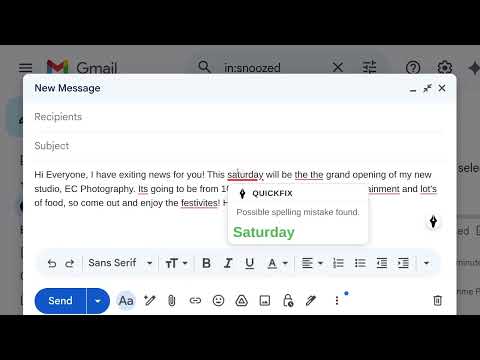
Grammar assistant. Detects errors as you type and fixes them instantly with Tab. Works on many websites, more to come.
QuickFix is a Chrome browser extension that provides fast grammar and spelling corrections across a wide array of websites. Whether you're writing emails, social media posts, documents, or messages, QuickFix catches errors quickly and helps you write with confidence. Text Detection Automatically detects grammar, spelling, and punctuation errors as you type in any text field. Smart Suggestions Hover over highlighted errors to see detailed explanations and click to apply fixes instantly. Tab-to-Fix All Premium feature: Fix all errors with a single Tab keypress - perfect for quick corrections before sending. Support Supports Gmail, Outlook, Zoom, WhatsApp and many more.
0 out of 5No ratings
Details
- Version1.3.0
- UpdatedJanuary 31, 2026
- FeaturesOffers in-app purchases
- Offered byibrahim.gabol.019
- Size40.78KiB
- LanguagesEnglish
- DeveloperIbrahim Muhammad Gabol
1 Mayfield Road Sutton SM2 5DU GBEmail
quickfixsupport@ibrahimgabol.comPhone
+44 7413 863673 - TraderThis developer has identified itself as a trader per the definition from the European Union and committed to only offer products or services that comply with EU laws.
Privacy

QuickFix - Press Tab to Fix Grammar has disclosed the following information regarding the collection and usage of your data. More detailed information can be found in the developer's privacy policy.
QuickFix - Press Tab to Fix Grammar handles the following:
This developer declares that your data is
- Not being sold to third parties, outside of the approved use cases
- Not being used or transferred for purposes that are unrelated to the item's core functionality
- Not being used or transferred to determine creditworthiness or for lending purposes
Support
For help with questions, suggestions, or problems, visit the developer's support site