

Quicken | Retail Purchase Categorization
116 ratings
)
Overview
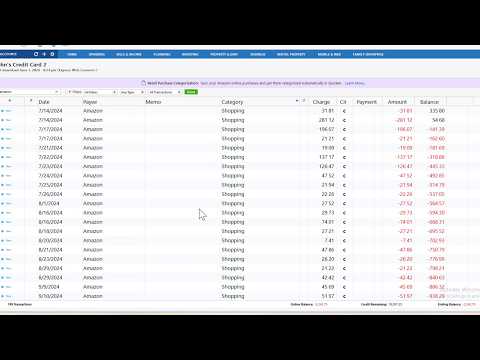
Auto-import and split Amazon orders by item in Quicken, matching transactions for clearer, more accurate spending insights.
Amazon purchases often include items from multiple spending categories: groceries, household essentials, electronics, and more. But when these purchases appear in your financial accounts, they usually show up as a single "Amazon" charge, often categorized simply as Shopping. This makes it hard to understand where your money went. The Quicken | Retail Order Categorization extension simplifies this process by automatically importing your Amazon order details and bringing them into Quicken at the item level. Key Benefits - See exactly what you bought - Understand your spending better - Save time on manual categorization - Get more accurate budgets and reports - Automatically match purchases to transactions How to Get Started Getting started only takes a few steps: 1. Install the Quicken | Retail Order Categorization extension from the Chrome Web Store. 2. Sign in using your Quicken ID. 3. Connect your Amazon account when prompted. 4. Choose the date range for the orders you want to import. 5. Open Quicken Desktop and update your data to download your Amazon orders. Once set up, your Amazon orders will be securely imported, automatically matched with your transactions, and split into item-level categories in Quicken. How to Pin the Extension Pinning keeps Quicken | Retail Purchase Categorization one click away in your toolbar. Here's how: 1. Click the puzzle piece icon (Extensions) in the top-right corner of Chrome. 2. Find Quicken | Retail Purchase Categorization in the list. 3. Click the pin icon next to it so it turns blue. That's it, the extension icon will now stay visible in your toolbar for quick access. What You’ll See in Quicken Once connected, Quicken enriches your Amazon transactions with detailed insights: 1. Item-level transaction splits - Instead of a single Amazon charge, each purchase is split into individual items, with suggested categories and product details added to the memo. 2. Automatic transaction matching - Amazon orders are automatically matched with existing transactions in your accounts whenever possible. 3. Clearer spending insights - Each item is categorized, making your budgets, reports, and spending analysis more accurate. 4. Amazon orders list - View all imported Amazon orders in one place, along with their suggested categories, within the Quicken | Retail Order Categorization extension page.
1.9 out of 5116 ratings
Details
- Version1.3.0
- UpdatedAugust 25, 2026
- Offered byQuicken Inc
- Size2.34MiB
- LanguagesEnglish (United States)
- DeveloperQuicken Inc
3760 Haven Avenue Ste C Menlo Park, CA 94025 USEmail
info@quicken.comPhone
+1 650-460-6699 - TraderThis developer has identified itself as a trader per the definition from the European Union and committed to only offer products or services that comply with EU laws.
- D-U-N-S080078015
Privacy

Quicken | Retail Purchase Categorization has disclosed the following information regarding the collection and usage of your data. More detailed information can be found in the developer's privacy policy.
Quicken | Retail Purchase Categorization handles the following:
This developer declares that your data is
- Not being sold to third parties, outside of the approved use cases
- Not being used or transferred for purposes that are unrelated to the item's core functionality
- Not being used or transferred to determine creditworthiness or for lending purposes
Support
For help with questions, suggestions, or problems, visit the developer's support site