


Overview
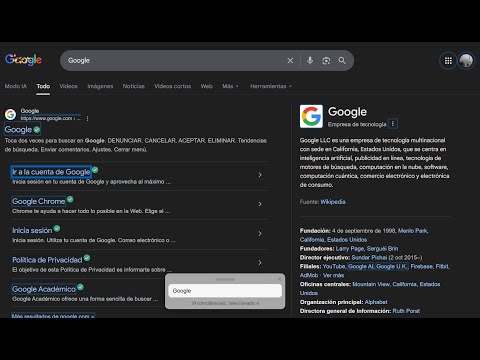
Busca elementos clicables según lo que escribes y los activa con Enter/Tab.
====== Español ====== (English below) QuickClicker — encuentra y pulsa elementos en cualquier página con sólo escribir. Un mini-buscador flotante que detecta enlaces y botones que contienen el texto que escribes, los resalta y te permite navegar entre ellos con teclado para activarlos con Enter. ---------- ¿Qué hace? --------- - Busca en la página elementos clicables (enlaces, botones, inputs) por el texto que escribes. - Resalta coincidencias y muestra cuál está seleccionado. - Activa el elemento seleccionado con Enter. - Navega resultados con Tab o ↓/↑. - Atajo configurable para abrir/ocultar el widget (por defecto -). Funciona incluso si “Abrir automáticamente” está activado. - Opciones: abrir automáticamente al cargar la página, incluir búsqueda por atributos (title, aria-label, placeholder), idioma (ES / EN). ---------- Cómo usarlo ---------- - Abrir/ocultar: haz clic en el icono de la extensión o pulsa la tecla configurada (por defecto - ) para abrir/ocultar el widget. Si activaste Abrir automáticamente, el widget aparece al cargar la página pero la tecla sigue funcionando como toggle. - Escribe lo que buscas en el campo de texto del widget. La extensión comienza a buscar coincidencias visibles en la página. - Navega: usa Tab o ↓ para avanzar (o ↑ para atrás). Pulsa Enter para activar el click en el elemento seleccionado. Por favor, comunique cualquier error o comentario a la siguiente dirección de correo electrónico: ruben.valverde.arana@gmail.com. ====== English ====== QuickClicker — find and click elements on any page just by typing. A tiny floating search widget that detects links and buttons containing the text you type, highlights them and lets you navigate with the keyboard to activate them with Enter. ---------- What it does ---------- - Searches the page for clickable elements (links, buttons, inputs) by the text you type. - Highlights matches and shows which one is selected. - Activates the selected element with Enter. - Navigate results with Tab or ↓/↑. - Configurable shortcut to open/hide the widget (default: -). Works even if “Open automatically” is enabled. - Options: open automatically on page load, include attribute search (title, aria-label, placeholder), language (EN / ES). ---------- How to use it ---------- - Open/hide: click the extension icon or press the configured key (default - ) to toggle the widget. If Open automatically is enabled, the widget appears on page load but the key still toggles it. - Type what you’re looking for in the widget’s field. The extension will search visible matches on the page. - Navigate: use Tab or ↓ to move forward (or ↑ to go back). Press Enter to click the selected element. Please report any errors or comments to the following email address: ruben.valverde.arana@gmail.com.
0 out of 5No ratings
Details
- Version1.0
- UpdatedDecember 11, 2025
- Size45.12KiB
- LanguagesEnglish
- DeveloperWebsite
Email
ruben.valverde.arana@gmail.com - Non-traderThis developer has not identified itself as a trader. For consumers in the European Union, please note that consumer rights do not apply to contracts between you and this developer.
Privacy

This developer declares that your data is
- Not being sold to third parties, outside of the approved use cases
- Not being used or transferred for purposes that are unrelated to the item's core functionality
- Not being used or transferred to determine creditworthiness or for lending purposes
Support
For help with questions, suggestions, or problems, please open this page on your desktop browser