

Work Faster in QuickBooks Online – Bulk Delete & ⌘K Search

Overview
Bulk-delete transactions QuickBooks won't let you, plus instant navigation, ⌘K search, and notes — all inside QBO.
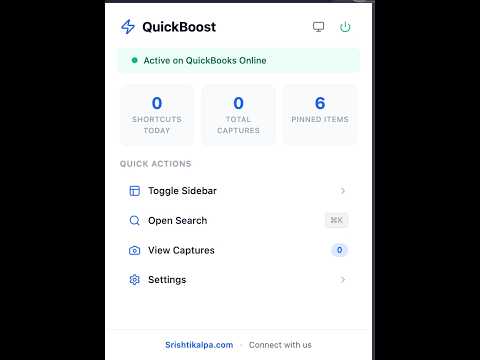
QuickBoost makes QuickBooks Online faster to work in — and does the one thing QBO won't: bulk cleanup. If you spend your day bouncing between reports, registers, and bank feeds, QuickBoost cuts out the clicking. It lives inside QBO — no separate app, no data export, no context switching. 🗑️ BATCH DELETE — CLEAN UP IN ONE PASS QuickBooks has no bulk delete anywhere. Duplicate imports, a bad bank feed, a misposted batch — normally that's one transaction at a time, all afternoon. QuickBoost adds batch delete to the Account Register. Select rows by rule — everything under $50, everything from one payee, everything uncategorised — or tick them yourself, then delete them in a single supervised run. Because it's your books, the safeguards are the feature: • You see the exact rows before anything runs — not a count, the actual list • A CSV of those rows downloads BEFORE the first change, so you always hold a record • Transactions in a closed period are refused outright • Reconciled transactions are excluded unless you explicitly tick to include them • Deletes need you to type the row count to confirm • Live progress, a Cancel button, and a per-row report of exactly what happened Batch delete ships switched OFF. Turn it on in Settings → Batch Selection when you want it. 📊 RULE-BASED SELECTION & CSV EXPORT The same selection engine works read-only on the Register and Banking screens. Select by amount, payee, or category and export to CSV — useful on its own, and it changes nothing in your books. ⚡ INSTANT NAVIGATION One keystroke to any of 37 QBO destinations — Profit & Loss, Balance Sheet, Banking, Invoices, Customers, Reconcile, Chart of Accounts and more. Pin the ones you use daily. 🔍 SMART SEARCH (⌘K / Ctrl+K) Type what you want — "profit and loss", "new invoice", "reconcile" — and go straight there. Fuzzy matching means you don't need the exact QBO menu path, and it learns what you pick most. ⌨️ 25 KEYBOARD SHORTCUTS New invoice, new expense, write cheque, journal entry, reconcile — all one combo away. Remap any of them. A built-in trainer nudges you toward the keyboard when you click something that has a shortcut. 📝 CAPTURE WITHOUT LEAVING THE PAGE Notes, voice memos, screenshots and bookmarks, saved against the company and page you're on. Flag a question for the client, leave yourself a note for next month's close, grab a screenshot of a mismatch — without switching apps. 📌 STICKY NOTES Pin a note directly to a figure or field on the QBO screen. It reappears exactly where you left it, on that page, in that company. 👥 BUILT FOR MULTI-CLIENT WORK Switch between company files in one keystroke. The Roster dashboard shows every client you work on with recent activity, so you can pick up where you left off. Each company gets its own accent colour, so you always know whose books you're in. 📄 AUTO-RENAME INVOICE PDFS Downloaded invoices and bills get named properly — "Acme Corp - INV-1055 - 2024-06-15.pdf" instead of "Invoice 1055.pdf" — using a template you control. 🔒 CLOSED-PERIOD WARNINGS Set your lock date and QuickBoost flags any date field that falls inside a closed period, before you post into it by accident. 🎯 BUILT FOR BOOKKEEPERS AND ACCOUNTANTS By people who use QuickBooks Online daily and got tired of the clicking — for bookkeepers, accountants and owners who live inside QBO. PRIVACY QuickBoost runs entirely in your browser on qbo.intuit.com. Notes, captures and settings stay in your own browser storage. We don't sell or share your QuickBooks data. Free to install. Shortcuts, search, capture and batch tools work out of the box. The Roster multi-client dashboard is a Pro upgrade for firms managing many clients.
5 out of 52 ratings
Details
- Version1.8.3
- UpdatedOctober 12, 2026
- Size242KiB
- LanguagesEnglish
- Developer
- Non-traderThis developer has not identified itself as a trader. For consumers in the European Union, please note that consumer rights do not apply to contracts between you and this developer.
Privacy

Work Faster in QuickBooks Online – Bulk Delete & ⌘K Search has disclosed the following information regarding the collection and usage of your data. More detailed information can be found in the developer's privacy policy.
Work Faster in QuickBooks Online – Bulk Delete & ⌘K Search handles the following:
This developer declares that your data is
- Not being sold to third parties, outside of the approved use cases
- Not being used or transferred for purposes that are unrelated to the item's core functionality
- Not being used or transferred to determine creditworthiness or for lending purposes