

Quick Tab Opener

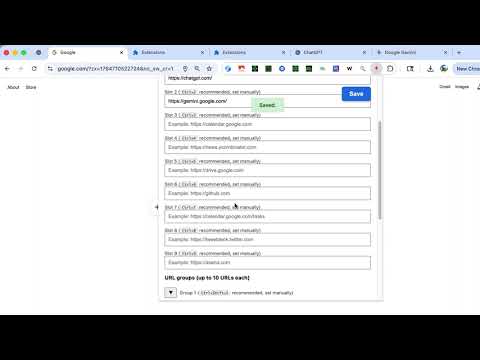
Overview
Open single URLs and groups of URLs using fully customizable keyboard shortcuts.
Quick Tab Opener helps you launch your favorite websites instantly with customizable keyboard shortcuts. 🚀 Key Features - 9 URL Slots: Assign a single URL to each slot (e.g., Ctrl+1 to Ctrl+9) - 9 URL Groups: Open up to 10 URLs at once per group (e.g., Ctrl+Shift+1 to Ctrl+Shift+9) - Fully Customizable Shortcuts: Bind any key combination via chrome://extensions/shortcuts - Pin Tabs by Default: Automatically pin opened tabs if you prefer - Smart URL Handling: Domain-only input (e.g., "github.com") is auto-normalized to "https://github.com" - Security First: Blocks dangerous URL schemes (javascript:, data:, file:, etc.) 💡 How It Works 1. Click the extension icon or press Ctrl+Shift+0 to open settings 2. Enter URLs in slots (single URLs) or groups (multiple URLs) 3. Assign keyboard shortcuts at chrome://extensions/shortcuts 4. Press your shortcut to instantly open the configured URL(s) 📌 Use Cases - Developers: Open GitHub, Stack Overflow, and documentation tabs together - Marketers: Launch analytics dashboards, social media, and ad platforms in one keystroke - Students: Quickly access LMS, email, and research portals No data is collected or transmitted. All settings are stored locally in your browser and synced via your Chrome account. Open source: https://github.com/gakkunn/Ex-Chrome-quick-tab-opener
0 out of 5No ratings
Details
- Version1.1.0
- UpdatedDecember 20, 2025
- Offered byyoshi
- Size717KiB
- Languages10 languages
- Developer
Email
yoshi.apps.contact@gmail.com - Non-traderThis developer has not identified itself as a trader. For consumers in the European Union, please note that consumer rights do not apply to contracts between you and this developer.
Privacy

This developer declares that your data is
- Not being sold to third parties, outside of the approved use cases
- Not being used or transferred for purposes that are unrelated to the item's core functionality
- Not being used or transferred to determine creditworthiness or for lending purposes