

Quick Notes Pro
5 个评分
)
概述
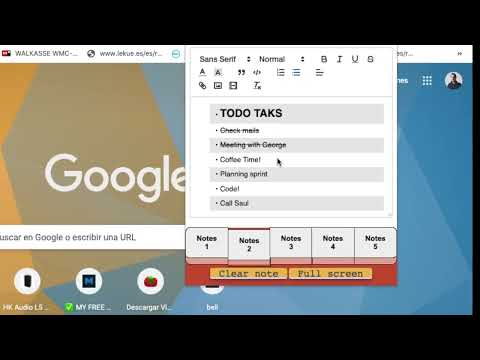
Take notes quickly from the browser with rich text, save images, videos, make lists or save your code with highlight functionality!
Take notes quickly and easily in your browser! Copy and save text with rich formatting, save images, videos, code with highlight formatting and much more! New Version released! -New Themes: Customize the extension as you like! Click the settings button in the upper right corner and select the theme you like best. -New JSON formatter: Copy-paste your unformatted Json in the editor, click on the { } button and then you will get the Json formatted in code block with highlights! -Rich text editor, copy and paste texts and keep the original format. -Autosave. -Multi tab with up to 5 notes simultaneously. -Save images and videos. -Privacy: All your data is saved in your computer, not in the cloud. -Resizable window and full screen mode -Save code blocks with highlight formatting with the most common languages. -Clean and pretty interface. -Easy and very useful. -Toolbar with many options to format your texts
5 星(5 星制)5 个评分
详情
- 版本1.1
- 上次更新日期2022年12月28日
- 提供方Alberto F. Roda
- 大小106KiB
- 语言English
- 开发者
邮箱
alferoda@gmail.com - 非交易者该开发者尚未将自己标识为交易者。欧盟地区消费者须知:消费者权利可能不适用于您与该开发者达成的合约。
隐私权
该开发者已声明,您的数据:
- 不会因未获批准的用途出售给第三方
- 不会为实现与产品核心功能无关的目的而使用或转移
- 不会为确定信用度或放贷目的而使用或转移