

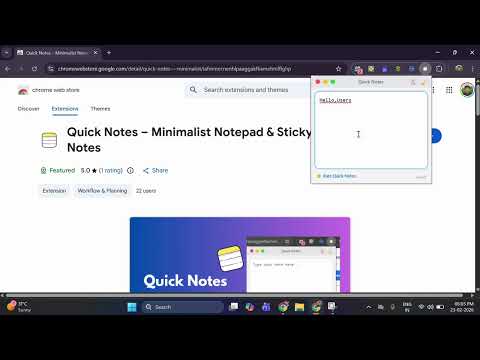
Quick Notes – Minimalist Notepad & Sticky Notes

Overview
The fastest, most private way to take notes in Chrome. Instant access, auto-save, and 100% local storage. No accounts needed.
📝 Quick Notes: Minimalist Notepad & Sticky Notes ⚡ The fastest, most private way to capture thoughts in Chrome. Stop losing your flow by switching tabs. 🚫🧠 Quick Notes is a distraction-free digital scratchpad that lives right in your toolbar. Whether you’re a 🎓 student, 💻 developer, or 🧑💼 professional, Quick Notes gives you an instant place to write—no cluttered cloud apps, no accounts, no friction. 🚀 Why Quick Notes Is the #1 Productivity Tool ⚡ Instant Access Open your notepad with a single click or a custom keyboard shortcut (Ctrl + Shift + Y). 💾 Smart Auto-Save Never hit “Save” again. Your ideas persist instantly using high-speed local storage. ✈️ Offline-First Works perfectly without an internet connection—ideal for travel or deep focus sessions. 🔐 Privacy-First Design Your data never leaves your device. No tracking, no accounts, 100% cloud-free. 🌗 Manual Dark Mode Toggle Switch between Classic Light and Eye-Care Dark Mode to match your workflow. 📋 One-Click Copy Instantly move notes to emails, Slack, or documents with the built-in clipboard tool. 🧠 Perfect For 🎓 Students Fast lecture notes and study reminders. 🧑💼 Professionals Quick meeting minutes and temporary “copy-paste” storage. ✍️ Writers & Researchers Capture research snippets and creative sparks instantly. 👨💻 Developers Jot down temporary code snippets or API keys securely. 🔒 Privacy & Security (2026 Standard) In an era of data tracking, Quick Notes stands for transparency. 🚫 Zero Data Collection We don’t collect, store, or sell your personal information. 💻 100% Local Storage All notes are saved using the chrome.storage.local API. ✅ Permission Transparency We only request storage permissions—nothing more. ⚙️ How to Use 📌 Pin the extension for one-click access. ⌨️ Start typing—your note saves automatically. 🌙 Toggle Dark Mode or 📋 copy your text using the title bar icons.
5 out of 52 ratings
Details
- Version1.0.1
- UpdatedFebruary 25, 2026
- Size12.25KiB
- LanguagesEnglish
- Developer
Email
rohankadam2596@gmail.com - Non-traderThis developer has not identified itself as a trader. For consumers in the European Union, please note that consumer rights do not apply to contracts between you and this developer.
Privacy

This developer declares that your data is
- Not being sold to third parties, outside of the approved use cases
- Not being used or transferred for purposes that are unrelated to the item's core functionality
- Not being used or transferred to determine creditworthiness or for lending purposes