

Quick Note Tab
3 valoraciones
)
Descripción general
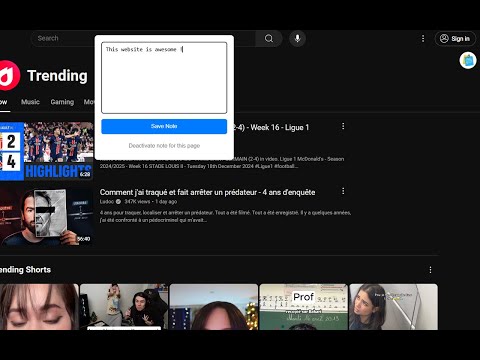
Take quick notes while browsing any webpage
This lightweight Chrome extension allows you to attach personalized notes to every website you visit. ✅ Site-Specific Notes: Automatically link notes to the URL you’re visiting. ✅ Easy to Use: Simple interface for quick note-taking and seamless saving. ✅ Secure Storage: All your notes are safely stored locally, ensuring privacy. ✅ Minimalist Design: Optimized for a distraction-free experience. ✅ Enable/Disable Notes: Disable notes for a specific site and re-enable them anytime by clicking the extension icon in the Chrome menu. How It Works: - Install QuickNoteTab on your browser. - Click the icon in the top-right corner of any webpage. (Pin the extension) - Write your note in the popup that appears and save it. - Revisit the same page later, and your note will be waiting for you! - Want to disable notes for a website? Simply click the extension icon in the Chrome menu to toggle it off or back on. Who Is This For? QuickNoteTab is perfect for students, professionals, researchers, and anyone who loves staying organized while browsing the web. Whether you’re taking notes for work, study, or personal projects, QuickNoteTab makes it effortless.
5 de 53 valoraciones
Detalles
- Versión3.0
- Actualizado6 de enero de 2025
- Ofrecido poralastralazar38
- Tamaño533KiB
- IdiomasEnglish
- Desarrollador
Correo electrónico
sagenicolas38@gmail.com - No operadorEste desarrollador no se ha identificado como operador. Los consumidores residentes en la Unión Europea deben tener en cuenta que los derechos de los consumidores no son aplicables a los contratos que suscriban con este desarrollador.
Privacidad

Este desarrollador declara que tus datos:
- No se venden a terceros, excepto en los casos de uso aprobados
- No se usan ni se transfieren para fines no relacionados con la función principal del elemento.
- No se usan ni se transfieren para determinar la situación crediticia ni para ofrecer préstamos.