

Quick Links

Overview
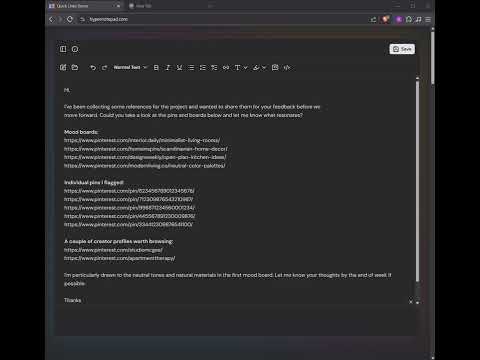
Instantly open all URLs in your selection as new tabs — works with plain text, rich HTML links, and custom hotkeys.
Ever see a list of links and you wish you could open them all at once? No one built something like this and I need it all the time. Trigger by selecting and then pressing the hotkey (Ctrl+Q or Cmd+Q) or selecting the option from the context menu. * If the selection is a plain text we will extract and open all links in its own tab. * If the selection is a HTML we will find links with the same destination like the first link and open all the links in its own tab. Settings: * Select the domains you want to use the extension. * Change the hotkey to something you prefer. * Choose if you want to confirm before autoclosing parent window.
0 out of 5No ratings
Details
- Version1.1.0
- UpdatedFebruary 26, 2026
- Offered bysankhaspathak
- Size16.59KiB
- LanguagesEnglish (United States)
- Developer
Email
sankhaspathak@gmail.com - Non-traderThis developer has not identified itself as a trader. For consumers in the European Union, please note that consumer rights do not apply to contracts between you and this developer.
Privacy

This developer declares that your data is
- Not being sold to third parties, outside of the approved use cases
- Not being used or transferred for purposes that are unrelated to the item's core functionality
- Not being used or transferred to determine creditworthiness or for lending purposes